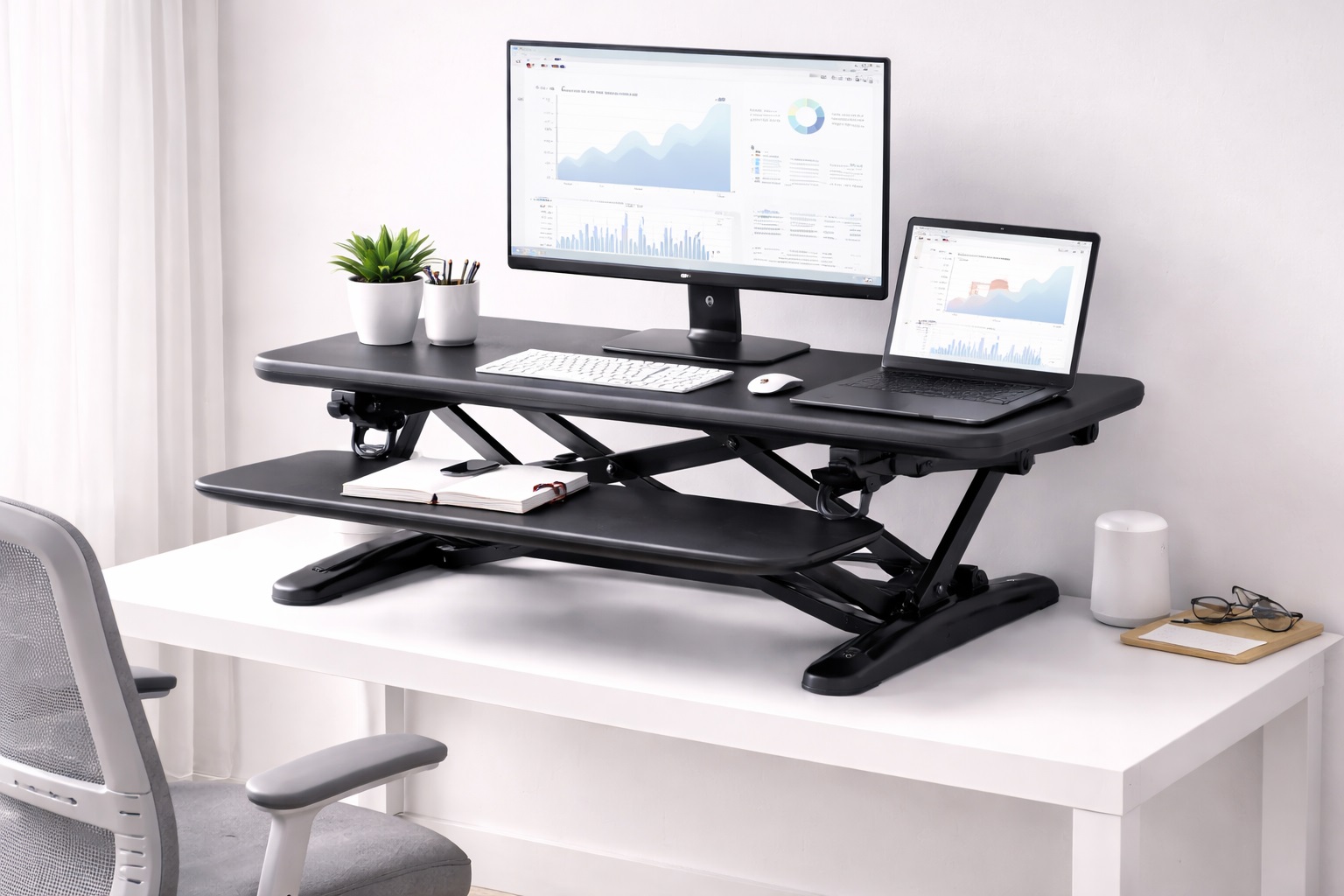
Best Standing Desk Converters for Home Office: Sit-Stand Flexibility at Your Existing Desk
Replacing a perfectly functional desk just to gain sit-stand capability is an expensive solution to what's often a fairly narrow problem: you like your current desk, but you'd like the option to stand for part of the day without giving it up. A standing desk converter solves exactly that specific problem by sitting on top of your existing surface and raising your monitor, keyboard, and other equipment to standing height on demand, without requiring you to buy new furniture or reorganize your entire room. It's a targeted fix for a targeted problem, and understanding it that way — rather than as a discount alternative to a full standing desk — helps set the right expectations for what a converter can and can't do.
The category has matured considerably over the past several years, and the mechanisms available now — manual gas-spring lift, crank-adjusted, and fully electric — cover a wide range of budgets and use patterns. Choosing between them comes down less to which is objectively best and more to how you actually plan to use the sit-stand feature: someone who intends to switch positions several times a day benefits from a different mechanism than someone who mostly wants to stand for a couple of hours in the afternoon. Thinking through your own likely pattern before shopping — rather than assuming you'll figure it out after the product arrives — makes the difference between a converter that gets used daily and one that quietly settles into a single fixed position within the first month.
This guide compares the practical converter types available for home office use, walks through the buying factors that determine whether a specific model will genuinely fit your desk and equipment, and answers the questions people ask most often before making this kind of purchase. The goal is matching the mechanism and features to your actual daily pattern rather than defaulting to whichever converter has the most reviews.
It's worth being upfront about what a converter is and isn't. It adds sit-stand flexibility to an existing desk; it does not turn that desk into a purpose-built standing desk with the same stability, workspace area, or cable management that a dedicated unit provides. For most home office setups, that trade-off is entirely reasonable, but it's worth understanding going in rather than discovering it after the purchase.
It also helps to think about the converter as a piece of equipment that sits on top of a system rather than a standalone product. Its stability depends partly on the desk underneath it, its cable management depends on how your other devices are arranged, and its usefulness depends on whether an anti-fatigue mat and a genuinely comfortable standing routine are part of the plan alongside it. A converter purchased in isolation, without thinking through these surrounding pieces, tends to disappoint even when the converter itself is a perfectly good product.
The three mechanisms compared below — gas-assisted manual lift, fixed standing height, and motorized electric — represent genuinely different approaches to the same underlying goal, and the right one depends more on your actual daily pattern of sitting and standing than on which mechanism sounds more advanced.
Top Picks Reviewed
1. Z-Lift Standing Desk Converter – Best Smooth-Adjustment Converter
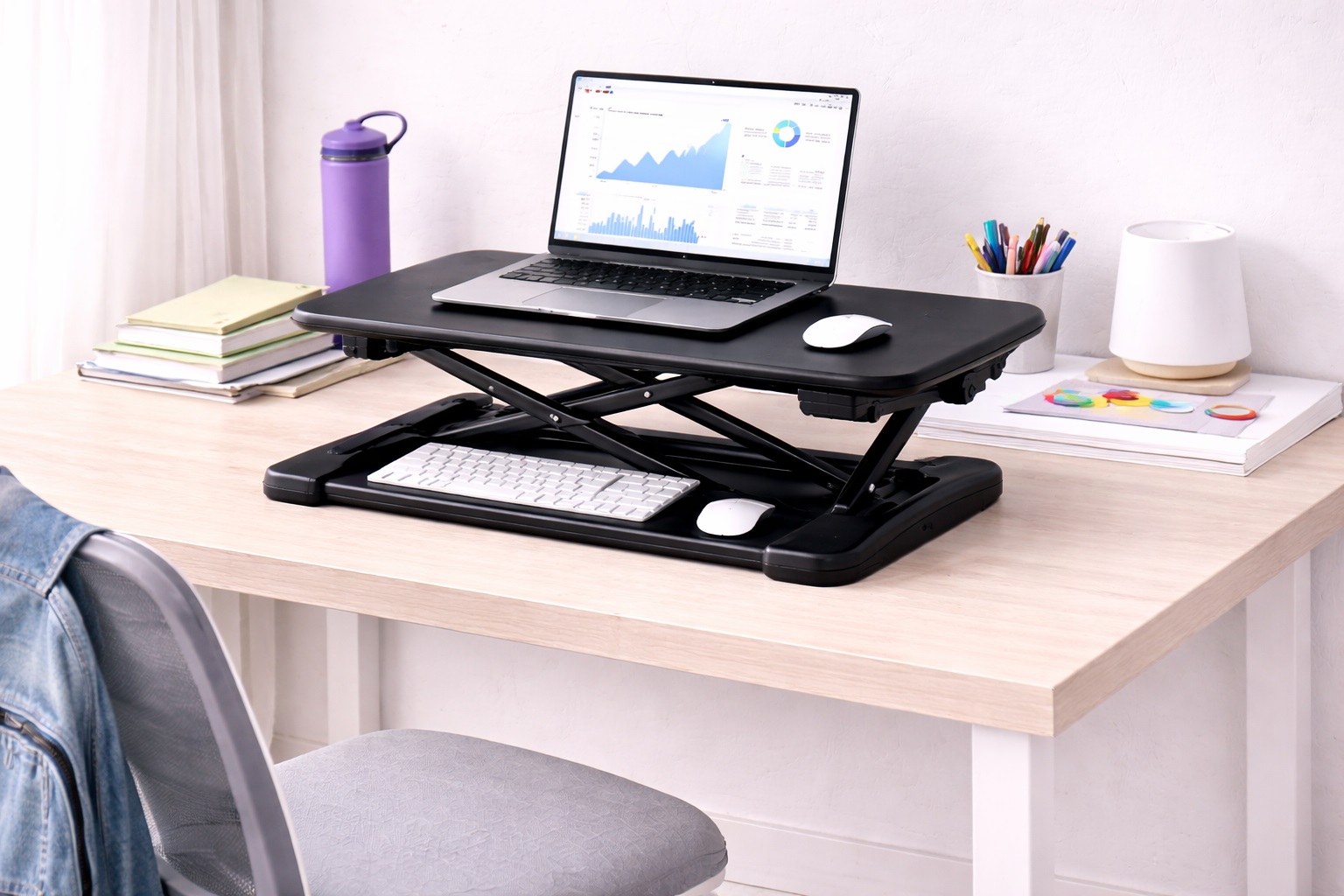
Z-lift converters use a scissor mechanism that allows single-handle height adjustment from sitting to standing position in seconds, typically assisted by a gas spring that reduces the physical effort needed to raise and lower a loaded platform. Most support a monitor, keyboard, and accessories simultaneously, providing enough workspace for a typical single-monitor home office setup without requiring a particularly large desk surface underneath.
- Pros:
- Single-handle or gas spring height adjustment
- Raises the entire workspace simultaneously — monitor and keyboard together
- Adequate workspace for most home office configurations
- Stable at both sitting and standing heights
- Cons:
- Reduces desk workspace in sitting position due to the converter's own footprint
- Less stable than a purpose-built standing desk at maximum height
The scissor mechanism's main practical advantage is that it moves the entire platform — monitor, keyboard tray, and any accessories on the surface — as one unit, so there's no need to separately adjust individual components each time you change position. That single-motion adjustment is a meaningful part of why this style has become the most common converter type in home offices.
Best For: Home office workers who want sit-stand flexibility at their existing desk without the cost of a full standing desk replacement.
Why We Recommend It: The Z-lift converter solves the fundamental problem — adding sit-stand capability to a fixed desk — without requiring a full desk replacement. For users who are ergonomically satisfied with their current desk except for height variability, the converter is the logical solution rather than an expensive furniture overhaul. For anyone who has already invested in a desk they like — solid wood, a particular finish, or simply the right dimensions for their room — a converter preserves that investment while still delivering the specific sit-stand benefit they were originally missing.
2. Fixed-Height Converter With Keyboard Tray – Best for Committed Standing Use
A fixed-height converter permanently raises the workspace to standing height with a pull-out keyboard tray positioned at typing level. Unlike adjustable converters, these don't lower back to sitting position — they're designed specifically for users who primarily stand and need a correct keyboard height kept separate from the monitor height above it.
- Pros:
- Stable permanent standing platform with no adjustment mechanism to wear out
- Separate keyboard tray positioned at correct typing height
- Simpler mechanism than adjustable alternatives
- More affordable than full Z-lift designs in most cases
- Cons:
- Cannot lower to sitting position
- Requires a stool or high chair for occasional seated use
Because there's no lift mechanism to loosen, wobble, or eventually fail, this style tends to be the most structurally stable option available in the standing desk converter category, which matters most to users who genuinely stand for the majority of their working day rather than switching positions frequently.
Best For: Users who primarily want to stand at their desk and need only occasional seated capability, or who are comfortable using a high stool when they do sit.
Why We Recommend It: Fixed-height converters are the most structurally stable option for standing use because there are no adjustment mechanisms to loosen or wear over time. For committed standing desk users who only occasionally need to sit, this simpler design is more reliable than an adjustable alternative they'd rarely use in its lowered position anyway. It's a style worth considering specifically for anyone who has already tried standing desk use and knows they prefer it most of the time, rather than someone still experimenting with how much of their day they actually want to spend on their feet.
3. Electric Standing Desk Converter – Best for Effortless Adjustment
Electric converters use a motor to raise and lower the workspace at the press of a button, often with programmable height presets for sitting and standing positions saved to memory. The motorized adjustment requires no manual effort and allows precise, repeatable height positioning every time. Many models include anti-collision technology that stops movement automatically if an obstacle is detected during adjustment.
- Pros:
- Motorized button-press height adjustment
- Programmable sitting and standing presets
- No manual lifting effort required
- Anti-collision safety on most models
- Cons:
- More expensive than manual alternatives
- Motor mechanism requires a power connection nearby
Because the adjustment requires nothing more than pressing a button, this style tends to see more frequent sit-stand transitions in practice than manual alternatives, simply because there's no physical effort discouraging the switch. That translates into more actual movement variety across a workday rather than defaulting to whichever position was set that morning.
Best For: Home office professionals who want the most convenient sit-stand transition and are willing to invest in motorized adjustment for the sake of that convenience.
Why We Recommend It: Electric adjustment eliminates the last friction point in sit-stand transitions — the physical effort of manual adjustment. When switching heights is completely effortless, users are more likely to actually alternate between sitting and standing rather than defaulting to one position out of simple inertia. Over the course of months, this small reduction in friction can meaningfully change how much actual variety a person builds into their workday, since even a manual converter that requires only modest effort to adjust still gets skipped more often than a motorized one on busy or distracted days. Programmable presets add a second, smaller benefit worth mentioning: once your ideal sitting and standing heights are saved, you never have to re-guess or fine-tune the position each time, which removes yet another small point of friction that can otherwise discourage regular use.
Buying Guide: How to Choose the Best Standing Desk Converter for Home Office
Use these factors to match your purchase to your actual needs rather than defaulting to the highest-rated option regardless of fit.
1. Height Range From Sitting to Standing
The converter must span the height difference between your seated and standing monitor positions. Measure your seated monitor height and your ideal standing monitor height directly; the difference, typically 12 to 16 inches for most users, must fall comfortably within the converter's adjustment range rather than sitting right at its limit. A converter whose maximum height only barely reaches your ideal standing position leaves no margin for adjustment over time, whether that's a different chair, different shoes, or simply a preference that shifts slightly as you get used to standing desk use.
2. Workspace Area for Your Actual Equipment
The converter's working surface must accommodate your monitor or monitors, keyboard, and any accessories you use simultaneously. Measure your minimum workspace requirements before selecting a converter, since narrow models may not hold a monitor plus mouse and accessories comfortably side by side. Lay out your current equipment on a table and measure the total width and depth it actually occupies, rather than estimating, since most people underestimate how much surface area a monitor, keyboard, mouse, and notepad genuinely require together.
3. Monitor Weight Capacity
Verify the converter's rated weight capacity comfortably exceeds your monitor's actual weight. A single 27-inch monitor typically weighs 10 to 15 pounds. Larger monitors and dual-monitor setups require converters specifically rated for the combined weight of both displays plus any additional peripherals. It's worth weighing your actual equipment on a bathroom scale if you're unsure, rather than estimating, since monitor weight varies more than people expect between similarly sized models from different manufacturers.
4. Keyboard Tray Presence and Position
Some converters include a separate keyboard tray sitting lower than the monitor surface, matching the correct typing height for standing use at roughly elbow height. Without a separate tray, the keyboard sits at monitor height, which is generally too high for comfortable standing typing over extended periods. Typing with your wrists bent upward toward a too-high keyboard for hours at a time is a common source of wrist strain, so this single feature is worth prioritizing if you plan to do serious typing work while standing rather than brief, occasional tasks.
5. Adjustment Mechanism and Effort Required
Manual Z-lift converters require some physical effort to raise and lower, though gas-assisted designs reduce this significantly. Electric models require only a button press. Consider how often you'll actually transition between heights, since smoother adjustment genuinely encourages more frequent position changes. Be honest with yourself about your own habits here — if you know you tend to avoid small inconveniences, the extra cost of an electric or gas-assisted mechanism is likely to pay off in how consistently you actually use the sit-stand feature over the following months.
6. Stability at Full Standing Height
Some budget converters wobble noticeably at maximum extension, which is the most commonly cited complaint in negative reviews across this category. Check reviews specifically for comments about standing-height stability rather than relying on sitting-height impressions alone. A converter can feel perfectly solid at desk height and still develop a noticeable wobble once fully extended, since the leverage on the base changes considerably between the two positions.
7. Mouse Pad and Peripheral Space
Verify the converter provides adequate space for a mouse alongside the keyboard at the same working level. Some narrow models only accommodate the keyboard itself, forcing the mouse to remain at desk level — an awkward height mismatch during standing use that undermines the ergonomic benefit. If you use a mouse heavily throughout the day, treat mouse space as a non-negotiable requirement rather than an afterthought, since a keyboard-only tray forces an uncomfortable reach or an awkward wrist angle every time you need to click something.
8. Anti-Fatigue Mat Compatibility
Standing for extended periods without an anti-fatigue mat causes foot and leg fatigue relatively quickly. A converter purchased without a mat is an incomplete standing desk solution. Budget for a quality mat alongside the converter itself for the full intended ergonomic benefit. Skipping this step is one of the more common reasons people abandon standing desk use within the first few weeks, since standing on a hard floor for any real length of time is genuinely uncomfortable regardless of how good the converter itself is.
9. Compatibility With Your Existing Desk
Converters sit directly on top of existing desks. Verify the converter's base footprint fits your desk's surface area without extending over the edges, and confirm the converter doesn't exceed the desk's own weight rating once fully loaded with equipment. It's easy to overlook the desk's own weight limit when focusing on the converter's specifications, but the combined weight of the converter plus your equipment ultimately rests on the same desk surface that supported your setup before.
10. Cable Management Through the Height Transition
When the converter raises and lowers, all connected cables must have enough slack to move with it. Cables that are too tight strain their connectors and can disconnect devices during adjustment. Build in roughly 15 to 20 centimeters of extra cable slack to comfortably accommodate the full height range. A cable management clip or a simple velcro tie along one side of the converter's lift column keeps loose cable from tangling or catching on the mechanism as it moves.
11. Noise Level of the Adjustment Mechanism
Electric motors and manual gas springs both produce some noise during adjustment, though the level varies considerably between models. If you work in a shared space or take frequent video calls, checking reviews for noise complaints is worth doing before committing to a specific mechanism. A motor that whirs audibly for a few seconds during adjustment is generally a minor issue on its own, but it becomes more noticeable if you're on a video call at the exact moment you decide to change position.
12. Desk Surface Material and Weight Considerations
A converter's stability depends partly on the desk surface beneath it, not just the converter's own base design. A solid wood or engineered wood desktop generally provides a firmer foundation than a thin laminate or a glass surface, both of which can flex slightly under a heavy, fully loaded converter. If your existing desk surface feels noticeably springy when you press down on it firmly, factor that into your stability expectations before assuming any wobble is the converter's fault alone.
13. Dual Monitor Arm Compatibility
If you use a monitor arm rather than resting displays directly on the surface, confirm the converter's platform includes a clamp-compatible edge or a VESA-mount option, since not every converter is designed to accept an arm's clamp mechanism. Attaching a monitor arm to a converter not built for one can either fail to grip securely or add enough leverage at full height to affect the unit's overall stability, so this is worth checking specifically rather than assuming compatibility.
Frequently Asked Questions
1. Is a standing desk converter as good as a full standing desk?
For sit-stand functionality specifically, a quality converter delivers most of the benefit at a fraction of the cost of a full standing desk. The trade-off is that converters reduce usable working surface area in the sitting position and may offer less stability at standing height than a purpose-built standing desk. For the majority of home office users, these trade-offs are worth accepting given the substantial cost difference, though anyone with especially heavy dual-monitor setups may find a dedicated standing desk the more satisfying long-term investment.
2. How often should I stand when using a converter?
Alternating between sitting and standing roughly every 30 to 60 minutes is a reasonable general guideline. The goal is movement variety rather than maximizing total standing time, since standing continuously for more than two to three hours becomes uncomfortable without an anti-fatigue mat. Some people find it helpful to set a simple timer as a reminder in the first few weeks, until switching positions becomes a natural habit rather than something they have to consciously remember.
3. Can I use a laptop with a standing desk converter?
Yes, though you'll typically want to pair it with an external monitor raised to eye level, an external keyboard, and an external mouse. Using only a laptop screen on a converter often places the display too low for comfortable standing use, forcing your neck into a downward angle that defeats much of the ergonomic purpose of standing in the first place.
4. Do I need an anti-fatigue mat with a standing desk converter?
Yes, if you plan to stand for more than thirty minutes at a stretch. Standing on a hard floor causes foot and leg fatigue significantly faster than standing on a cushioned mat. Budget for a quality anti-fatigue mat alongside the converter for the full ergonomic benefit it's intended to provide. Treat the mat as part of the same purchase rather than an optional add-on, since converter and mat together are what actually deliver a comfortable standing experience.
5. What weight can a standing desk converter support?
Most converters support 15 to 35 pounds, which covers a standard monitor, keyboard, mouse, and accessories comfortably. Dual-monitor setups may require a converter specifically rated for the combined weight of both displays plus peripherals, so verify the rated capacity against your actual equipment before ordering. Adding a monitor arm or additional peripherals later increases the total load beyond your initial setup, so leaving some margin above your current equipment's weight is a sensible precaution.
6. Is the most expensive converter always the best choice?
Not necessarily. Higher price often reflects a motorized mechanism, premium materials, or a larger workspace, but many mid-range manual options deliver the same core sit-stand benefit for everyday home office use. Match the product to your actual needs rather than defaulting to the highest price. The added cost of an electric mechanism is worth paying if effortless adjustment genuinely matters to you, but it isn't a requirement for a functional, comfortable sit-stand setup.
7. How long should a quality converter last?
A well-built converter from a reputable manufacturer typically lasts three to five years or longer with reasonable care. Warranty length is a useful proxy for how confident the manufacturer is in the product's own durability.
8. Can I return a converter if it doesn't suit my desk?
Most retailers offer a 15 to 30 day return window. Keep the original packaging during your evaluation period to make a return straightforward if the converter doesn't fit your desk or equipment as expected. Test the converter with your full actual setup rather than a single monitor if you plan to eventually add a second, since a return after full assembly is more work than catching a fit problem early.
9. What should I prioritize when choosing a converter?
Start with your actual equipment — monitor size, keyboard setup, and how often you'll realistically switch positions — rather than maximizing every available specification. Matching real needs produces a better result than chasing the most feature-rich listing. Write down your actual monitor size, desk width, and typical daily schedule before browsing, and use that list to filter out products that clearly don't fit rather than getting drawn in by marketing images alone.
10. Does brand name matter when buying a standing desk converter?
Established brands typically offer better warranty support and more consistent quality control. Newer brands sometimes offer excellent value, so reading verified purchase reviews carefully is worth the extra time before choosing an unfamiliar name. A brand's track record on similar products, even if it's a different model, can offer a reasonable indication of their general build quality and customer support standards.
11. Will a converter work with a small or narrow desk?
Many converters are designed with a compact footprint specifically for smaller desks, though it's still important to measure your desk's surface area and confirm the converter's base fits without overhanging the edges before ordering. An overhanging base is both an aesthetic issue and a stability risk, since the converter's own footprint needs full support from the desk surface beneath it to remain steady during use.
12. Can a standing desk converter damage my desk?
Generally no, since most converters simply rest on the desk surface under their own weight rather than clamping or screwing into it. The main risk is a surface that isn't rated for the combined weight of the converter and your equipment, so checking your desk's own weight capacity alongside the converter's footprint is worth doing before setup.
13. Do standing desk converters work on glass or uneven desktops?
Glass surfaces can work but deserve extra caution, since a converter's rubber feet may grip less securely on glass than on wood or laminate, and an uneven or warped desktop can prevent a converter's base from sitting flush. Testing stability at both sitting and standing height before loading it with your actual equipment is a sensible precaution on either surface type.
Final Verdict
- Best Smooth-Adjustment Converter: Z-Lift Standing Desk Converter — the practical sit-stand upgrade for any existing desk.
- Best for Committed Standing Use: Fixed-Height Converter With Keyboard Tray — the most stable platform for primarily stand-up work.
- Best for Effortless Adjustment: Electric Standing Desk Converter — the most convenient transition for maximizing daily posture variety.
The right standing desk converter comes down to how you'll actually use the sit-stand feature day to day, not which model has the longest specification sheet. Match the mechanism, workspace, and weight capacity to your real equipment and habits, and a converter can deliver most of the benefit of a full standing desk without the cost or disruption of replacing furniture that otherwise works fine. Pair whichever converter you choose with a genuinely good anti-fatigue mat and a realistic plan for alternating positions throughout the day, and the combination will likely serve you just as well as a purpose-built standing desk costing several times more.