Best Budget Laptop Stands for Better Posture
Anyone who's spent a full day hunched over a laptop screen sitting flat on a desk already knows the problem a laptop stand solves. The built-in screen sits well below eye level for most seated postures, which forces the neck into a forward tilt that adds up to real strain over hours of daily use. A laptop stand fixes this with a surprisingly simple mechanism — raising the screen closer to eye level — and it does so at a price point that's a fraction of what an adjustable standing desk or monitor arm would cost.
What makes shopping for a budget laptop stand more complicated than it should be is that the category actually contains a few genuinely different design philosophies, not just the same stand at different price tiers. Some prioritize adjustability for people who move between locations. Some prioritize portability for people who travel. Some prioritize stability for people with a fixed desk setup who never need to move the stand at all. Picking based on price alone, without considering which of these philosophies matches your actual routine, is the most common reason people end up disappointed with a laptop stand purchase.
This guide compares three stands that represent those distinct approaches, walking through where each one excels and where its design tradeoffs start to show. We also cover the buying factors that matter most before you commit — height range, stability at full extension, weight capacity, and ventilation — since these are the details that separate a stand that solves the problem from one that just adds another wobbly accessory to your desk.
It's worth being upfront about one thing: a laptop stand is only half of a proper ergonomic setup. Raising the screen to eye level moves the built-in keyboard to an awkward, elevated angle, which means most people using a laptop stand seriously also pair it with an external keyboard and mouse. That's a modest additional cost, but it's the difference between a setup that actually improves posture and one that just moves the strain from your neck to your shoulders and wrists instead.
If you're dealing with neck or upper back discomfort from laptop use, travel frequently and want the benefit on the road, or simply want a cleaner, more ergonomic desk setup without paying for a premium accessory, the picks and buying guide below are built around exactly those situations.
It also helps to set expectations correctly before buying. A budget laptop stand won't replace a full sit-stand desk, and it won't fix posture problems caused by an unsuitable chair or a desk that's the wrong height for your body. What it does well, reliably and at a low cost, is remove the single biggest contributor to laptop-related neck strain: a screen positioned well below eye level for hours at a stretch. Combined with a reasonably supportive chair and a desk at a sensible height, a stand closes most of the remaining gap between laptop use and a proper ergonomic workstation.
The three stands compared here were chosen specifically because they don't overlap much in their strengths. If you already know your setup is fixed and permanent, or that you travel constantly and need something pocketable, you can likely skip straight to the review that matches your situation. If you're not sure yet, reading through all three before deciding is worth the extra few minutes, since the wrong type of stand for your routine is a more common source of disappointment than any specific quality issue with the product itself.
Top 3 (Detailed Reviews)
1. Adjustable Aluminum Laptop Stand – Best For Everyday Ergonomics
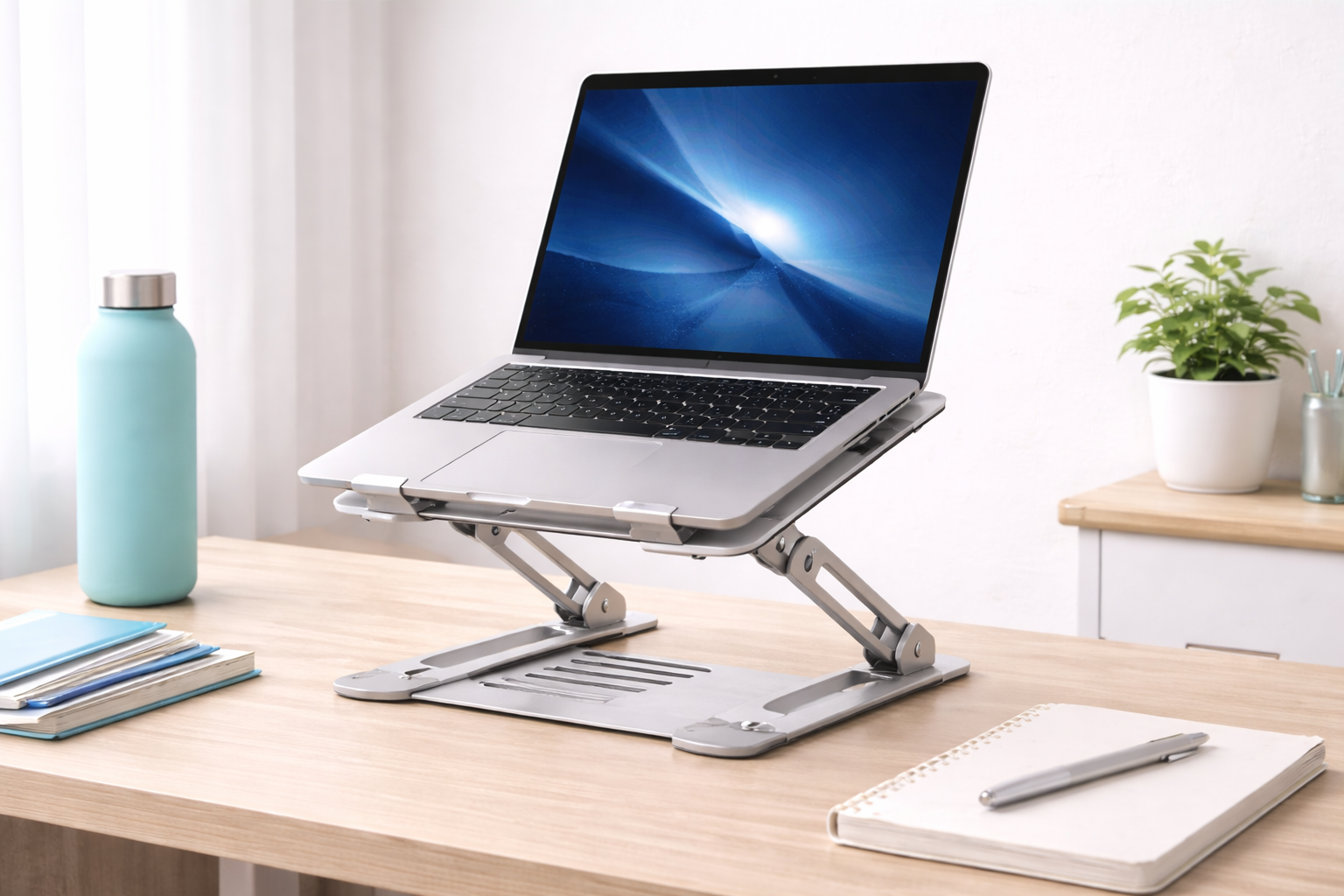
An adjustable aluminum laptop stand raises the screen to eye level while reducing the neck and upper back strain that comes with hours of looking down at a flat laptop. Aluminum construction keeps the stand stable at low weight, and most designs use an open frame that improves airflow underneath the laptop compared to resting it directly on a desk. Typical models support laptops from 11 to 17 inches and fold flat for storage when not in use, which matters if desk space is limited. The height adjustment mechanism usually works through a hinged or telescoping design, letting you dial in a precise eye-level position rather than settling for a single fixed height. Because the frame is open rather than solid, heat that would normally get trapped against a flat desk surface escapes more easily, which some laptop owners also notice as slightly quieter fan behavior during longer sessions. The main tradeoff is that using the stand at a comfortable height essentially requires an external keyboard, since the laptop's own keyboard ends up too high and too angled to type on directly. Most versions in this category fold down to a slim profile that slides into a desk drawer or backpack pocket without difficulty, and the hinge mechanism on better-built models locks firmly at each height setting rather than drifting downward under the laptop's weight over the course of a workday.
- Pros:
- Eye-level screen position reduces neck strain
- Lightweight aluminum construction stays stable
- Open-frame design improves airflow and cooling
- Folds flat for storage and travel
- Cons:
- Requires a separate external keyboard once elevated
- Fold mechanism can loosen over time on cheaper builds
Best For: Remote workers, students, and anyone who spends multiple hours daily on a laptop and experiences neck or upper back discomfort from looking down at the screen.
Why We Recommend It: Raising a laptop screen to eye level is one of the most immediately noticeable ergonomic improvements available for the price. Combined with better cooling from the open frame, this is the stand most people should start with before considering anything more specialized.
2. Foldable Portable Stand – Best For Travel and Frequent Setup Changes
A foldable portable laptop stand collapses down to a flat or compact shape that fits easily into a laptop bag's exterior pocket. Most use aluminum alloy or a rigid, lightweight plastic, with rubber grips at the contact points to prevent the laptop from sliding during use. At their lightest, these stands weigh under 200 grams, adding almost no noticeable weight to a bag while still delivering a genuine ergonomic benefit wherever you set up. Setup and teardown typically take under 30 seconds, which matters more than it sounds like it should when you're moving between a hotel desk, a coworking space, and a kitchen table over the course of a single work trip. The height range on portable stands tends to be more limited than dedicated desktop models, since compactness is the priority, but most still lift the screen enough to make a meaningful difference over a completely flat laptop. Many designs in this category use a triangular or origami-style folding pattern that distributes the laptop's weight across multiple contact points rather than a single hinge, which helps them feel more stable in use than their compact folded size might suggest.
- Pros:
- Folds small enough to fit in any laptop bag
- Very lightweight, typically under 300 grams
- Sets up and packs away in under 30 seconds
- Rubber grips prevent the laptop from sliding
- Cons:
- Height adjustment range is more limited than desktop stands
- Lighter materials feel less substantial than heavy aluminum alternatives
Best For: Travelers, digital nomads, and remote workers who regularly use laptops in hotels, coworking spaces, and other varied locations.
Why We Recommend It: This stand delivers the eye-level benefit without meaningful bag weight or setup time. For anyone who moves between locations regularly, the ratio of compactness to actual ergonomic benefit is hard to beat at this price.
3. Fixed-Height Riser Stand – Best For Permanent Desk Setups
A fixed-height laptop riser takes the simplest possible approach — a single stable platform set at a preset height that lifts the laptop to roughly correct eye level without any mechanical adjustment at all. These stands trade flexibility for stability, and because there's no hinge or telescoping mechanism to engineer, they're typically less expensive than adjustable alternatives at a similar build quality. The clean, minimal shape also tends to suit a permanent desk setup better than a stand with visible adjustment hardware. Without moving parts, there's essentially nothing to loosen, wobble, or fail over years of use, which is a meaningful advantage for anyone who's dealt with a hinged stand that developed play in the joint after a year of daily adjustment. Because the shape is usually a simple molded or bent form rather than an assembly of multiple parts, there's also very little that can go wrong mechanically over years of continuous use, which partly explains why this style tends to carry a lower price than adjustable alternatives of comparable build quality.
- Pros:
- No moving parts to loosen or wear out over time
- Clean, minimal look suited to a permanent desk setup
- Often less expensive than adjustable alternatives
- No adjustment needed once correctly positioned
- Cons:
- No height adjustment for different seated positions
- Not practical for a standing desk
Best For: Home office users with a fixed desk and chair height who want a stable, permanent laptop elevation solution without ongoing adjustment.
Why We Recommend It: When your seating position is consistent day to day, a fixed riser offers a stability advantage that adjustable mechanisms simply can't match — no joints to loosen, no wobble, and no risk of the height drifting out of position over time.
Buying Guide: How to Choose the Best Budget Laptop Stand
Use these factors to match your purchase to how you actually use a laptop, rather than defaulting to whichever stand has the most reviews.
1. Height Adjustment Range
The core purpose of a laptop stand is raising the screen to eye level, so verify the stand actually reaches the right height for your seated position — generally 2 to 3 inches below eye level. If you use a standing desk, look for a stand with a wider height range so it works for both sitting and standing throughout the day. It's worth actually measuring your current eye level against your desk surface before shopping, rather than guessing, since the right height varies more between individuals than most buyers expect.
2. Stability at Maximum Height
Some stands develop noticeable wobble at their fullest extension, especially with heavier laptops. This detail rarely shows up in product photos, so reading reviews specifically about stability at extended heights is worth the extra few minutes, since a stand that wobbles during typing defeats its own ergonomic purpose. If you type with any real force or use a laptop on the heavier end of the spectrum, this factor deserves more weight in your decision than the height range itself.
3. Weight Capacity
Confirm the stand's rated weight capacity comfortably exceeds your laptop's actual weight. Most stands support 10 to 22 pounds, which covers the large majority of consumer laptops. Gaming laptops and larger MacBook Pro models sit closer to the upper end of that range, so it's worth double-checking if you use a particularly heavy machine. Weight capacity listings are usually conservative rather than exaggerated, but pairing a heavy laptop with a stand rated only marginally above its weight is where most stability complaints in reviews tend to originate.
4. Laptop Width Compatibility
Check the stand's maximum width rating against your laptop's actual footprint. Most stands accommodate up to 17-inch laptops comfortably, but ultra-wide gaming laptops and some 16-inch models with wider chassis can approach or exceed that limit, so it's worth measuring rather than assuming. A laptop that overhangs the stand's platform even slightly can feel less secure, even if it technically still balances.
5. Ventilation Design
An open-frame stand allows heat to escape from a laptop's bottom vents, which a flat desk surface normally blocks. Better airflow can meaningfully reduce thermal throttling during demanding tasks and may extend component lifespan over years of use. Solid platform stands without gaps underneath don't offer this same benefit. For laptops that run warm under sustained load, this single factor can make a noticeable difference in how the machine performs during longer work sessions or video calls.
6. Anti-Slip Surface
Rubber or silicone contact points prevent a laptop from creeping forward while you type at an angle. Stands without adequate grip allow slow sliding during intensive typing sessions, which becomes a real annoyance over a full workday. Check that the grip material actually holds rather than just looking like it should in photos. Grip material also tends to degrade slightly with age, so a stand that feels secure on day one is worth checking against reviews mentioning longer-term use.
7. Setup and Adjustment Speed
If you move your stand between locations regularly, how quickly it folds and sets up matters more than it might seem. Instant-fold designs open and collapse in under five seconds, while screw-adjustment designs take longer but sometimes offer a more rigid extended position. Match the mechanism to how often you're actually setting the stand up fresh. If you're setting up and packing away daily, even a few extra seconds per use adds up meaningfully over a month of regular travel.
8. Cable Routing
Some stands include small hooks or channels for routing charging and peripheral cables. This isn't essential, but it helps keep the desk looking clean by preventing cables from draping across the visible part of the setup, especially in view during video calls. It's a minor feature, but one that's easy to appreciate once you're used to it and equally easy to miss on a stand that lacks it entirely.
9. Material Quality
Aluminum alloy stands are more rigid and conduct heat away from contact points more effectively than plastic alternatives, and they're less likely to leave marks on the laptop's underside from any slight relative motion. A premium aluminum build feels noticeably more solid in hand, and the modest cost difference over an equivalent plastic design is usually worth it. Over years of regular folding and unfolding, plastic hinges also tend to develop stress marks well before a comparable aluminum joint shows any wear at all.
10. Portability and Packed Size
If you plan to travel with the stand, check both its expanded height and its collapsed dimensions. Stands that fold to under 25 centimeters packed fit in most laptop bag exterior pockets without issue, and anything under 500 grams adds negligible weight to what you're already carrying. It's worth weighing the stand yourself against the listed spec if you're already carrying a full bag, since small discrepancies between listed and actual weight are common in this category.
11. Base Footprint and Desk Space
Some stands have a wide base for extra stability, while others use a narrower footprint to save desk space. On a smaller desk, a compact base matters more than it seems, since a wide stand base can crowd out space for a mouse or notepad even though the laptop itself sits above the desk surface. Checking the base dimensions specifically, not just the overall product size, avoids this surprise once the stand arrives.
12. Price Relative to Build Quality
The cheapest laptop stands often use thinner aluminum or lower-grade hinges that develop wobble faster than mid-range options. Spending slightly more within the budget category typically buys a noticeably more solid hinge and a sturdier overall build, which pays off over the years a stand typically stays in daily use. As with most accessories in this price range, the jump from the very bottom to the middle of the category tends to deliver the most noticeable improvement in day-to-day durability, and it's usually a small enough price difference that it's worth paying rather than risking an early replacement.
Frequently Asked Questions
1. Do I need an external keyboard with a budget laptop stand?
Yes, in most cases. Raising the laptop to eye level pushes the built-in keyboard to an uncomfortable, upward angle. Pairing the stand with an external keyboard is the ergonomically correct setup — screen at eye level, keyboard at elbow height — and the modest added cost is well justified by the posture improvement. A compact wireless keyboard adds relatively little to the overall setup cost and packs away just as easily as a portable stand if you travel.
2. What height should I set my laptop stand to?
The center of the screen should sit at approximately your eye level when seated in your normal posture, which for most people means raising the laptop 5 to 8 inches above its flat position. Some people prefer the screen slightly below eye level to reduce neck extension, so it's worth adjusting gradually rather than maximizing height by default.
3. Can a laptop stand actually improve performance?
Yes, indirectly. Most laptops exhaust heat through vents on the bottom, and resting flat on a desk blocks that airflow, which can cause thermal throttling — the processor slowing down to manage heat. An open-frame stand restores proper airflow, keeping temperatures lower and performance more consistent during demanding tasks.
4. Will a laptop stand damage my laptop?
Not if the stand has rubber or silicone contact points and is used within its rated weight capacity. Bare metal-on-metal contact can scratch some laptop finishes, so it's worth checking that contact points are protected before buying. Staying within the weight rating means the stand isn't stressing the chassis any more than normal flat-desk use already does.
5. Can I use a laptop stand with a standing desk?
Yes, provided the stand offers enough height range to work for both seated and standing use. For standing desk use, the laptop should sit at roughly the same eye level as when standing, which is usually 15 to 25 inches higher than a seated screen position, so it's worth checking the stand's maximum height before assuming it will cover both. If a single stand can't reach the standing height you need, some people keep a separate low-cost riser specifically for standing sessions rather than compromising on the seated setup.
6. Is the most expensive budget laptop stand always the best?
Not necessarily. A higher price within the budget category often buys a sturdier hinge or better materials, but plenty of mid-range options perform just as well for everyday use. Focusing on the specific features that matter for your routine is more useful than assuming price alone settles the question.
7. How long should a quality laptop stand last?
A well-built stand from a reputable brand typically lasts two to five years or longer with reasonable care, and checking the warranty terms before buying is a decent shortcut for gauging how confident the manufacturer is in the build.
8. Can I return a laptop stand if it doesn't suit my setup?
Most retailers offer a 15 to 30 day return window. It's worth keeping the original packaging during that evaluation period in case the height range, stability, or size doesn't end up matching what you expected from the listing. Testing the stand with your actual laptop and typical seating position within the first few days makes it far easier to catch a mismatch before the return window closes.
9. What's the best budget laptop stand for someone who works from multiple locations?
The foldable portable stand is generally the better fit, since it prioritizes compact size and quick setup over the more extensive adjustment range of a dedicated desktop model. Someone with a single fixed desk gets more long-term value from the adjustable aluminum or fixed riser options instead.
10. Does brand reputation matter for a budget laptop stand?
It matters more for warranty support and consistency than for the basic function of the stand itself. Established brands tend to offer more reliable customer service if a hinge or fold mechanism fails, though smaller brands sometimes offer genuinely good value — reading verified reviews carefully is worth the extra effort.
11. Can a laptop stand help with shoulder pain, not just neck strain?
It can help indirectly. Poor neck posture from looking down at a flat laptop often causes compensating tension through the shoulders and upper back. Raising the screen to a more neutral eye level tends to reduce that whole chain of strain, though a stand paired with an external keyboard delivers the full benefit rather than the stand alone.
12. Is a fixed-height riser a downgrade compared to an adjustable stand?
Not necessarily — it depends on your setup. If your seating position is genuinely consistent day to day, a fixed riser offers better long-term stability with nothing to loosen over time. An adjustable stand only pays off if you actually need to change the height regularly, such as switching between sitting and standing. For a lot of home office setups with one dedicated desk, the fixed riser ends up being the more practical and better value choice over time.
Final Verdict
- Best Overall: Adjustable Aluminum Laptop Stand – the most impactful everyday ergonomic upgrade for laptop users.
- Best for Travel: Foldable Portable Stand – the ergonomic benefit that actually travels with you.
- Best for Dedicated Desks: Fixed-Height Riser Stand – the most stable, minimal option for a permanent setup.
There's no single right answer here — the best budget laptop stand depends on whether your setup is fixed, mobile, or somewhere in between. Someone working from the same desk every day has very different priorities than someone splitting time between a home office and a coworking space each week. Use the reviews and buying guide above to match the stand to your actual routine, and pair it with an external keyboard if you go with an adjustable design, since that combination is what actually delivers the full ergonomic benefit rather than just moving the laptop a few inches higher. Give whichever stand you choose a full week of regular use before judging it, since small adjustments to height and positioning often take a few days to settle into a comfortable routine.