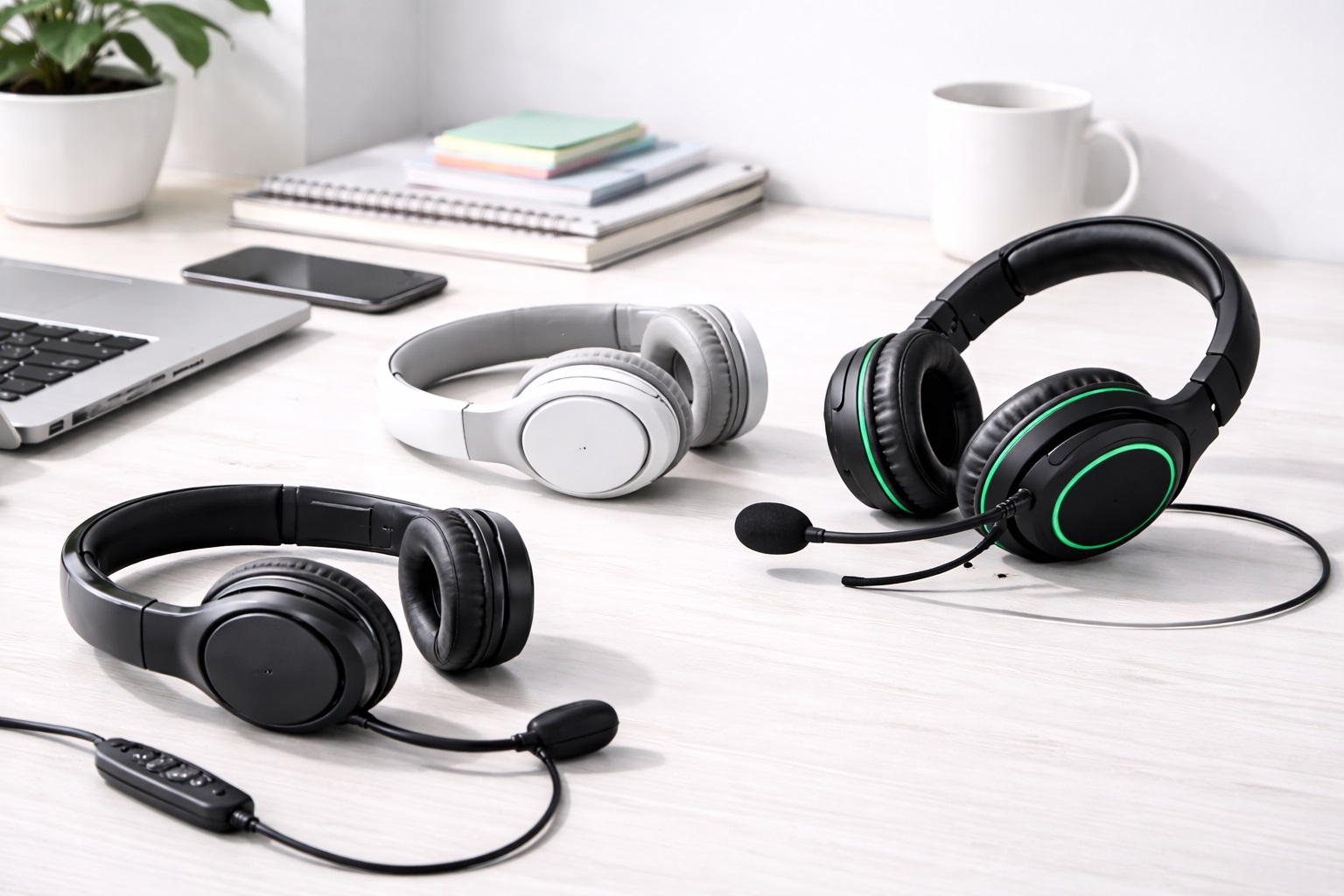
Best Budget Headsets 2026: Great Sound Without the Price Tag
A budget headset does not have to sound thin, feel flimsy, or drop your calls halfway through a meeting. The low-cost end of the headset market has grown up over the past few years, and a lot of the audio and microphone tricks that used to be reserved for premium models now show up in headsets priced well under fifty dollars. Manufacturers have figured out that most buyers in this price bracket care about a handful of things — clear voice pickup, a comfortable fit, and a connection that doesn't cut out mid-sentence — rather than the flashy extras that pad out flagship product pages.
The trick is knowing which features actually matter for how you use a headset day to day, rather than chasing a spec sheet full of numbers that sound impressive but don't translate into a better experience. A headset with an enormous battery is not useful if you're never away from a charger. A gaming-branded headset with a wide soundstage is not the right pick if ninety percent of your usage is client calls. Matching the product to the actual pattern of your day is the single biggest factor in whether a budget headset feels like a smart purchase six months later or a drawer item you regret.
This guide breaks down the three most common types of affordable headsets people search for — wireless over-ear, on-ear wireless, and wired USB — and walks through what each one is genuinely good at, where it falls short, and who should buy it. Each review covers the honest trade-offs rather than a generic pros list, because every headset style on this page is a compromise of some kind, and the right compromise depends entirely on your situation. After the reviews, a ten-point buying guide and a frequently asked questions section cover the practical details that usually decide whether a purchase works out or ends up back in a drawer within a month.
Top 3 Budget Headsets (Detailed Reviews)
Wireless Over-Ear Headset – Best For All-Day Comfort
Over-ear budget headsets wrap the whole ear in a cushioned cup, which does two things well: it blocks a decent amount of outside noise passively, and it spreads the clamping pressure across a wider area so the headset feels lighter than its actual weight suggests after a couple of hours. Most models in this class run on a rechargeable battery good for a full workday or longer, connect over Bluetooth or a small USB dongle, and pair a boom or flip-down microphone that sits closer to your mouth than an earbud-style mic ever could. The combination of full ear coverage and a boom mic is why this style tends to show up at the top of most comparison lists for people whose day is built around back-to-back video calls.
What separates a good over-ear budget model from a mediocre one usually comes down to two details that don't show up in a headline spec: how the headband distributes weight across the top of your head, and whether the cups swivel enough to match the natural angle of your ears. A headset that nails both of those can be worn for six or seven hours without the nagging discomfort that cheaper hinges and thin headbands tend to produce by the early afternoon.
- Pros:
- Cups seal around the ear for noticeably better passive noise blocking
- Boom microphone position gives clearer voice pickup on calls
- Battery typically lasts a full day of mixed calls and music
- Padded headband spreads weight evenly for long wear
- Cons:
- Takes up more space in a bag than smaller alternatives
- Ears can feel warm after several hours in a hot room
Best For: Anyone who spends most of the day on video calls or listening to music at a desk and wants a headset they can forget they're wearing for hours at a stretch.
Why We Recommend It: Of the three styles compared here, the over-ear design gives back the most on both ends of a call — it makes the other person easier to hear and makes you easier to understand, and it does so without asking for a premium price. For most home and office setups, it's the safest default recommendation.
On-Ear Wireless Headset – Best For Traveling Light
An on-ear headset trades some of that passive noise blocking for a smaller, lighter build. The cups rest against the ear rather than around it, which cuts down on bulk and usually means a folding hinge that lets the whole headset fold flat for a bag or laptop sleeve. Call quality is still solid thanks to a retractable or flip-down microphone, and the lighter clamp means less heat buildup over a session, which some people prefer even at a desk, not only when traveling.
The trade-off is straightforward: less material between your ear and the outside world means more ambient sound gets through, especially in a busy open-plan office or a coffee shop. For anyone whose day involves moving between a home office, a shared workspace, and the occasional commute, that trade-off is usually worth making, since the alternative is either leaving a bulkier headset at home or hauling it around unused.
- Pros:
- Folds down small enough for a laptop bag side pocket
- Noticeably lighter on the head than over-ear models
- Runs cooler over long sessions thanks to open-backed cups
- Still handles calls well with a flip-down or retractable mic
- Cons:
- Lets in more background noise from open surroundings
- Direct on-ear pressure can bother some people after a few hours
Best For: People who move between a home office, a coworking space, and the occasional coffee shop and need something that fits in a bag without adding bulk or weight.
Why We Recommend It: It keeps most of what makes a wireless headset useful for calls while shedding the size and weight that make over-ear models a hassle to carry around. For anyone who is not chained to one desk all day, that trade-off is worth it, and the folding hinge alone makes packing far less of an afterthought.
Wired USB Headset With Noise-Canceling Microphone – Best For Nonstop Calls
Wired USB headsets skip batteries entirely, which sounds like a downgrade until you consider what it removes from the equation: no charging schedule, no dying mid-call, and no wireless interference from a crowded office full of other Bluetooth and Wi-Fi devices. This is the style most call centers and support teams have relied on for years, largely because the audio connection is stable and the microphone — usually built with noise-canceling elements — stays focused on your voice rather than the keyboard or the room around you.
Because the signal travels over a physical cable instead of radio waves, there's effectively zero chance of the kind of intermittent dropout or crackle that can occasionally show up on wireless headsets in a building packed with other wireless devices. The only real cost is the cable itself, which means a bit less freedom to lean back, stand up, or walk a few steps away from the desk mid-call without unplugging.
- Pros:
- Connection never drops or needs re-pairing
- Nothing to charge or forget to plug in overnight
- Noise-canceling mic keeps background sound out of calls
- Consistent audio quality call after call
- Cons:
- The cable limits how far you can move from your computer
- Needs a free USB port, which can be scarce on thin laptops
Best For: People who are on back-to-back calls for most of the workday and would rather not think about battery percentage at all.
Why We Recommend It: When call volume is high, reliability beats convenience every time, and a wired connection with a dedicated noise-canceling mic is about as reliable as headset audio gets at this price. It's the option we'd point a busy support or sales team toward first.
Buying Guide: How to Choose the Best Budget Headset
Specs on a product page rarely tell you whether a headset will actually suit your day. These ten factors are the ones that make the real difference once the headset is out of the box and in daily use, and they're worth checking in roughly this order before you commit to a purchase.
1. Where the Microphone Sits
A microphone mounted on a flexible boom arm can be positioned an inch or two from the corner of your mouth, which is the single biggest factor in how clear you sound to the person on the other end of a call. Microphones built into the earcup or dangling on a short stalk pick up more room noise because they simply sit farther away from your mouth and closer to the general environment. If calls are a big part of why you're buying a headset, a boom mic is worth prioritizing over almost anything else on this list, including battery life and even comfort, since a headset nobody can understand isn't doing its job. A quick way to sanity-check this before buying is to look at product photos rather than just the description — a mic that visibly bends close to mouth height is usually a better sign than one buried flush against the earcup.
2. Bluetooth Versus a USB Dongle
Bluetooth is convenient and works with phones, tablets, and laptops without extra hardware, but it introduces a small delay between when audio is sent and when you hear it. A USB radio dongle running on its own dedicated 2.4GHz connection usually has less of that delay, which matters more for gaming and fast-paced conversation than for casual music listening or a straightforward one-on-one call. If your laptop has a free USB-A port, a dongle-based headset is the safer bet for anything real-time, and many budget models now include both connection types so you're not forced to pick just one.
3. How Much Battery You Actually Need
Bigger batteries mean more weight and often a higher price, so it's worth being honest about your actual usage instead of chasing the largest number printed on the box. Eight to ten hours of battery life covers a full workday without a midday charge for most people. Anything above twenty hours is mostly useful if you travel often and don't want to pack a charging cable, or if you regularly forget to charge devices overnight and need a buffer for the next day.
4. Active Noise Cancellation Versus Passive Isolation
Active noise cancellation uses tiny built-in microphones and onboard circuitry to cancel out steady background sound like an air conditioner hum or an airplane cabin, and it's genuinely useful in a loud shared office or during travel. Passive isolation just relies on thick padding and a snug seal around the ear, which works fine for moderate everyday noise and costs nothing extra to maintain or charge. For calls specifically, what matters more than either of these is whether the outgoing microphone has its own noise reduction, since that's what actually determines whether the person on the other end hears your background noise.
5. Earcup Material and How It Feels Over Time
Leatherette or protein-leather pads seal well and look sharp out of the box, but they trap heat and can start to peel after a year or two of daily use in a warm room, which is a common complaint in budget headset reviews. Fabric or velour pads breathe better and stay comfortable longer during extended sessions, though they let in slightly more outside noise than a sealed leatherette pad would. Memory foam padding under either surface tends to hold its shape the longest and adapts best to a wider range of head and ear shapes, so it's worth checking which cushioning material sits under the outer fabric, not just the outer fabric itself.
6. Total Weight and All-Day Comfort
Weight matters more than almost any other spec once you've been wearing a headset for several hours straight, since even a small difference compounds over a long day. Look for something under roughly 250 grams if you plan to keep it on most of the day at a desk. A headband that adjusts smoothly in small increments and cups that swivel to match the angle of your ears both help distribute pressure evenly rather than concentrating it on one spot at the top of your head or against your jaw. If possible, try the headset on in a store or check the return policy carefully before ordering online, since comfort is genuinely hard to judge from a spec sheet alone.
7. Compatibility With the Platforms You Actually Use
Most USB and Bluetooth headsets work fine with Zoom, Microsoft Teams, Google Meet, and Discord without any special drivers or setup, but it's still worth checking before you buy, especially if you rely on older or more unusual conferencing software at work. A few headsets carry specific certifications for particular platforms, which mostly just guarantees the volume and mute button behave the way that software expects them to, rather than adding any real audio quality improvement. If your workplace standardizes on one particular platform, a quick search for that headset model plus the platform name usually turns up other users confirming it works before you spend any money.
8. Physical Controls You Can Reach Without Looking
Volume and mute controls built into the earcup or an inline remote on the cable save you from fumbling through operating system settings mid-call, which matters more than it sounds like it would once you're actually in the middle of a meeting. A physical mute button you can find by feel, ideally paired with an LED that confirms the mic is muted, is a small feature that pays off constantly once you're used to relying on it instead of checking a screen.
9. Matching the Headset to Gaming or Work Calls
Headsets marketed for gaming usually lean into a wider soundstage and microphone monitoring so you can hear your own voice through the headphones while you play. Headsets built for office use tend to prioritize voice clarity and comfort over long stretches instead, since gamers and remote workers are optimizing for slightly different things. If you genuinely split your time between gaming and work calls, look for a model that reviewers describe as solid at both rather than assuming a gaming headset will automatically double as a great work headset just because it looks more expensive.
10. Whether Replacement Parts Exist
Earpads and headbands wear out long before the electronics inside a headset actually fail, which means the lifespan of a headset is often limited by cushioning rather than by the drivers or the microphone. Before buying, it's worth a quick search to see whether replacement pads are sold separately for that exact model. A headset with available replacement parts can realistically stay in service for years past when the original pads would have given out and needed the whole unit tossed, and it's often a far cheaper fix than most people assume once you know where to look for the part.
Frequently Asked Questions
1. What actually separates a headset from a pair of headphones?
A headset includes a microphone built in, whether that's a boom arm or a smaller mic on the earcup, so you can talk as well as listen during a call or a game. Headphones are designed purely for listening and skip the microphone entirely, which usually makes them lighter and sometimes better for pure audio quality. If calls, gaming voice chat, or video meetings are part of the plan, you need a headset rather than headphones, no matter how good the headphones sound on their own.
2. Will a budget headset work with my phone?
Bluetooth headsets pair with phones the same way they pair with laptops, so most wireless models work fine for calls and music on a smartphone without any extra setup. Wired USB headsets are trickier on phones, since many current phones no longer include a full-size USB port, so you'd need an adapter cable or a USB-C model to make the connection work reliably.
3. How can I cut down background noise on my headset's microphone?
Start with positioning — a boom mic should sit close to the corner of your mouth, not near your chin or cheek, since even an inch or two makes a real difference. Turn on the microphone's noise-canceling mode if the headset offers one in its settings or companion app. Beyond the hardware itself, closing a window or turning off a nearby fan during calls removes noise at the source, and free software like Krisp or the built-in noise suppression in Teams and Zoom can clean up whatever background sound is left over.
4. Should I get a wired or wireless budget headset?
Wired headsets win on reliability — there's no battery to manage and essentially no risk of a dropped connection mid-call, ever. Wireless headsets win on freedom of movement, which matters if you get up during calls or move between rooms during the day. If you mostly sit at one desk for most of your calls, the wireless advantage is smaller than it sounds on paper, and a wired headset might actually suit you better without you losing much in practice. A middle-ground option worth considering is a wireless headset that also ships with a backup cable, so you get the everyday convenience without being stuck if the battery ever dies mid-shift.
5. How long do the earpads on a budget headset usually last?
Most earpads hold up for one to two years of regular daily use before the foam compresses and the outer material starts to crack or peel at the seams. This is normal wear rather than a defect, and it happens to expensive headsets too, just usually a bit more slowly. Checking whether replacement pads are sold for your specific model before you buy can add years of usable life to an otherwise perfectly good headset.
6. Does spending more always get you a better budget headset?
Not really. Once you're past the very cheapest models, price increases often buy you nicer materials or a couple of extra convenience features rather than a dramatically better core listening or calling experience. Plenty of mid-priced options outperform pricier alternatives for ordinary daily use, so it's worth reading reviews for your specific price bracket rather than assuming higher price always means a better product.
7. How long should a decent budget headset last before it needs replacing?
A reasonably well-built headset from an established brand typically holds up for three to five years of regular use, sometimes considerably longer if you replace the earpads when they eventually wear out. The length of the manufacturer's warranty is usually a decent hint at how confident they are in their own build quality, so it's worth comparing warranty terms alongside the price.
8. What if the headset I bought doesn't feel right?
Most retailers give you somewhere between fifteen and thirty days to return a headset that doesn't work out for you, though the exact window varies by seller and sometimes by payment method. Hang onto the original box and packaging during that trial period so a return, if you end up needing one, goes smoothly and quickly instead of turning into a hassle.
9. What should I actually prioritize when shopping for a budget headset?
Start with how you'll use it, not with the spec sheet — daily call volume, whether you move around while wearing it, and how many hours a day it'll realistically be on your head all matter more than chasing the longest battery life or the longest feature list. Match the headset to that real, honest pattern rather than to the highest number printed on the box or the most impressive marketing claim. Writing down your actual weekly usage before you shop, even loosely, tends to make the decision faster and cuts down on buyer's remorse later.
10. Does the brand name matter for a budget headset?
Established brands tend to offer better warranty support and more consistent quality control from unit to unit, which matters more than it might seem for a product you'll wear on your head for hours at a time. Lesser-known brands sometimes offer real value for the price, but it's worth reading a handful of verified buyer reviews before trusting an unfamiliar name with your money and your ears.
Final Verdict
- Best Overall: Wireless Over-Ear Headset — the most comfortable, best-isolated option for people who live in video calls all day.
- Best for Traveling Light: On-Ear Wireless Headset — the pick for anyone who needs a headset that folds up and disappears into a bag.
- Best for Nonstop Calls: Wired USB Headset With Noise-Canceling Mic — the most dependable choice when call volume is the top priority.
None of these three styles is objectively "the best" budget headset — they're built around different trade-offs between comfort, portability, and reliability, and the right one for a friend's setup might be the wrong one for yours. The fastest way to land on the right choice is to be honest about how many hours a day you'll actually wear it, whether you move around while using it, and how much you're willing to trade battery convenience for a guaranteed connection. Match those answers against the buying guide above, and picking the right budget headset for your situation should turn into an easy, fairly quick decision rather than another round of endless comparison shopping. Whichever style you land on, spend a few extra minutes checking replacement parts and return policy before you buy — those two details tend to matter more, months down the line, than any single spec on the box.