Best Webcams for Travel: Compact Picks for Remote Work
Packing a webcam for a trip is a different exercise than picking one for a permanent desk setup. At home, size and cable length rarely matter much because the camera sits in one spot indefinitely. On the road, the calculus changes — you're setting up and breaking down in hotel rooms, coworking desks, and borrowed conference spaces, often with lighting you can't control and a laptop camera that simply wasn't built to look good under fluorescent bulbs or dim lamps.
Anyone who has taken an important client call from a dim hotel room already knows the problem this guide addresses. The built-in camera on most laptops sits at an unflattering angle, handles low light poorly, and offers no way to adjust for the room you happen to be in that week. A dedicated webcam fixes most of that in one small addition to your bag, provided you pick one suited to how you actually travel rather than one built purely for a fixed desk.
The good news is that a genuinely useful travel webcam doesn't need to be exotic or expensive. Most of what separates a professional-looking video call from an amateur one comes down to three things: enough resolution and autofocus to stay sharp, a way to compensate for whatever lighting a room throws at you, and a design compact enough that you'll actually bring it along rather than leaving it behind because it's a hassle to pack. This guide walks through three distinct approaches that cover the vast majority of remote workers and digital nomads, along with the buying details that matter more when a camera has to survive repeated packing and setup in unfamiliar rooms.
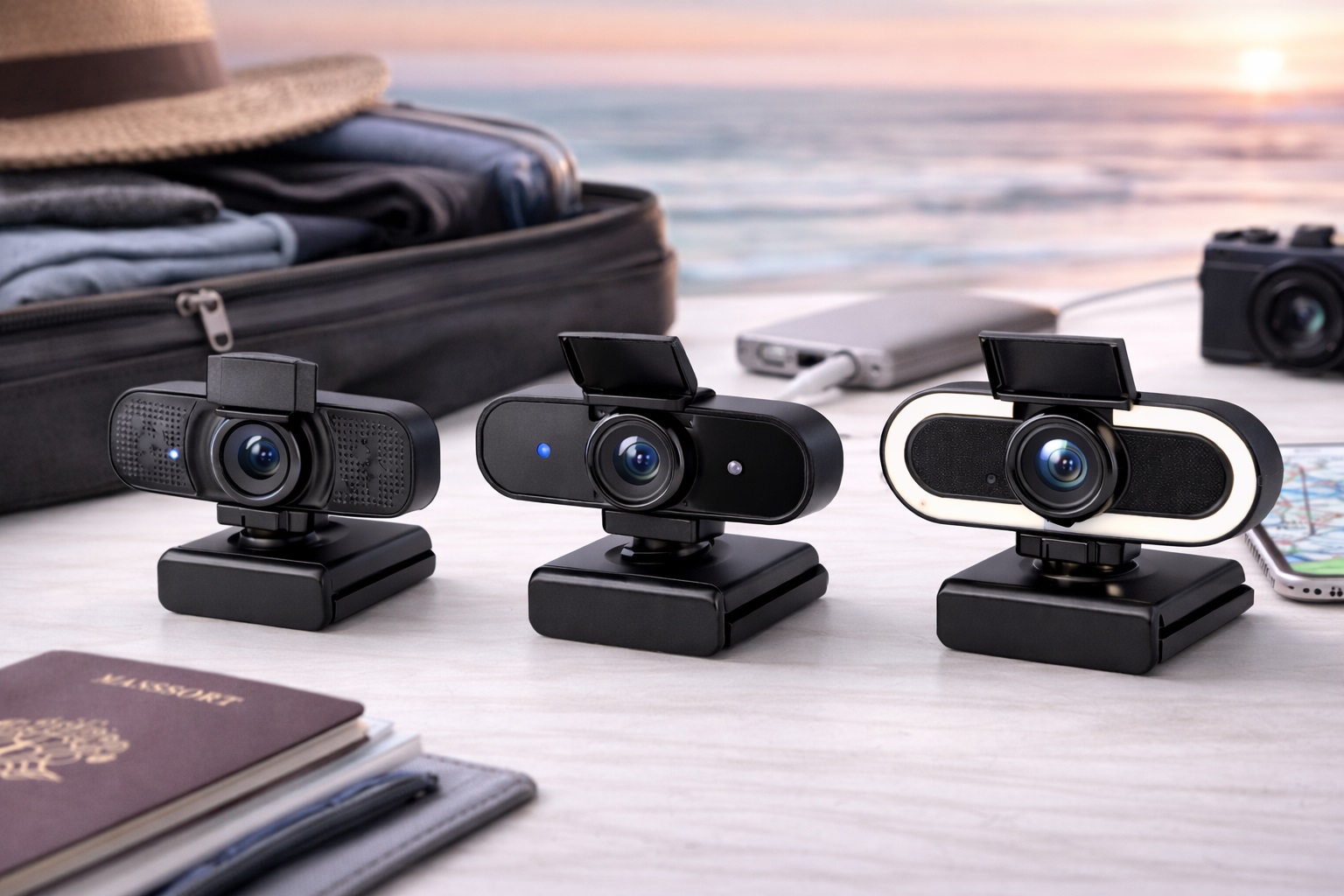
None of the three picks below is a universal best choice — each solves a slightly different travel problem. One prioritizes broad, dependable image quality for the widest range of calls. Another solves the lighting problem directly, which matters more when you're bouncing between hotel rooms with unpredictable window placement and lamp wattage. The third addresses privacy, a growing concern for anyone working from shared spaces like coworking floors or hostel common areas where a camera left uncovered is a real, avoidable risk.
These categories aren't mutually exclusive in the marketplace — plenty of models blend elements of more than one — but framing them this way makes it easier to identify which underlying problem you're actually trying to solve before comparing specific listings side by side.
Read through the breakdowns below, then use the buying guide to weigh the details — field of view, mount compatibility, connection type — that decide whether a camera that looks great in a product photo actually works well in the kind of room you'll be calling from next month.
It's also worth acknowledging what a travel webcam doesn't need to be. You're not choosing a permanent studio fixture, so chasing the absolute highest resolution or the most elaborate feature list rarely pays off the way it might for a fixed home setup. A camera that sets up fast, tolerates being packed repeatedly, and adapts to whatever room you're in beats one that looks impressive on a spec sheet but assumes a stable, controlled environment you won't actually have on the road.
Top 3 Webcams for Travel (Detailed Reviews)
1. 1080p Webcam with Autofocus – Best Overall for Travel
A 1080p webcam with dependable autofocus and automatic light compensation is the safest starting point for anyone who wants one camera that works acceptably in nearly every situation a trip throws at it. Full HD resolution matches what almost every video platform actually transmits, so you're not paying for detail that gets compressed away the moment the call connects. The auto-light adjustment matters more for travel than for a fixed home office, since it's doing real work every time you set up in a new room with different window light and ceiling fixtures.
This category tends to be the most broadly compatible option too — plug-and-play support across Windows and macOS means you're not troubleshooting driver installs on a hotel's spotty Wi-Fi the morning of a call.
The other advantage of this category is how little thought it demands once it's in your bag. You clip it on, it focuses, it adjusts to the room's light, and you're on the call — no companion app to open, no calibration step, no settings to re-check after a firmware update pushed itself in the background overnight.
For anyone who has cycled through several accommodations in a single trip, this kind of predictability has real value beyond the image quality itself. Knowing that setup will take the same thirty seconds regardless of whether you're in a business hotel or a small rental apartment removes one more variable from an already busy travel schedule.
- Pros:
- 1080p resolution suitable for virtually every video platform
- Autofocus keeps you sharp even as you adjust position in a new room
- Automatic light compensation adapts to unfamiliar rooms
- Plug-and-play compatibility avoids setup delays before calls
- Cons:
- Capped at 1080p, so it won't stand out for content creation
- A permanently attached USB cable on some models limits packing flexibility
Best For: Remote workers and digital nomads who want one dependable camera that performs consistently across hotels, coworking spaces, and client offices without extra setup steps.
Why We Recommend It: When you can't predict tomorrow's lighting or desk setup, a camera that adapts automatically without fiddling is worth more than one with higher specs that needs manual tuning every time you relocate.
2. Webcam with Built-In Ring Light – Best for Travel in Low-Light Rooms
Hotel rooms and short-term rentals are notorious for bad lighting — a single overhead fixture, a lamp in the wrong corner, or curtains that block most of the daylight. A webcam with an integrated, adjustable ring light sidesteps the problem entirely by bringing consistent front illumination with you instead of relying on whatever the room provides. That consistency matters more on the road than at home, where you'd normally just reposition a desk lamp once and be done with it.
The built-in light also means one less item to pack. Instead of carrying a separate ring light and finding an outlet and a stable surface for it, the lighting travels attached to the camera itself, ready as soon as you clip it to a laptop screen or a hotel TV.
This matters more than it might sound. A separate lighting setup needs its own outlet, its own stable surface, and its own place in your bag — three more things that can go wrong or get left behind in a rushed checkout. Folding that function into the camera itself means one item to remember instead of two, and one less cable competing for a limited number of outlets in an unfamiliar room.
- Pros:
- Built-in ring light solves inconsistent hotel and rental lighting
- Removes the need to pack a separate lighting accessory
- Adjustable brightness suits different room sizes and window light
- One compact unit handles both video and illumination
- Cons:
- Adds bulk and a slightly larger packed footprint than a standard webcam
- The ring light can feel warm to look at during long back-to-back calls
Best For: Frequent travelers, evening-call takers, and anyone whose accommodation rarely has reliable daylight or desk lighting during working hours.
Why We Recommend It: Lighting is the single biggest variable affecting how you look on a call, and it's also the variable travelers have the least control over. Carrying your own light source removes that unpredictability entirely.
3. Webcam with Privacy Shutter – Best for Travel Privacy and Shared Spaces
Working from hostels, shared coworking desks, or a hotel room you'll hand back to housekeeping means your camera spends time in spaces you don't fully control. A physical privacy shutter lets you block the lens completely with a simple slide, without unplugging the camera or digging through software settings between calls. It's a small mechanical detail, but it removes any question about whether the camera is actually off.
Most webcams in this category still include the core features that matter for travel — 1080p resolution and a usable built-in microphone — so you're not trading away image quality to get the added privacy control.
There's also a practical peace-of-mind element that's easy to underrate until you've actually worked from a shared space for a few weeks. Knowing at a glance, without opening any settings menu, that the lens is physically covered removes a small but recurring source of low-level worry that can accumulate over a long trip.
- Pros:
- Physical shutter guarantees the lens is blocked, no software required
- Fast to open and close between back-to-back calls
- Paired with solid 1080p video and a usable microphone
- Simple slide mechanism that works the same way every time
- Cons:
- Shutter housing adds a small amount of extra width to the camera body
- The mechanical slide is one more moving part that could eventually wear
Best For: Anyone working from shared or semi-public spaces — coworking floors, hostels, shared Airbnbs — who wants certainty that the camera is off between calls.
Why We Recommend It: A hardware shutter removes the guesswork that comes with relying on a software toggle you can't visually confirm, which matters more when the room around the camera isn't fully under your control. It's a straightforward feature, but one that's easy to overlook until you actually need it in an unfamiliar space.
Buying Guide: How to Choose the Best Webcam for Travel
Match these factors to how you'll actually use the camera on the road rather than defaulting to the highest-spec model available. A camera picked for a permanent desk and a camera picked to survive a month of hotel rooms and coworking desks often look different on paper, even when they share the same core sensor and resolution, simply because travel adds constraints — packing, unpredictable lighting, unfamiliar mounts — that a stationary setup never has to deal with.
1. Resolution: 1080p vs. 2K vs. 4K
1080p covers essentially every video calling platform, since most compress incoming video to 720p or lower regardless of the camera's native resolution. 2K adds a margin of extra sharpness that can help in bright, well-lit rooms. 4K is mostly wasted on live calls but can be useful if you occasionally record content while traveling. For most remote workers, 1080p is the practical sweet spot, and going higher mainly adds file size and processing load without a visible benefit on the receiving end of a call.
2. Frame Rate
30fps is the standard for calls and handles the vast majority of travel use cases without issue. 60fps produces smoother motion, which mainly benefits streaming or fast-paced presentations rather than routine meetings. Since higher frame rates also demand more bandwidth, and travel Wi-Fi is frequently the weakest link, 30fps is usually the safer, more consistent choice on the road, particularly on shared hotel networks during peak evening hours.
3. Autofocus Performance
A camera with fast, accurate autofocus stays sharp as you shift position, which happens more often when you're working from unfamiliar chairs and desks. Fixed-focus cameras can blur noticeably at close range, a problem that's more likely to surface in cramped hotel-room setups than at a permanent desk with consistent distance and framing. If your travel routine involves cramming a laptop onto a small desk or nightstand, a wider tolerance for varying distance is worth prioritizing.
4. Low-Light Adaptability
Because you can't control the lighting in every location you'll work from, look for automatic light correction, HDR, or a built-in ring light if you expect variable conditions. Testing footage in a dim room before you travel gives a far more reliable picture than trusting manufacturer marketing claims about low-light performance, since some auto-exposure settings brighten an image at the cost of natural-looking skin tones.
5. Field of View
A 65–78 degree field of view keeps framing flattering for individual calls in tight quarters, which describes most hotel-room and small-desk setups. Wider angles above 90 degrees show more background, which can work against you in a cluttered temporary space but may suit a presentation where showing more of the room is the point. If your accommodation changes weekly, a mid-range field of view tends to be the more forgiving default.
6. Built-In Microphone Quality
Webcam microphones range widely in usability, and travel environments — thin hotel walls, street noise, shared spaces — put more strain on them than a quiet home office would. Dual microphones with noise reduction perform noticeably better than single-mic designs. If audio quality on calls matters to your work, a dedicated USB microphone paired with the webcam remains the more reliable combination, and it's a small addition worth making room for in your bag.
7. Mount Type and Compatibility
Most webcams use a clip mount designed for a laptop or monitor edge. Confirm the clip works with thinner laptop screens and hotel TVs alike, since travel setups vary far more than a fixed home desk. A tripod mount adapter, where available, adds flexibility for rooms without a suitable screen to clip onto, which comes up more often than you'd expect in smaller rented rooms.
8. Privacy Shutter
A physical shutter provides certainty that software toggles can't always guarantee, especially useful in shared or temporary spaces where you may not fully trust the surrounding environment. If privacy is a real concern for the kind of spaces you work from, treat this as a must-have rather than a nice-to-have, since it's one of the few features that's difficult to compensate for after the fact.
9. Plug-and-Play vs. Software Dependency
A webcam that works immediately without installing software is more reliable when you're relying on hotel Wi-Fi or a coworking network you don't control. Software-dependent cameras add a setup step that's more likely to go wrong in an unfamiliar environment, right before a call you can't afford to be late for. A companion app that also requires an account login adds yet another point of failure on unfamiliar networks.
10. USB Connection Type
USB-C is increasingly convenient for modern laptops with limited USB-A ports, which matters more when you're also juggling a charger, an adapter, and other travel accessories competing for the same ports. Check which type your laptop supports before buying, and note whether the cable is removable — a detachable cable is easier to replace if it gets damaged in transit, and a spare cable weighs almost nothing to carry as backup.
11. Packed Size and Portability
A webcam that's a hassle to pack is a webcam that eventually gets left behind. Look at the folded or coiled dimensions, not just the camera body size, and consider whether it fits easily into a laptop sleeve pocket alongside a charger and cables without needing its own dedicated pouch. A camera that requires its own padded case is one more thing to fit into an already tight carry-on, and that friction is often what causes people to stop bringing it after a trip or two.
12. Durability for Frequent Handling
A travel webcam gets packed and unpacked far more often than a stationary one, so hinge and clip durability matters more here than it would for a desk-bound camera. Reviews that specifically mention long-term durability under repeated use are more useful than general ratings when you're evaluating a camera for frequent travel. A clip mechanism that feels slightly loose out of the box is worth returning early, since that looseness typically worsens rather than improves with repeated use.
None of these twelve factors needs to be weighed equally for every traveler. Someone working from a single long-term rental for a few months will care more about low-light adaptability and microphone quality than packed size, while someone hopping between cities every few days will weight portability and durability far higher. Reading the list with your own actual travel pattern in mind, rather than treating every factor as equally important, makes the buying decision considerably faster.
Frequently Asked Questions
1. Is 1080p good enough for a webcam for travel?
Yes, for virtually all video call applications. Most platforms cap video at 720p or 1080p regardless of camera resolution, so a 1080p webcam already delivers the maximum quality your platform will transmit. Higher resolutions mainly help with recording rather than live calls, so there's little practical reason to pay extra for 4K if calls are your main use case.
2. Why does my travel webcam look blurry in hotel rooms?
Poor or mixed lighting is the most common culprit, followed by autofocus struggling at close range or bandwidth limits causing compression. Improve the room's lighting and check the camera's focal distance before assuming the hardware itself is at fault — moving a lamp or opening a curtain often solves it outright.
3. Do I need a separate microphone when traveling with a webcam?
Not strictly, but it helps. Webcams and microphones are independent devices, and a dedicated external microphone typically outperforms a webcam's built-in mic, especially in noisier travel environments like shared coworking spaces or thin-walled hotel rooms where ambient sound is harder to control.
4. How can I make my travel webcam look better on the go?
Put a light source in front of you rather than behind — a window or lamp facing your face works better than one behind you. Raise the camera to eye level to avoid unflattering upward angles, and use a simple, uncluttered wall as a backdrop whenever the room allows it. These small adjustments usually matter more than the camera model itself.
5. Will a travel webcam work with a hotel TV?
Often, yes, if the TV has a USB port and supports external webcams for calling apps. Compatibility varies by TV model, so it's worth checking before relying on this option for an important call, ideally with a quick test call the night before rather than the morning of.
6. Does a travel webcam need more bandwidth than a home setup?
Not inherently, but hotel and coworking Wi-Fi is frequently less stable than a home connection. Sticking to 1080p at 30fps, rather than higher resolutions or frame rates, reduces the bandwidth strain and lowers the chance of a call dropping or freezing on a shared network with many other users.
7. Is the most expensive travel webcam always the best choice?
Not necessarily. Higher price often adds features like extra resolution or advanced light correction, but many mid-range options cover everything a typical remote worker needs for calls on the road. Spend the extra money on the feature that solves your specific travel problem rather than on specs that sound impressive in a listing.
8. How long should a travel webcam last with regular packing and use?
A well-built model from a reputable brand typically holds up for two to five years even with frequent packing, provided the clip and cable are handled with reasonable care. Warranty terms are a useful indicator of expected durability, and a longer warranty period often signals more confidence in the build quality.
9. Can I return a travel webcam if it doesn't suit my setup?
Most retailers offer a 15–30 day return window. Keep the original packaging during your trial period so returning it remains an option if the camera doesn't work out for your travel routine, and test it in more than one lighting condition before that window closes.
10. What is the best webcam for travel for remote workers and digital nomads specifically?
It depends on your biggest constraint — consistent image quality, unpredictable lighting, or privacy in shared spaces. Match your priority to the three categories above rather than assuming one option is universally best, since each is genuinely built to solve a different problem rather than to outrank the others.
11. Do I need a tripod for a travel webcam?
Not usually. Most travel setups rely on a clip mount attached to a laptop screen or hotel TV. A tripod adapter is a helpful backup for rooms without a suitable screen edge, but it's rarely essential — a small flexible tripod does add flexibility for oddly shaped rooms or desks with unusual monitor arrangements, though it's an extra item to carry.
12. Does brand reputation matter when choosing a travel webcam?
Established brands generally offer more consistent quality control and more reliable warranty support, which can matter more when you're relying on the camera away from home and can't easily swap a faulty unit locally. Newer brands can still offer good value, so verified reviews are worth checking either way, particularly reviews that specifically mention travel or portable use rather than only desk-based reviews.
Final Verdict
- Best Overall for Travel: 1080p Webcam with Autofocus – the most consistently dependable choice across hotels, coworking spaces, and client meetings.
- Best for Low-Light Rooms: Webcam with Built-In Ring Light – solves inconsistent hotel and rental lighting without extra gear to pack.
- Best for Privacy in Shared Spaces: Webcam with Privacy Shutter – the most certain way to keep the lens covered between calls.
There isn't a single travel webcam that beats the other two outright — each one is built around a different problem that comes up on the road, whether that's unpredictable image quality, unreliable lighting, or working from spaces you don't fully control.
Think through which of those three challenges you run into most often during your own trips, then match your choice accordingly. Getting that one decision right will do more for your call quality than chasing extra specs you're unlikely to notice on a video call anyway.
Whichever camera you settle on, spend a few minutes testing it in a dim room and a bright one before your first trip, rather than discovering its limits mid-call with a client watching. A short trial at home tells you far more than any spec sheet about how the camera will actually behave once you're relying on it from an unfamiliar desk.