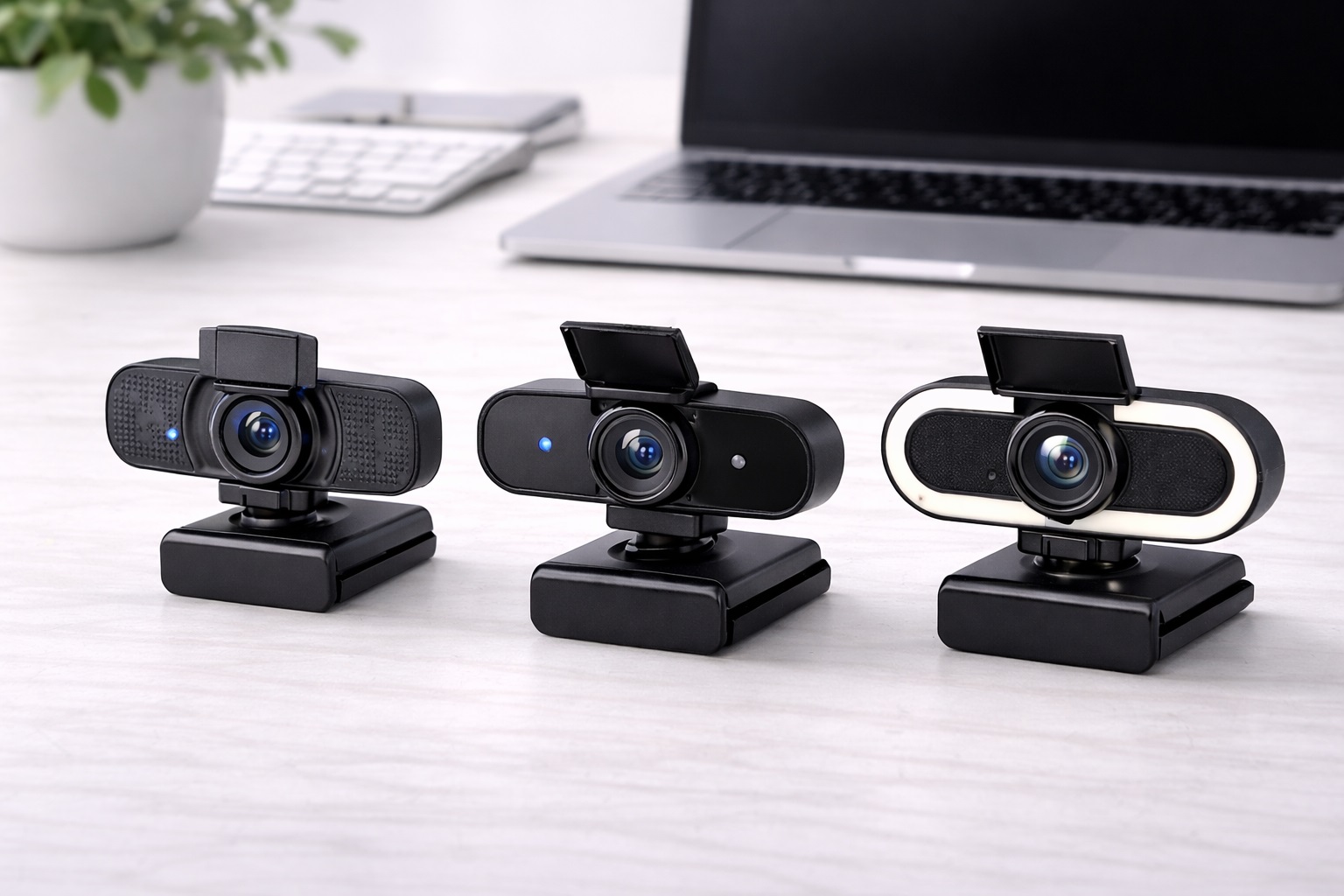
Best Webcams for Small Desks: Clear Video Without the Bulk
A small desk changes how you shop for accessories in a way that's easy to underestimate until you're actually standing there with a tape measure. Every additional item competes directly with the space you need for a keyboard, a notebook, or simply somewhere to rest a coffee cup, and a webcam that looks perfectly reasonable in a product photo can feel bulky and in-the-way once it's clipped onto a monitor sitting eighteen inches from your face.
The instinct for a compact workspace is often to shop by size alone — pick whatever looks smallest in the listing photos — but that approach misses the bigger picture. A tiny webcam that lacks autofocus or handles low light poorly isn't actually a good trade for a cramped desk; it just replaces one frustration with another. The better approach is understanding which features genuinely matter for a small setup and which ones you can reasonably do without, rather than treating footprint as the only variable that counts.
This guide is built around that specific trade-off. The three categories below were chosen because they represent meaningfully different answers for compact workspace users: an efficient all-around option that avoids unnecessary bulk, a lighting-focused option for desks that don't get much natural light, and a privacy-focused option for anyone whose small desk sits in a shared or high-traffic part of a home. None of the three is universally correct — the right pick depends on your specific room and how you use the space.
It's also worth acknowledging what a small desk setup can't fully solve on its own. No webcam, however compact, eliminates the reality that a tight desk means less room for a proper lighting rig or a second monitor for framing reference. What the right webcam can do is avoid adding unnecessary clutter to a space that's already working hard, so the accessory blends into your workflow rather than fighting it for room.
There's a broader principle behind this guide worth naming directly: on a small desk, every accessory decision is really two decisions at once — does it do the job well, and does it cost you usable surface area to get there. A slightly larger webcam that replaces the need for a separate lamp can actually be the more space-efficient choice overall, even though it looks bulkier sitting on the shelf. Keeping that combined calculation in mind, rather than judging size in isolation, leads to better decisions for a genuinely tight workspace.
Top 3 Webcams for Small Desks (Detailed Reviews)
1080p Webcam with Autofocus – Best Overall for Compact Setups
A standard 1080p webcam with reliable autofocus and automatic light compensation is usually the most space-efficient starting point for a small desk, simply because it does the job well without adding a separate lighting accessory or bulky housing to an already tight surface. Full HD resolution covers every mainstream calling platform's needs, and because most platforms compress incoming video regardless of source resolution, there's little practical reason to chase a larger 4K sensor that would only add unnecessary size and cost.
Autofocus matters just as much on a small desk as anywhere else, arguably more — sitting close to the screen in a compact setup means small movements toward or away from the camera happen more often, and a camera that loses focus at close range will show it constantly. Automatic light compensation also helps offset the reality that a small desk often sits in a corner or against a wall, away from the most favorable natural light in the room.
Physically, this style tends to have the smallest and most unobtrusive housing of the three categories here, clipping directly onto a monitor with minimal added footprint and no separate accessory competing for desk space. For someone whose priority is simply not adding clutter to an already tight surface, this is usually the easiest starting point.
- Pros:
- Compact housing adds minimal bulk to a small desk
- 1080p resolution suitable for every major calling platform
- Autofocus keeps the image sharp at close working distances
- No separate lighting accessory needed to take up extra space
- Cons:
- Capped at 1080p, with no headroom for future 4K needs
- Automatic light compensation has limits in genuinely dim rooms
Best For: Anyone with a small or shared desk who wants a clear video upgrade without adding a bulky accessory to an already tight surface.
Why We Recommend It: This category solves the core video quality problem without asking a compact workspace to sacrifice any of its limited surface area, which makes it the most space-conscious default for small-desk buyers.
It also tends to be the easiest option to relocate if your small desk setup changes, whether that means moving to a different room, switching to a new monitor, or rearranging furniture in a shared space. Because the housing is compact and the mount is a simple clip, repositioning it takes seconds rather than requiring you to rethink cable routing or accessory placement.
Webcam with Built-In Ring Light – Best for Desks Away From Natural Light
Small desks are frequently tucked into corners, pushed against interior walls, or squeezed into whatever leftover space a room offers — and that positioning often means less access to good natural light than a desk that gets to claim prime real estate near a window. A webcam with a built-in, adjustable ring light solves that specific problem without requiring a separate desk lamp that would eat into already limited surface area.
Because the light is built directly into the camera housing, this option actually saves desk space compared to buying a webcam and a lamp separately, even though the camera itself looks a little bulkier on its own. For someone weighing a small webcam plus a small lamp against a single combined accessory, the combined option is often the more space-efficient choice overall, not less.
It's particularly well suited to desks positioned against an interior wall, in a corner of a shared room, or in any layout where the available natural light is inconsistent or simply insufficient for clear video. The adjustable brightness dial lets you match the light output to how dim the space actually is, rather than overcompensating.
- Pros:
- Combines lighting and camera into one space-saving accessory
- Solves poor natural light without a separate desk lamp
- Adjustable brightness suits varying levels of ambient light
- Particularly useful for corner or interior-wall desk placements
- Cons:
- Larger housing than a standard webcam, despite the space it saves overall
- Can run warm to the touch during longer sessions
Best For: Compact desks positioned away from windows or in interior corners where natural light is limited or inconsistent.
Why We Recommend It: For a small desk specifically, replacing two separate accessories — a webcam and a lamp — with one combined unit is a genuine space-saving win, not just a lighting upgrade.
It's also worth considering the cord situation this option avoids. A separate desk lamp typically means an additional power cable and outlet competing for space behind an already crowded small desk, while a USB-powered ring light webcam draws power through the same connection as the camera itself, keeping the overall cable footprint simpler.
Webcam with Privacy Shutter – Best for Shared or High-Traffic Rooms
Small desks are disproportionately likely to sit in multi-purpose rooms — a corner of a living room, a shared bedroom, a nook in a studio apartment — simply because that's where the available space happens to be. That positioning makes a physical privacy shutter more relevant than it might be for a webcam sitting in a dedicated, private home office. A dedicated office door can simply be closed when the camera isn't in use, but a desk wedged into a shared living area rarely has that same option, which is exactly the gap a mechanical shutter is built to close.
A mechanical slide that blocks the lens completely gives you a guarantee that a software toggle can't fully replicate, which matters when your desk is visible to roommates, family members, or anyone else moving through a shared living space throughout the day. It takes a second to close and doesn't require unplugging the camera, which fits naturally into a compact setup where you may not want to deal with cables at all.
Most webcams in this category still deliver the core specifications that matter — typically 1080p resolution and a built-in microphone — so the added privacy feature doesn't come at the cost of the video quality itself.
- Pros:
- Physical shutter guarantees the lens is covered in shared spaces
- No unplugging required, which suits a compact, cable-conscious setup
- Paired with solid 1080p video and a built-in microphone
- Simple slide mechanism that's easy to operate one-handed
- Cons:
- Shutter housing adds slightly more width than a plain webcam
- A mechanical part is one more component that could eventually wear
Best For: A small desk positioned in a shared living space, a multi-purpose room, or anywhere visible to others throughout the day.
Why We Recommend It: For a compact setup that doubles as part of a shared living space, a physical privacy guarantee matters more than it does in a dedicated, closed-door office, without requiring any extra desk space to achieve it.
It also pairs well with the reality that small desks are often used at irregular hours by whoever needs a quiet corner at the time, which means the camera may sit connected far longer than it's actually in active use. A shutter that defaults to closed keeps that idle time genuinely private without adding any extra step to your setup or teardown routine.
Buying Guide: How to Choose the Best Webcam for a Small Desk
The factors below are weighted specifically for a compact workspace, where footprint and mounting simplicity carry more importance than they would on a larger desk with room to spare.
1. Housing Size and Desk Footprint
Measure your actual available clip space before assuming a webcam will fit comfortably. Most small-desk monitors sit closer to eye level with less depth behind them, and a bulky webcam housing can look and feel cramped in that context even if it technically clips on. Compact, low-profile designs are worth prioritizing specifically for this reason.
2. Clip Depth and Monitor Compatibility
Small desk setups sometimes pair with thinner monitors or laptop screens, which can cause a standard clip mount to sit unevenly or feel unstable. Check the clip's depth range against your specific screen before buying, since a webcam that wobbles or slides during a call defeats the purpose regardless of image quality.
3. Resolution Relative to Actual Need
1080p covers the needs of virtually every calling platform, since most services compress video to 1080p or below regardless of the source resolution. On a small desk, there's little reason to pay extra for a larger 4K sensor that adds size and cost without a corresponding visible benefit during calls.
4. Autofocus at Close Range
Sitting close to the screen is common on a small desk, which makes reliable close-range autofocus more important than it might be for someone with more distance between themselves and the camera. Look specifically for reviews that mention performance at shorter distances rather than assuming general autofocus quality translates directly to close-up use.
5. Lighting Without Adding Clutter
A separate desk lamp competes directly with limited surface area on a small desk. If your lighting is inconsistent, a webcam with a built-in light source is often more space-efficient than adding a standalone lamp, since it solves the same problem without claiming additional desk real estate.
6. Cable Length for Tight Layouts
Small desks sometimes place the computer tower or laptop in an unconventional position — tucked under the desk, off to one side — which can strain a short webcam cable. Confirm the included cable length reaches your actual USB port comfortably before buying, since a cable that's just barely too short creates ongoing frustration.
7. Field of View for Close Framing
Sitting closer to the camera on a small desk means a narrower field of view, around 65 to 78 degrees, generally produces more flattering framing than a wide angle designed for distance. Wider fields of view can end up showing more of a cluttered background than intended when the camera is mounted close to your face.
8. Built-In Microphone for Tight Spaces
On a small desk, a separate external microphone may itself compete for space, making the webcam's built-in microphone more relevant than it would be in a larger setup with room for extra peripherals. A dual-microphone design with basic noise reduction is a reasonable baseline if you'd rather not add another accessory.
9. Privacy in Multi-Purpose Rooms
Small desks are disproportionately located in shared or multi-purpose rooms, which makes a physical privacy shutter worth prioritizing even if privacy wasn't your first concern when starting to shop. It's a low-cost addition that solves a real, recurring situation for anyone whose desk is visible to others throughout the day.
10. Mounting Alternatives to a Monitor Clip
If your small desk doesn't have a monitor tall enough for a standard clip, or if you work primarily from a laptop, check whether the webcam includes or supports a small tripod mount. This alternative can be more practical than a clip in genuinely compact laptop-only setups.
11. USB Connection Type and Port Access
Compact setups sometimes have limited port access, particularly on newer laptops with fewer USB-A ports. Check which connection type your machine supports and whether the webcam's cable length and connector type will actually work with your available ports without needing an adapter.
12. Return Policy for a Tight Fit
Because fit and footprint matter so much more on a small desk than on a larger one, a generous return window — typically 15 to 30 days — is worth checking before buying. It gives you room to confirm the webcam actually feels comfortable and unobtrusive in your specific space rather than committing based on listing photos alone.
13. Desk Surface Material and Clip Grip
A webcam clip that grips securely on a thick wooden monitor stand can feel noticeably less stable on a thin metal or glass monitor edge common in compact, modern small-desk setups. Rubberized clip padding helps across most surface types, but it's worth checking reviews specifically for mentions of slipping or loose fit on thinner monitor bezels, since a small desk often pairs with a smaller, lighter monitor that flexes more than a larger display would under the same clip pressure.
14. Testing Camera Angle Before Committing to a Spot
Because a small desk offers fewer alternative placement options than a larger one, it's worth briefly testing the camera's angle and framing in its intended spot before settling on a permanent position. A slightly different clip height or a few degrees of tilt can noticeably change how flattering the framing looks, and on a small desk where the camera typically sits closer to your face than average, small angle differences have an outsized effect on the final impression compared to a more distant setup.
One more consideration worth naming directly: don't assume every product within a given category performs identically simply because the feature set sounds the same on paper. Two compact 1080p autofocus webcams from different brands can still differ in clip stability, cable quality, or how quickly the autofocus recovers after a close-range movement. Reading a handful of recent, verified reviews for the specific model you're considering — not just the general category — remains worth the extra few minutes, especially when desk space is tight enough that a return means genuinely reworking your setup.
Frequently Asked Questions
1. Will a webcam actually fit comfortably on a small desk monitor?
In most cases, yes, provided you check the clip's depth range against your specific monitor before buying. Compact, low-profile webcam designs are generally easier to fit on smaller monitors and laptop screens than bulkier styles with built-in lights, though even those can work with a slightly wider clip opening.
2. Is 1080p resolution good enough on a small, close-range desk setup?
Yes, for virtually all video calling platforms. Most services compress incoming video to 1080p or lower regardless of the camera's native resolution, so a 1080p webcam already shows the maximum quality most calls will display, even at closer working distances typical of a small desk.
3. Why does my webcam look blurry when I lean closer on a small desk?
This usually points to weak autofocus performance at close range, which is more noticeable on a small desk where you naturally sit closer to the screen. Check reviews specifically mentioning close-range focus performance, and confirm the camera isn't simply positioned closer than its minimum focal distance allows.
4. Do I need a separate lamp if my small desk already has a webcam with automatic light compensation?
Not necessarily, though automatic compensation has limits in genuinely dim rooms. If your desk regularly struggles with low light, a built-in ring light webcam is usually more space-efficient than adding a standalone lamp to an already tight surface.
5. Can I use a tripod instead of a monitor clip on a small desk?
Yes, if the webcam includes or supports a tripod mount adapter. This can be a more practical option for laptop-only setups or unusually thin monitors where a standard clip doesn't sit securely.
6. Is the most expensive webcam always the best fit for a small desk?
Not necessarily. Higher price often reflects size and features that don't matter as much on a compact setup, like larger sensors or bulkier accessory lighting. Focus on footprint, autofocus at close range, and mount stability over general price or spec sheet prestige.
7. How long should a small-desk webcam last with regular use?
A reasonably well-built webcam typically lasts several years of regular use, similar to standard-sized alternatives. The cable and any mechanical parts, such as a privacy shutter, tend to be the first components to show wear.
8. What if the webcam I choose still feels too bulky on my desk?
Most retailers offer a return window of roughly 15 to 30 days. Test the webcam in your actual space for a few days before that window closes, since bulk that seemed acceptable in photos can feel different once it's physically clipped onto your specific monitor.
9. What's genuinely the best webcam for a small or shared desk?
It depends on your specific constraints. Someone purely concerned with footprint may prefer the standard compact autofocus option, someone in a dim corner benefits more from the built-in ring light, and someone in a shared or high-traffic room may value the privacy shutter most.
10. Does brand matter more for a compact webcam than a standard one?
Not dramatically, though established brands tend to offer more consistent build quality across their compact product lines. Reading verified reviews that specifically mention fit and stability on small monitors is worth the extra effort regardless of brand.
11. Can a webcam with a built-in ring light still fit a genuinely tiny desk?
Usually yes, since the combined accessory typically takes up less total space than a separate webcam and lamp would together. The camera housing itself is larger than a plain webcam, but the net space saved by not needing a second accessory usually works in favor of a small desk.
12. Should I prioritize footprint over image quality when shopping for a small desk?
Not entirely — the goal is finding a webcam that balances both rather than sacrificing one for the other. A tiny webcam with poor autofocus or weak low-light performance isn't actually a good trade for a small desk; it just replaces one problem with a different one.
13. Will a webcam with a privacy shutter be harder to mount on a small desk than a plain one?
Only marginally. The shutter adds a small amount of width to the housing, but the overall clip mechanism and mounting process remain the same as a standard webcam. Most small-desk users find the added privacy well worth the negligible size difference.
14. How do I decide between a slightly bigger webcam that saves space overall and a smaller one that doesn't?
Think about the combined footprint of everything you'd otherwise need. If a compact webcam without a light means also needing a separate desk lamp, the two together often take up more usable surface area than one slightly larger combined accessory. Judge the full setup, not just the size of the camera on its own.
15. Does a small-desk webcam setup need a dedicated USB hub?
Not necessarily, though compact laptops with limited ports can make a small USB hub genuinely useful if the webcam, keyboard, and other peripherals are all competing for the same one or two available ports. A basic hub is inexpensive and takes up very little additional desk space, so it's a reasonable add-on if port availability turns out to be the actual constraint rather than the webcam itself.
16. Can I use a small-desk webcam with a laptop stand or riser?
Yes, and in many compact setups this actually improves both ergonomics and camera angle at once, since raising a laptop to eye level with a stand also raises the webcam clipped to its screen. This is a particularly practical combination for a small desk, since a stand takes up minimal additional footprint while solving two problems — screen height and camera angle — simultaneously.
Final Verdict
- Best Overall for Compact Setups: 1080p Webcam with Autofocus – clear video without adding unnecessary bulk.
- Best for Desks Away From Natural Light: Webcam with Built-In Ring Light – solves lighting and saves space at once.
- Best for Shared or High-Traffic Rooms: Webcam with Privacy Shutter – hardware-level privacy for a desk that doubles as shared space.
A small desk doesn't have to mean compromising on video quality — it just means being more deliberate about which features genuinely earn their place on a limited surface. The three options above each solve a different version of that trade-off, whether your priority is minimizing footprint, fixing inconsistent lighting without adding a lamp, or protecting your privacy in a room that serves more than one purpose.
Think honestly about your specific desk before deciding — where it sits in the room, how much natural light reaches it, and who else might see it throughout the day. Matching the webcam to that reality will serve you better over time than choosing based on whichever listing photo looks smallest, since footprint alone rarely tells the whole story of how an accessory will actually feel once it's part of your daily setup.
If none of the three trade-offs above feels clearly dominant for your situation, the standard 1080p autofocus option remains the safest starting point. It adds the least bulk of the three, covers the video quality basics reliably, and leaves room to add a light or a privacy-focused webcam later if a specific need becomes clear once you've actually lived with the setup for a few weeks.