Best Travel Ergonomic Mice: Hand-Friendly Precision on the Road
Working from hotel rooms, coworking spaces, and unfamiliar desks introduces a specific kind of strain that a stable home office setup doesn't. Desk heights vary from one location to the next, chairs are rarely adjusted to fit you personally, and the temptation to just use the laptop trackpad instead of unpacking a mouse grows the more inconvenient that mouse feels to carry and set up. Over weeks of travel, small daily compromises in hand position add up the same way they would at a single desk — the difference is that travel makes it easier to skip the ergonomic accessory altogether simply because it's one more thing to pack.
This guide is built specifically for remote workers who need ergonomic hand support in hotel rooms and coworking spaces. It compares the three most practical ergonomic mouse categories through the lens of portability first, without losing sight of the actual ergonomic benefit each one provides, since a travel mouse that's easy to pack but doesn't meaningfully help your wrist isn't solving the real problem.
Packing size, setup speed, and durability under the wear of repeated travel all matter more here than they would for a mouse that lives permanently on one desk. A design that's excellent at a stationary desk can be a poor travel companion if it's bulky, fragile, or slow to set up in an unfamiliar space where you might only be working for a night or two before moving on.
None of the three categories below were designed specifically as travel products, but each has real practical differences in how well it adapts to a life on the road. The sections that follow walk through those differences, followed by a buying guide focused on what actually matters when your desk changes location on a regular basis.
Battery life, cable management, and physical durability all take on more weight in a travel context than they would for someone who sets a mouse down once and rarely moves it again. Keep those three factors in mind as you read through the comparisons below, since they often separate a mouse that travels well from one that merely happens to be portable in theory.
It's worth being honest that no ergonomic mouse fully replaces the benefit of a properly adjusted desk and chair, and travel rarely offers either. What a good travel mouse can do is remove one variable from an otherwise inconsistent setup, giving your hand at least one familiar, comfortable point of contact regardless of how the rest of the workspace is arranged that day. That consistency is worth more on the road than it might seem, since it's often the only part of your physical setup you have full control over.
Top 3 Ergonomic Mice for Travel (Detailed Reviews)
1. Vertical Ergonomic Mouse – Best Overall for Remote Work on the Road
Vertical mice orient the hand in a handshake position — thumb up, palm facing inward — which places the forearm in its neutral position and eliminates the forearm rotation that flat mice require. This single change dramatically reduces the wrist pronation stress that causes repetitive strain injury in heavy computer users, a benefit that matters just as much on an unfamiliar hotel desk as it does at a permanent home setup. Most vertical mice include adjustable DPI and wireless connectivity, and wireless operation in particular is a meaningful travel advantage, since it removes one more cable to pack, untangle, and route around an unfamiliar workspace. Many vertical models are also reasonably compact compared to some larger ergonomic accessories, making them a realistic addition to a laptop bag without adding significant bulk or weight.
- Pros:
- Neutral forearm position reduces pronation stress
- Reduces wrist and forearm strain over time
- Adjustable DPI for different task sensitivities
- Available wired and wireless
- Cons:
- Right-handed only on most models
- Adjustment period of one to two weeks is common
Best For: Remote workers experiencing wrist or forearm discomfort from working across varied desk setups, and travelers who want to establish one consistent, comfortable hand position regardless of where they're working that week.
Why We Recommend It: The vertical mouse is the most directly effective ergonomic mouse design for preventing and relieving forearm strain, and its wireless connectivity and moderate footprint make it a realistic travel companion rather than a device better suited to staying permanently at one desk. For most travelers who already know they benefit from a vertical grip at home, there's little reason to switch to a different, less familiar design just because they're on the road, since the same grip and muscle memory carry over cleanly to a hotel desk or coworking table.
2. Trackball Mouse – Best for Minimal Setup and Desk Space Anywhere
Trackball mice keep the mouse body stationary — you move the cursor by rolling a ball with your thumb or fingers rather than moving the entire mouse. This virtually eliminates the repetitive arm and wrist movement that standard mice require, which is valuable anywhere, but especially useful when working from unfamiliar desks that may be smaller, more cluttered, or oddly shaped compared to your usual setup. Because a trackball never needs a lane of open desk space to glide across, it adapts instantly to whatever surface is available in a hotel room or coworking space, without requiring you to clear a path the way a gliding mouse would. This also makes it a practical choice for compact hotel desks that already have a lamp, room-service tray, or laptop stand competing for the same limited surface area.
- Pros:
- Near-zero wrist and arm movement required
- Mouse body stays stationary on desk
- Available in thumb-operated and finger-operated designs
- Precise control once the learning curve is mastered
- Cons:
- Steep learning curve for new users
- Trackball requires regular cleaning as dust accumulates
Best For: Travelers and remote workers with existing wrist injuries or severe RSI, and anyone who regularly works from unpredictable, cramped, or unconventional desk surfaces on the road.
Why We Recommend It: The trackball design offers the most wrist-stationary operation of any mouse type, and its stationary footprint is a genuine practical advantage when you can't count on having a full, clear desk surface at every stop along a trip. Some thumb-operated trackball models are also notably compact and lightweight compared to larger finger-operated versions, which is worth checking if packing weight is a specific concern on top of the general space advantage.
3. Ergonomic Standard Mouse – Best for Simple, Reliable Travel Use
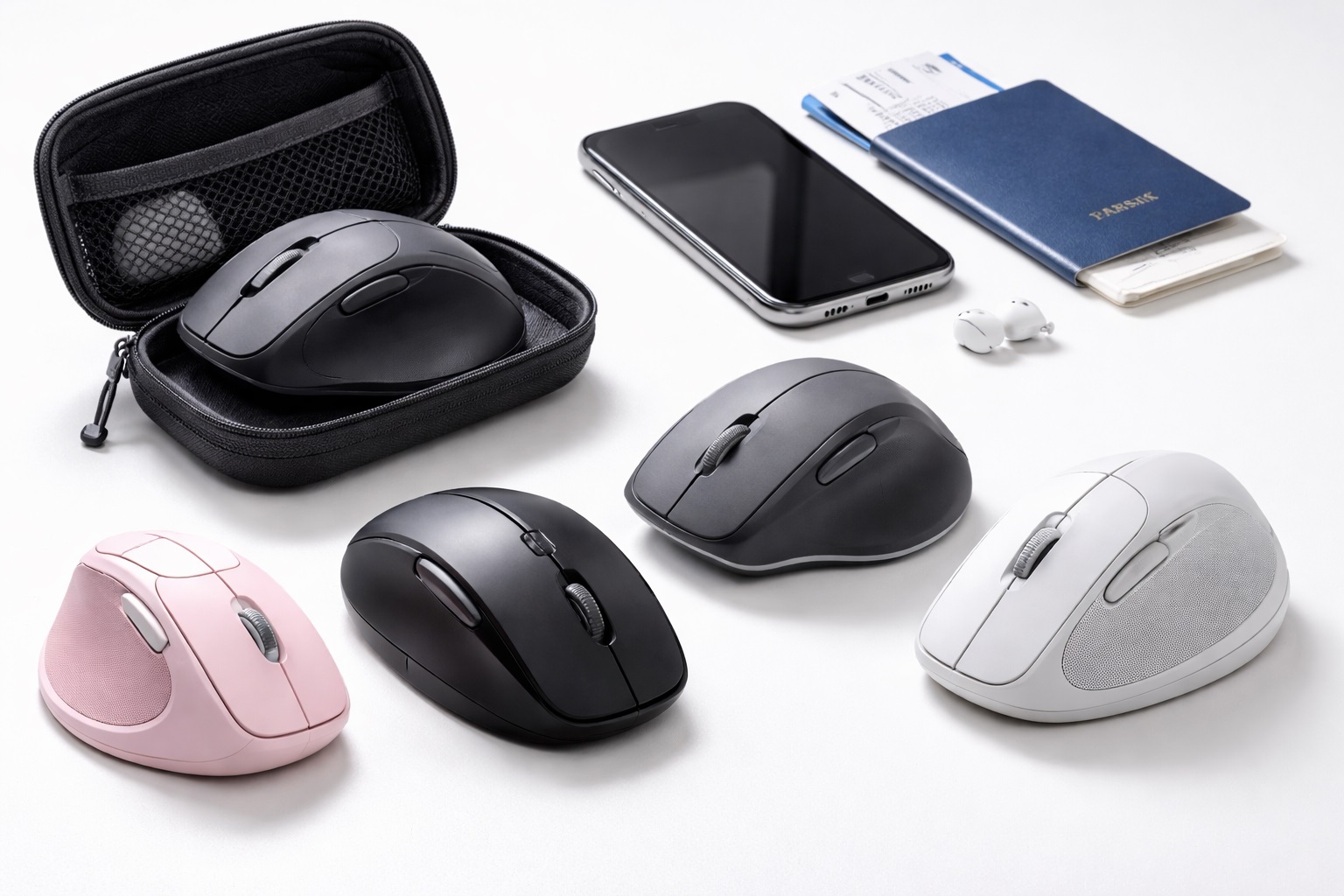
Some mice take a less radical approach to ergonomics — using a contoured right-hand shape, elevated thumb rest, and angled grip that improves on a standard flat mouse without the full commitment of a vertical design. These represent a gentler ergonomic improvement that requires no adjustment period while still reducing strain compared to a generic flat mouse, which is a genuine advantage while traveling, since there's rarely a convenient stretch of downtime to work through an adjustment period between flights or hotel check-ins. Because the grip and movement pattern stay close to a standard mouse, there's no relearning required each time you set up in a new location.
- Pros:
- More comfortable than flat mice with minimal adjustment required
- Still compatible with standard mouse muscle memory
- Side thumb button support on most models
- Often available at more accessible prices
- Cons:
- Less ergonomic benefit than vertical or trackball alternatives
- Not suitable for left-handed users on most models
Best For: Travelers who want a comfort improvement over a flat mouse without any adjustment period disrupting their work while on the move.
Why We Recommend It: For remote workers who want to start improving mouse ergonomics without committing to a new grip style, an ergonomically shaped standard mouse offers meaningful improvement with zero learning curve, which fits naturally into a schedule with little room for an adjustment period. For anyone unsure whether a bigger ergonomic commitment is worth the packing space, this category is the lowest-friction way to test whether an improved grip makes a noticeable difference during travel work before investing in a vertical or trackball design.
Buying Guide: How to Choose the Best Travel Ergonomic Mouse
Use these factors to match your purchase to how you actually work while traveling, not just your general ergonomic needs at a stationary desk.
1. Ergonomic Type (Vertical vs. Standard Contoured vs. Trackball)
Vertical mice put the forearm in a neutral position, reducing pronation, in a reasonably compact package. Standard contoured mice improve on flat mice with less dramatic hand angle change and no learning curve. Trackballs eliminate arm movement entirely and adapt to almost any desk surface. Weigh your specific strain complaint against how much you value zero-learning-curve simplicity while traveling.
2. Physical Size and Packing Footprint
Check the actual dimensions and weight of any mouse you're considering for travel, not just the category it belongs to. Some vertical and trackball designs are noticeably more compact than others within the same category, and a smaller, lighter unit is easier to justify carrying on every trip rather than leaving behind when packing light. A difference of even a few ounces adds up when you're also weighing a laptop, charger, and other gear against airline carry-on limits.
3. Wireless Connectivity and Dongle Management
Wireless is generally preferable while traveling, since it eliminates one more cable to pack and untangle. If the mouse uses a USB dongle rather than Bluetooth, consider a model with internal dongle storage in the mouse body itself, which prevents the easy-to-lose dongle from getting separated from the mouse during frequent packing and unpacking. Bluetooth-only models remove the dongle question entirely, at the cost of a slightly more involved initial pairing process with a new device.
4. Battery Life Between Charging Opportunities
Battery life on wireless ergonomic mice is typically 2 to 4 weeks per charge, which comfortably covers most trips without needing to pack a charging cable specifically for the mouse. Still, check the specific figure for any model you're considering, since travel schedules don't always offer a convenient moment to recharge, and a mouse that shares a charging cable standard with your phone or laptop simplifies your packing list further.
5. Durability Under Repeated Packing and Unpacking
A mouse that travels in a bag alongside a laptop, charger, and other gear experiences more physical wear than one that stays permanently on a desk. Look for a solidly built housing and a case or pouch that protects buttons and scroll wheels from being pressed or damaged while jostling around in transit, since a loose mouse rattling against harder items in a bag is a common source of early wear.
6. Hand Orientation (Right vs. Ambidextrous)
Most ergonomic mice are right-hand specific. Left-handed travelers have fewer options — some vertical mice offer left-handed versions, and trackballs are often ambidextrous. Verify orientation compatibility before purchasing, as most ergonomic mouse designs don't work for left-handed use, and this is doubly important to confirm before a trip since exchanging an order becomes far less convenient once you're away from home.
7. Size and Grip Match
Vertical mice specifically need to match hand size. A mouse that's too small forces the hand into an uncomfortable grip angle, and a mouse that's too large strains the hand in the opposite direction. Check manufacturer size recommendations before buying, since you won't have the option to test the fit in person before a trip in most cases, making an accurate size match more important than it would be for a purely local purchase.
8. Learning Curve Timing Around Travel Schedules
Vertical mice require a one to two week adjustment period, during which precision feels reduced. Start this transition before a trip rather than during one, so you're not managing an unfamiliar grip and an unfamiliar workspace at the same time.
9. Setup Speed in Unfamiliar Spaces
A mouse that requires minimal setup — no software installation, no pairing process beyond a quick Bluetooth connection — saves real time when you're only at a given desk for a day or two. Favor models with straightforward, driver-free connectivity if you frequently switch between different computers or workspaces during a trip, since reinstalling software on a borrowed or shared computer isn't always practical or permitted.
10. Adapting to Different Desk Heights and Surfaces
Hotel desks and coworking spaces vary widely in height and surface texture compared to a home office. A mouse with reliable tracking across varied surfaces, and one that doesn't require a specific mouse pad to function well, adapts more easily to whatever workspace you encounter.
11. Return Policy for Ergonomic Mice
Ergonomic mice have a higher return rate than standard mice because hand fit is difficult to evaluate without physically holding the device. Purchasing from a retailer with a 30-day return window gives you time to test the mouse across a real trip or two before deciding it's a permanent addition to your travel kit, rather than judging it after a single short outing that may not reflect typical travel conditions.
12. Protective Cases and Travel Pouches
A simple zippered pouch or hard case protects a travel mouse from scratches, dust, and accidental button presses while packed. Some manufacturers include a case specifically designed for their compact or travel-oriented models, which is worth checking for before buying a separate generic pouch.
13. Time Zone Changes and Adjustment Timing
If you're planning to start the adjustment period for a vertical mouse, avoid doing so during the first few days after a long-haul flight or significant time zone change. Combining jet lag with a new grip and reduced precision compounds the difficulty of both, and waiting until you've settled into a new schedule makes the transition noticeably easier.
14. International Power and Charging Compatibility
Wireless mice charge over standard USB, which is universally compatible with the adapters and power banks most travelers already carry for phones and laptops. This is one area where a travel mouse rarely introduces its own compatibility concerns, unlike some other electronics that require specific voltage or plug considerations abroad.
15. Building a Consistent Travel Ergonomics Routine
Beyond the mouse itself, a few small habits make a real difference on the road: propping a laptop on whatever's available — a stack of books, a suitcase, a bathroom counter turned standing desk — to bring the screen closer to eye level, and pairing that with a compact external keyboard when your trip involves more than a day or two of real work. The ergonomic mouse solves one part of the equation, but travelers who also address screen height report a more noticeable overall improvement than those who upgrade the mouse alone and leave everything else about their temporary setup unchanged.
16. Weighing a Compact Mouse Pad for the Trip
A small, foldable mouse pad weighing only a few ounces solves two travel-specific problems at once: it gives a gliding mouse a consistent, trackable surface regardless of the hotel desk's finish, and it protects the desk itself from the light scuffing a mouse can cause on a polished or lacquered surface. It's a minor addition to a travel kit that pays off disproportionately on trips where you can't predict what kind of desk surface you'll be working on.
17. Airport Security and Lithium Battery Rules
Wireless ergonomic mice with a built-in rechargeable battery are treated the same as most other small rechargeable electronics at airport security, and they're generally fine to pack in either carry-on or checked luggage without special handling. The stricter TSA-style rules apply mainly to spare, removable lithium batteries carried separately, which typically need to travel in carry-on rather than checked bags. Since most travel mice use a built-in battery rather than swappable cells, this is rarely a practical concern, but it's worth a quick check if you're considering a model with a separate battery compartment.
18. Onboard Memory for Settings Across Multiple Computers
Some ergonomic mice store DPI and button customization directly on the device itself, rather than relying on software installed on each computer you connect it to. This matters more while traveling than it does at a single desk, since work-issued laptops and shared coworking computers often restrict software installation. A mouse with onboard memory keeps your preferred settings consistent no matter which machine you plug into, without needing administrator access to reconfigure it each time.
19. Keeping Track of a Small Accessory Between Stops
A compact travel mouse is exactly the kind of item that's easy to leave behind on a hotel nightstand or tucked into a coworking space's shared outlet strip. Packing it in the same dedicated pocket every time, rather than wherever it happens to land at the end of a workday, meaningfully reduces the odds of leaving it behind at some point during a longer trip.
Frequently Asked Questions
1. How long does it take to adjust to a vertical ergonomic mouse while traveling frequently?
Most users need one to two weeks to feel as comfortable with a vertical mouse as with their previous flat mouse. It's best to complete this adjustment period before a trip begins, rather than trying to adapt to a new grip and a new environment simultaneously.
2. Is a trackball or vertical mouse better for frequent travelers?
Both address different priorities. Vertical mice reduce forearm pronation significantly and pack reasonably compactly. Trackballs eliminate arm movement entirely and adapt to nearly any desk surface without needing open glide space, which is valuable when desk conditions vary widely between stops.
3. Can left-handed travelers find a good ergonomic mouse?
Most vertical ergonomic mice are right-hand specific by design. Left-handed travelers have more limited options. Some manufacturers offer specific left-handed vertical models, and trackball mice are often ambidextrous, offering more flexibility for left-handed users on the road.
4. Does an ergonomic mouse help with carpal tunnel syndrome while working from hotels?
Ergonomic mice can reduce the forearm pronation and repetitive movements that contribute to carpal tunnel syndrome. They're not a medical treatment and should be used alongside medical advice for existing conditions. Consistent use across varied desk setups helps maintain the benefit even as your workspace changes.
5. What's the most compact ergonomic mouse option for travel?
Compact vertical mice and thumb-operated trackballs both tend to pack smaller than larger, feature-heavy ergonomic mice. Checking the actual listed dimensions and weight of a specific model matters more than assuming an entire category is universally compact.
6. How do I keep a wireless dongle from getting lost while traveling?
Look for a mouse with internal dongle storage, typically a small compartment on the underside of the mouse body. This keeps the dongle physically attached to the mouse itself, removing the risk of it being left behind in a laptop or forgotten in a hotel room.
7. Is the most expensive travel ergonomic mouse always the best?
Not necessarily. Higher price often means more features, but many mid-range options offer excellent portability and comfort for regular travel. Focus on size, battery life, and durability rather than price alone, since those three factors matter more consistently across trips than extra software features you may rarely use.
8. How long should a quality travel ergonomic mouse last?
A well-built product from a reputable brand typically lasts two to five years or longer with reasonable care, even accounting for the additional wear that regular travel and packing introduce. Always check warranty terms as a quality indicator.
9. Can I return a travel ergonomic mouse if it doesn't suit my routine?
Most retailers offer a 15 to 30 day return window. Keep the original packaging during your evaluation period, and try to test the mouse across at least one real trip before the window closes.
10. What is the best ergonomic mouse for remote workers who travel frequently?
The best choice depends on your specific priorities — packing size, battery life, or maximum strain reduction. Review the buying guide factors above and weigh them against how often and how far you actually travel for work.
11. Does brand name matter when choosing a travel ergonomic mouse?
Established brands generally offer better quality control, customer support, and warranty reliability, which can matter more while traveling since local support options may be limited. Newer brands sometimes offer excellent value — read verified reviews carefully before purchasing.
12. Should I buy a second mouse specifically for travel, or use the same one everywhere?
Many frequent travelers prefer a dedicated, slightly more compact travel mouse separate from a larger primary model used at a home desk, since the two contexts often have different footprint and durability priorities. If you only travel occasionally, however, one versatile model that suits both settings avoids the extra cost and complexity of maintaining two devices.
13. Does climate or altitude affect a travel mouse's performance?
No meaningful effect under normal conditions. Optical and laser sensors used in modern ergonomic mice function reliably across the range of temperatures and altitudes typical of business and leisure travel. The more relevant travel factors remain battery life, physical durability, and desk surface compatibility rather than environmental conditions.
14. Are wireless ergonomic mice allowed in airport carry-on luggage?
Yes, in nearly all cases. Mice with a built-in rechargeable battery are treated like most other small electronics at security checkpoints. The stricter rules around spare lithium batteries generally apply to loose, removable cells rather than the built-in batteries used in most travel mice.
15. Does an ergonomic mouse require installing software on every computer I use?
Not necessarily. Basic functions work immediately on any computer without installation. Mice with onboard memory can also retain custom DPI and button settings without needing dedicated software installed on each new machine, which is useful on shared or work-restricted computers.
16. What should I do if I leave my travel mouse behind at a hotel?
Contact the hotel promptly, since compact accessories left on a nightstand or desk are commonly found during routine cleaning. Going forward, packing the mouse in the same dedicated pocket of your bag every time helps prevent it from being left behind again on a later trip.
Final Verdict
- Best Overall for Remote Work on the Road: Vertical Ergonomic Mouse – Meaningful strain relief in a reasonably packable, wireless design.
- Best for Minimal Setup Anywhere: Trackball Mouse – Adapts instantly to almost any desk surface without needing open glide space.
- Best for Simple, Reliable Use: Ergonomic Standard Mouse – Zero adjustment period for a schedule with no time to spare.
The right travel ergonomic mouse depends on how you actually work on the road — how often your desk changes, how much you're willing to pack, and how urgently your current setup needs an ergonomic upgrade. Choosing based on your real travel pattern, rather than the mouse that looks most impressive in a product listing, will get you a setup that actually comes with you on every trip instead of staying behind in a drawer. The best travel accessory, in the end, is the one you'll actually reach for after a long day of flights and unfamiliar desks rather than the one that simply sounded most compelling while shopping from home.