Best Budget Ergonomic Mice: Real Relief for Wrist Pain
Wrist and forearm discomfort from a standard mouse rarely announces itself dramatically. It tends to show up gradually, as a dull ache after a long workday, a tightness that lingers into the evening, or a tingling sensation that makes you shake out your hand between tasks without quite noticing you're doing it. By the time it's uncomfortable enough to search for a solution, many people assume the fix has to be expensive, and that assumption keeps them using the same aggravating mouse far longer than necessary.
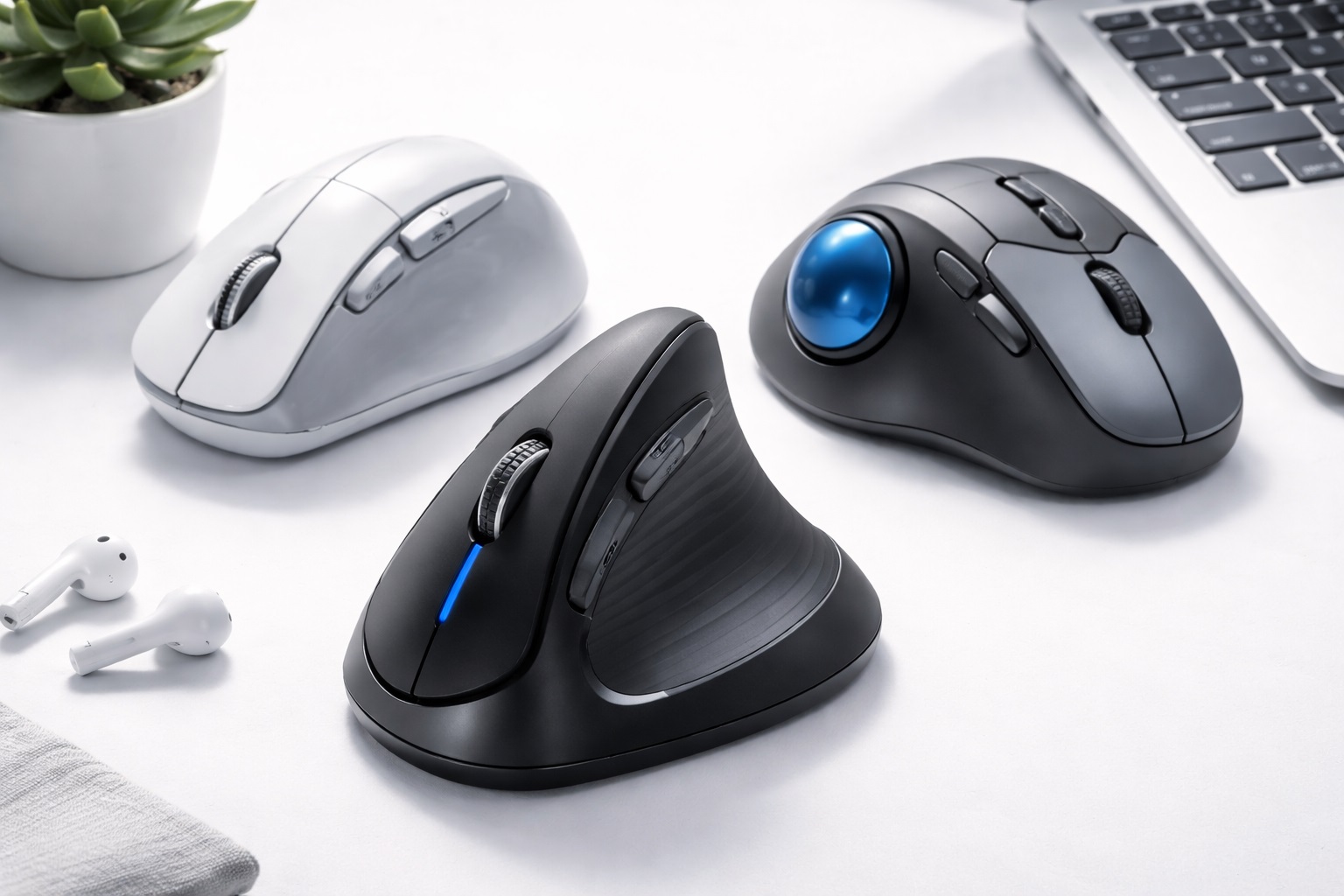
It doesn't have to be expensive. The ergonomic mouse market has a genuinely useful budget tier, and the three designs compared below represent meaningfully different approaches to the same underlying problem rather than three versions of the same idea at different price points. A vertical mouse changes your hand's orientation entirely. A trackball removes arm movement almost completely. A contoured standard mouse offers a gentler improvement with no adjustment period at all. Picking between them comes down to how severe your discomfort is and how much change you're willing to adapt to.
None of these designs is a medical treatment, and a genuinely painful or persistent condition deserves a conversation with a healthcare provider rather than a mouse purchase alone. But for the common, garden-variety strain that comes from long hours at a flat mouse, switching to one of these three formats is one of the more effective and least expensive changes you can make to a desk setup.
This guide walks through what each design actually changes about your hand position, who tends to benefit most from it, and the practical buying factors — size, orientation, learning curve, and return policy — that matter more for ergonomic mice than for a standard mouse purchase, where fit is much less individual.
It's worth setting expectations honestly before comparing specific designs. None of these three mice will feel instantly better than what you're used to, with the possible exception of the contoured standard mouse. Real ergonomic improvement tends to arrive gradually, over days rather than minutes, as your hand and forearm adjust to a healthier resting position. Judging a new mouse in the first hour of use is one of the most common reasons people give up on a design that would have worked well with a little more patience.
Top 3 Budget Ergonomic Mice (Detailed Reviews)
1. Vertical Ergonomic Mouse – Best Overall for Wrist and Forearm Pain
A vertical mouse turns your hand into a handshake position, thumb pointed upward and palm facing inward, rather than the flat, pronated position a standard mouse forces onto your forearm all day. That single change puts the forearm in its natural resting alignment and removes the twisting motion that causes much of the cumulative strain heavy computer users develop over time. Most budget vertical mice still include adjustable sensitivity settings and both wired and wireless versions, so the lower price doesn't mean giving up basic functionality.
- Pros:
- Puts the forearm in a neutral, unrotated position that directly addresses pronation strain
- Meaningfully reduces wrist and forearm fatigue over the course of a workday
- Adjustable sensitivity settings suit different tasks and preferences
- Available in both wired and wireless versions even at a budget price point
- Cons:
- Almost exclusively designed for right-handed use
- Takes one to two weeks of regular use before it feels as natural as a flat mouse
Best For: Anyone experiencing ongoing wrist, forearm, or shoulder discomfort from a standard mouse, and cautious users who want to head off strain before it becomes a real problem.
Why We Recommend It: Of the three designs here, the vertical mouse addresses the actual mechanical cause of forearm strain most directly. The neutral hand position it creates is about as close as a mouse can get to how your hand naturally wants to rest at your side. Once the adjustment period passes, most people who make the switch report they wouldn't willingly go back to a flat mouse for daily heavy use, even if they still keep one around for travel or occasional tasks.
2. Trackball Mouse – Best for Eliminating Arm Movement Entirely
A trackball mouse stays completely still on your desk. Instead of moving the whole device to move the cursor, you roll a ball with your thumb or fingers while the body of the mouse never shifts position. This removes nearly all of the repeated arm and wrist motion that a standard or even a vertical mouse still requires, which makes it a particularly strong option for anyone whose discomfort comes specifically from repetitive movement rather than hand angle alone.
- Pros:
- Requires almost no wrist or arm movement once positioned
- Mouse body remains fixed, which also frees up desk space
- Available in both thumb-operated and finger-operated designs
- Once mastered, offers precise, stable cursor control for detailed work
- Cons:
- Steeper learning curve than either of the other two options
- The ball mechanism needs occasional cleaning as dust builds up around it
Best For: People recovering from a wrist injury, dealing with severe repetitive strain, or anyone whose doctor has specifically recommended minimizing hand and wrist movement.
Why We Recommend It: No other mouse design comes close to a trackball's ability to keep the wrist stationary throughout the workday. For a genuinely limiting strain condition, that stillness can matter more than any other single feature. Even setting aside injury recovery specifically, plenty of long-term trackball users simply prefer never having to reach across a mouse pad or reposition the device to keep tracking within range.
3. Ergonomic Standard Mouse – Best for an Easy, No-Adjustment Upgrade
Not every ergonomic improvement requires relearning how to use a mouse. A contoured standard mouse keeps the familiar flat grip but reshapes the body with a raised thumb rest, a gently angled surface, and a shape that better matches the natural curve of a resting hand. It's a smaller improvement than a vertical or trackball design, but it asks nothing of you in return — there's no adjustment period, and your existing muscle memory carries over immediately.
- Pros:
- Comfortable improvement over a flat mouse with effectively no learning curve
- Fully compatible with existing mouse habits and muscle memory
- Side thumb buttons included on most models even at this price
- Generally the least expensive of the three ergonomic formats
- Cons:
- Offers a smaller ergonomic benefit than a vertical or trackball design
- Still mostly limited to right-handed shapes
Best For: Users who want a noticeable comfort improvement over a flat mouse without committing to a different grip style or accepting any adjustment period.
Why We Recommend It: This is the lowest-friction way to start improving your setup. For anyone hesitant about the bigger changes a vertical or trackball mouse requires, it's a genuine step forward with essentially zero downside. It's also a reasonable middle step for someone planning to eventually try a vertical mouse but who isn't ready yet for the adjustment period that design demands.
Buying Guide: How to Choose the Best Budget Ergonomic Mouse
Ergonomic mice are more personal than standard mice, since fit and hand size affect comfort far more directly. Work through the factors below in order to narrow down which design and specific model actually suits your hand and your specific strain complaint.
1. Match the Design to Your Specific Complaint
Forearm rotation strain responds best to a vertical mouse, since that's the exact motion it eliminates. Wrist and arm movement fatigue responds better to a trackball, since the mouse body never moves. General discomfort without a specific diagnosis often responds well to a contoured standard mouse as a first, low-commitment step. Identifying which category your discomfort falls into narrows the decision considerably before you even start comparing specific models. If you're genuinely unsure, describing your symptoms to a physical therapist or occupational health specialist, even briefly, can point you toward the design most likely to help rather than leaving the choice to guesswork.
2. Hand Size and Grip Compatibility
Vertical mice in particular need to match your hand size closely. A mouse that's too small forces an awkward, cramped grip, while one that's too large stretches the hand uncomfortably in the opposite direction. Look for manufacturer size guidance, usually described in terms of small, medium, or large hand dimensions, and take it seriously rather than guessing based on the product photos alone. Tracing your hand on paper and comparing it against the manufacturer's stated dimensions, when available, is a simple way to get a more objective sense of fit before ordering.
3. Right-Hand vs. Left-Hand Availability
Most ergonomic mice, across all three formats, are designed specifically for right-handed use. Left-handed users have meaningfully fewer choices, though some manufacturers do offer left-handed vertical models, and trackballs are more commonly ambidextrous or available in both orientations. Confirm handedness compatibility before buying rather than assuming a general ergonomic mouse will work equally well for either hand. This is genuinely one of the more frustrating gaps in the ergonomic mouse market, and it's worth checking listings carefully rather than assuming a product photo showing a right hand is simply an illustration choice.
4. Realistic Expectations for the Learning Curve
A vertical mouse typically takes one to two weeks before it feels as natural and precise as a familiar flat mouse. During that window, expect some loss of accuracy, particularly for fine clicking or dragging tasks. This is completely normal, not a sign the mouse is wrong for you, and giving up in the first few days is the most common reason people abandon a design that would have worked well with a little more patience. Setting a personal rule to stick with it for a fixed number of workdays before judging the result removes the temptation to quit on a difficult first afternoon.
5. Wired vs. Wireless for Ergonomic Use
Both wired and wireless versions exist across all three ergonomic formats, even at budget price points. Wireless removes cable drag, which can matter more with a vertical mouse's altered hand angle than with a standard mouse. Battery life on budget wireless ergonomic mice typically runs two to four weeks per charge, which is generally reasonable for daily desk use. If you're prone to forgetting to charge peripherals, a wired option removes that particular concern entirely, though at the cost of a cable that may drag slightly against the vertical grip's altered angle.
6. DPI Range and Sensitivity Adjustment
Adjustable sensitivity settings, commonly labeled DPI, let you fine-tune how far the cursor moves relative to your hand's motion. This matters particularly during the adjustment period with a vertical mouse, when starting at a lower sensitivity and gradually increasing it can make the new hand position feel more controllable while you build familiarity with it. Many budget models offer only a couple of preset levels rather than continuous adjustment, which is usually enough for general office and browsing use.
7. Thumb Rest Shape and Comfort
On a vertical mouse, the thumb rests against a dedicated surface rather than actively working the scroll wheel or buttons the way it might on a standard mouse. The angle and height of that rest has a real effect on comfort. A rest angled too steeply extends the thumb uncomfortably, while one that's too flat fails to properly support the side of the hand. Since this detail rarely appears clearly in product photos, checking user reviews specifically for comments about thumb comfort is often more informative than the spec sheet itself.
8. Scroll Wheel Placement on a Vertical Design
Because a vertical mouse rotates the entire hand position, the scroll wheel sits at a different angle than it would on a flat mouse. Most users adjust to this within a few days, but it's worth checking that the wheel falls naturally under your index finger in the vertical grip before assuming every model will feel the same in this respect. A wheel positioned slightly too far forward or back can feel awkward even after the rest of the hand position has become comfortable.
9. Click Sound and Feel
Some budget ergonomic mice offer quieter click mechanisms that reduce the audible snap of a standard switch noticeably. This matters in shared or quiet spaces, and for anyone who finds repetitive clicking sounds genuinely distracting over a full workday. The tradeoff is a slightly softer, less tactile feel that some users prefer and others find a little less satisfying to use. If you share a workspace with roommates, family, or coworkers in close proximity, this feature is worth prioritizing more than it might initially seem.
10. Cleaning and Maintenance Needs
A trackball specifically requires periodic cleaning, since dust and skin oils accumulate around the ball and can start to affect tracking smoothness over time. Most models allow the ball to be removed for cleaning without tools. Vertical and contoured standard mice need less specific maintenance beyond normal wiping down. Setting a reminder to clean a trackball every few weeks keeps tracking accuracy consistent and avoids the gradual, easy-to-miss decline that comes from a gritty or dust-coated ball.
11. Software and Button Customization
Many budget ergonomic mice, even at lower price points, now ship with basic software for remapping side buttons or saving sensitivity presets. This isn't essential, but it's a genuine convenience if you use the same device across multiple tasks that benefit from different settings, such as detailed design work versus general browsing. Even basic remapping software, without any advanced macro features, can meaningfully improve day-to-day comfort by putting frequently used functions within easier reach of your resting hand position.
12. Return Policy and Trial Period
Hand fit is difficult to judge from a product listing alone, which makes ergonomic mice more prone to returns than standard mice. Buying from a retailer with a generous return window, ideally 30 days or more, gives you enough time to genuinely evaluate whether a specific design relieves your particular strain rather than making a snap judgment in the first uncomfortable days of adjustment. Mark the return deadline on a calendar as soon as the mouse arrives, since it's easy to lose track of the window once the adjustment period settles in and daily life gets busy again.
Frequently Asked Questions
1. How long does it take to get used to a vertical ergonomic mouse?
Most people need one to two weeks of regular use before a vertical mouse feels as comfortable and precise as a familiar flat mouse. Expect a temporary dip in accuracy during that window, and try to use it consistently rather than switching back and forth, since that tends to extend the adjustment period rather than shorten it. If a task genuinely requires precision you don't yet have with the new mouse, it's fine to keep a familiar backup nearby for that specific task while the adjustment continues.
2. Is a vertical mouse or a trackball better for wrist pain?
It depends on the source of the discomfort. A vertical mouse is generally better for pain caused by forearm rotation and pronation. A trackball is generally better when the goal is minimizing all wrist and arm movement, such as during recovery from an injury or a more severe repetitive strain condition. Some people eventually find they prefer one design so strongly that owning both, and switching depending on the task or how their hand feels that day, becomes the actual long-term solution.
3. Can left-handed users find a good budget ergonomic mouse?
Options are more limited than for right-handed users, but they do exist. Some manufacturers produce dedicated left-handed vertical models, and trackballs tend to be more commonly ambidextrous than vertical designs. It's worth confirming handedness compatibility directly on the product listing before ordering. If a left-handed model isn't available in the design you want, an ambidextrous trackball is often the most practical fallback rather than forcing an uncomfortable right-handed vertical mouse.
4. Will a budget ergonomic mouse help with carpal tunnel syndrome?
An ergonomic mouse can reduce the repetitive movement and forearm rotation that contribute to carpal tunnel symptoms, but it isn't a substitute for medical treatment for an existing diagnosis. For general prevention or mild discomfort, switching early tends to help considerably. For a confirmed or worsening condition, a healthcare provider's guidance should take priority. Mention any mouse or keyboard changes you're making to your provider so they can factor it into their overall treatment recommendations.
5. Can I use an ergonomic mouse for gaming?
Vertical mice are less commonly used for gaming, since the altered hand position doesn't suit rapid directional changes as well as a standard gaming mouse shape. For casual or occasional gaming, a vertical mouse works reasonably well. For competitive or fast-paced gaming specifically, the tradeoffs usually outweigh the ergonomic benefit. Some gamers keep a separate standard gaming mouse specifically for competitive play while using an ergonomic design for everything else, which avoids forcing a single mouse to serve two very different purposes.
6. Is the most expensive ergonomic mouse always better than a budget option?
Not necessarily. Higher-priced ergonomic mice often add wireless charging, extra programmable buttons, or premium materials, but the core ergonomic benefit — hand position and movement reduction — is often just as present in a well-designed budget model. Focus on the design category that matches your strain rather than the price tag. A more expensive mouse that's the wrong shape for your hand won't help nearly as much as a well-fitted budget option in the right category.
7. How long should a budget ergonomic mouse last?
A reasonably well-built ergonomic mouse from an established brand typically lasts two to five years of regular daily use. Checking the manufacturer's warranty length gives a useful signal of how confident they are in the product's durability. The scroll wheel and primary buttons tend to be the first components to show wear on any mouse, ergonomic or otherwise, so early complaints about those specific parts are worth paying attention to in reviews.
8. Can I return an ergonomic mouse if it doesn't fit my hand?
Most retailers offer a return window somewhere between fifteen and thirty days. Keep the original packaging during your evaluation period, since hand fit is genuinely hard to judge from photos alone and returns for this reason are common and generally straightforward. Retailers are generally used to processing ergonomic mouse returns specifically for fit reasons, so there's no need to feel apologetic about it if the design simply doesn't suit your hand.
9. What is the best budget ergonomic mouse for home office users with wrist fatigue?
For most people dealing with general forearm and wrist fatigue from long hours at a computer, a vertical mouse offers the most direct and effective relief. Those with more severe or movement-specific discomfort may find a trackball better suited to their situation. Anyone still unsure after reading through the comparisons here should default to the vertical mouse, since it addresses the most common underlying cause of everyday mouse-related strain.
10. Does brand name matter when choosing an ergonomic mouse?
Established brands tend to offer more consistent build quality and more reliable customer support if something goes wrong. That said, newer or less well-known brands sometimes offer genuinely good value in this category, so reading recent, verified reviews is worth the extra few minutes before deciding. Pay particular attention to reviews mentioning long-term daily use rather than just first impressions, since ergonomic mice sometimes reveal issues only after weeks of regular use.
11. Should I try an ergonomic mouse before switching entirely, or commit right away?
Committing to regular daily use for at least a week or two, rather than switching back to your old mouse whenever the new one feels unfamiliar, gives the most honest sense of whether a design genuinely works for you. Half-measures tend to extend the adjustment period without actually resolving the discomfort you're trying to fix. Treat the first two weeks as a genuine trial rather than a final verdict, and reassess honestly once that window has passed.
12. Can an ergonomic mouse be used alongside other ergonomic changes, like a wrist rest or a different keyboard?
Yes, and combining an ergonomic mouse with a properly positioned keyboard and a supportive chair tends to address strain more completely than any single change on its own. A mouse switch alone can meaningfully help, but it works best as part of a broader look at your overall desk setup. Reviewing chair height, monitor position, and keyboard angle at the same time you switch mice tends to produce a bigger overall improvement than changing any single item in isolation.
Final Verdict
- Best Overall for Wrist and Forearm Pain: Vertical Ergonomic Mouse – the most direct fix for forearm rotation strain.
- Best for Eliminating Arm Movement: Trackball Mouse – maximum stillness for injury recovery and severe strain.
- Best for an Easy, No-Adjustment Upgrade: Ergonomic Standard Mouse – meaningful comfort with zero learning curve.
The right budget ergonomic mouse depends less on which model has the best reviews and more on what your hand and your specific discomfort actually need. If forearm rotation is the main culprit, a vertical mouse tackles that directly. If the goal is reducing movement altogether, a trackball goes further than either alternative. And if you'd rather ease into ergonomic improvements without relearning anything, a contoured standard mouse delivers a real, if smaller, upgrade with no adjustment cost at all. Whichever you choose, give it a genuine two-week trial before judging the result, since the first few uncomfortable days are rarely a fair test of how the design actually performs once your hand adjusts.
It's also reasonable to treat this as an ongoing process rather than a single purchase decision. Discomfort patterns change as work habits, desk setups, and even the seasons shift, and a mouse that felt perfect a year ago might need reconsidering after a change in role, workload, or workspace. Keeping the buying factors above in mind for future purchases, not just this one, makes it easier to stay ahead of strain rather than reacting to it only once it has already become a genuine problem.