Best Ergonomic Mice for Students: Healthy Habits From Day One
Long study sessions put a surprising amount of repetitive strain on the hand and wrist, often more than a typical office job, because studying tends to combine hours of scrolling through readings, clicking between browser tabs, and note-taking with far fewer natural breaks than a structured workday provides. Students frequently push through a paper or a problem set in one long sitting rather than pacing the day the way an office job might, which means whatever strain a mouse causes has less opportunity to be interrupted and reset.
This guide is built specifically for students who spend long hours studying and want to avoid repetitive strain injury before it starts. It compares the three most practical ergonomic mouse categories through that lens, with particular attention to price, since student budgets are real and most students are choosing a first ergonomic mouse rather than replacing a worn-out one.
Developing good habits early matters more than it might seem. Repetitive strain injuries tend to build up slowly over years of computer use, and the hand positions students settle into during school years often carry forward into their working lives. An ergonomic mouse adopted now, before any pain has developed, is a meaningfully easier adjustment than switching after years of strain have already set in.
None of the three categories below require a large budget to get meaningful benefit. Ergonomic design and affordability aren't mutually exclusive, and this guide specifically highlights where each category tends to sit on price alongside its ergonomic benefit, so a tight student budget doesn't have to mean skipping ergonomic support entirely.
The sections that follow cover the three main types, a buying guide focused on what matters most for a student's specific study habits and budget, and a set of common questions students ask when shopping for their first ergonomic mouse.
It's also worth acknowledging that most students didn't grow up thinking about mouse ergonomics at all — the topic tends to become relevant only once discomfort actually shows up, at which point some of the strain has already accumulated. Reading this guide before that point, rather than after, is exactly the kind of small, low-cost decision that pays off disproportionately over the years of computer use still ahead in a typical academic and professional career. A short research session now is a much smaller investment than months of discomfort later.
Financial constraints are also a real part of the decision for most students, and this guide treats price as a legitimate factor rather than an afterthought. None of the three categories below require choosing between comfort and cost entirely — the tradeoffs are more nuanced than that, and the buying guide section below breaks down where each option tends to sit on price relative to the ergonomic benefit it delivers.
Top 3 Ergonomic Mice for Students (Detailed Reviews)
1. Vertical Ergonomic Mouse – Best Overall for Long Study Sessions
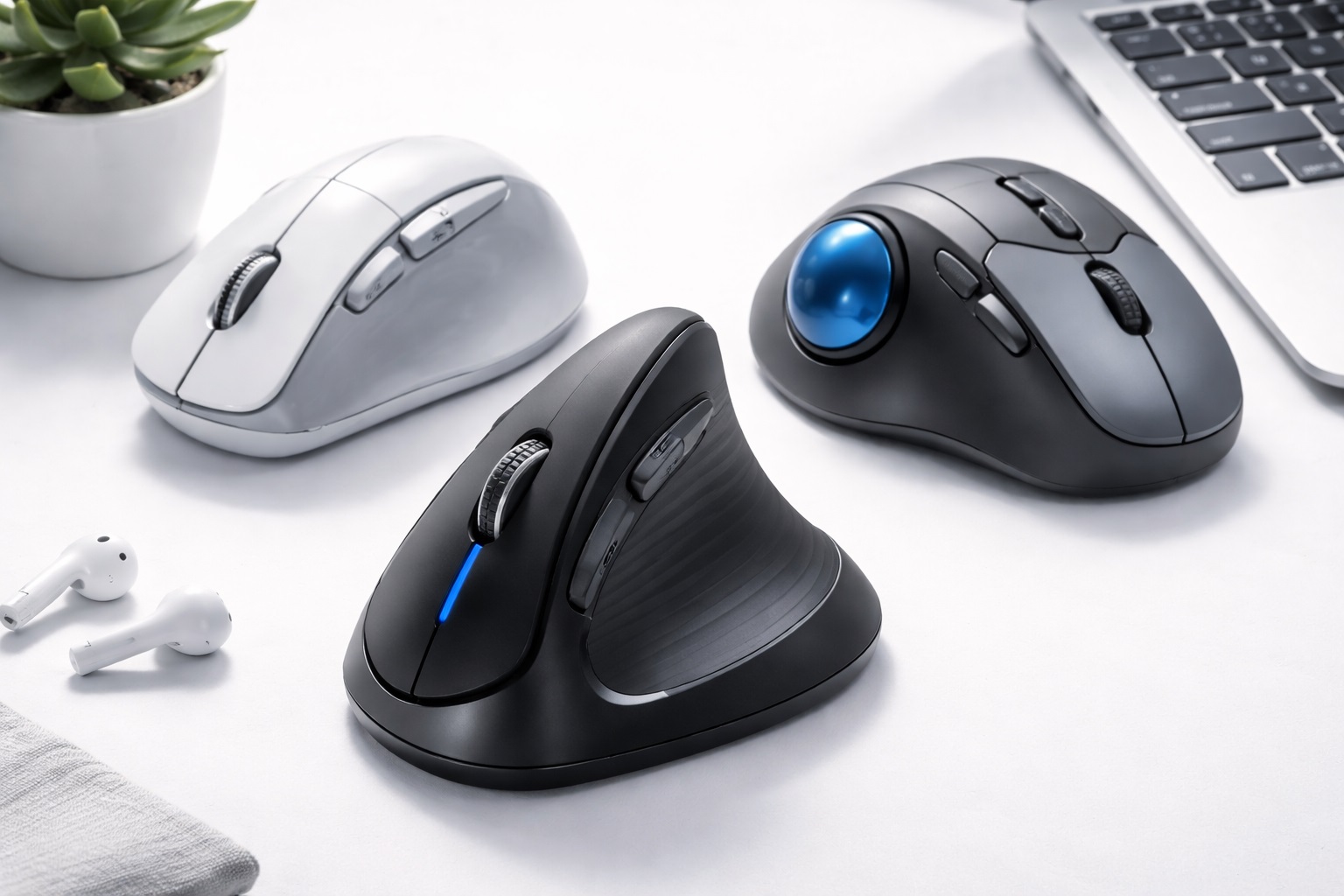
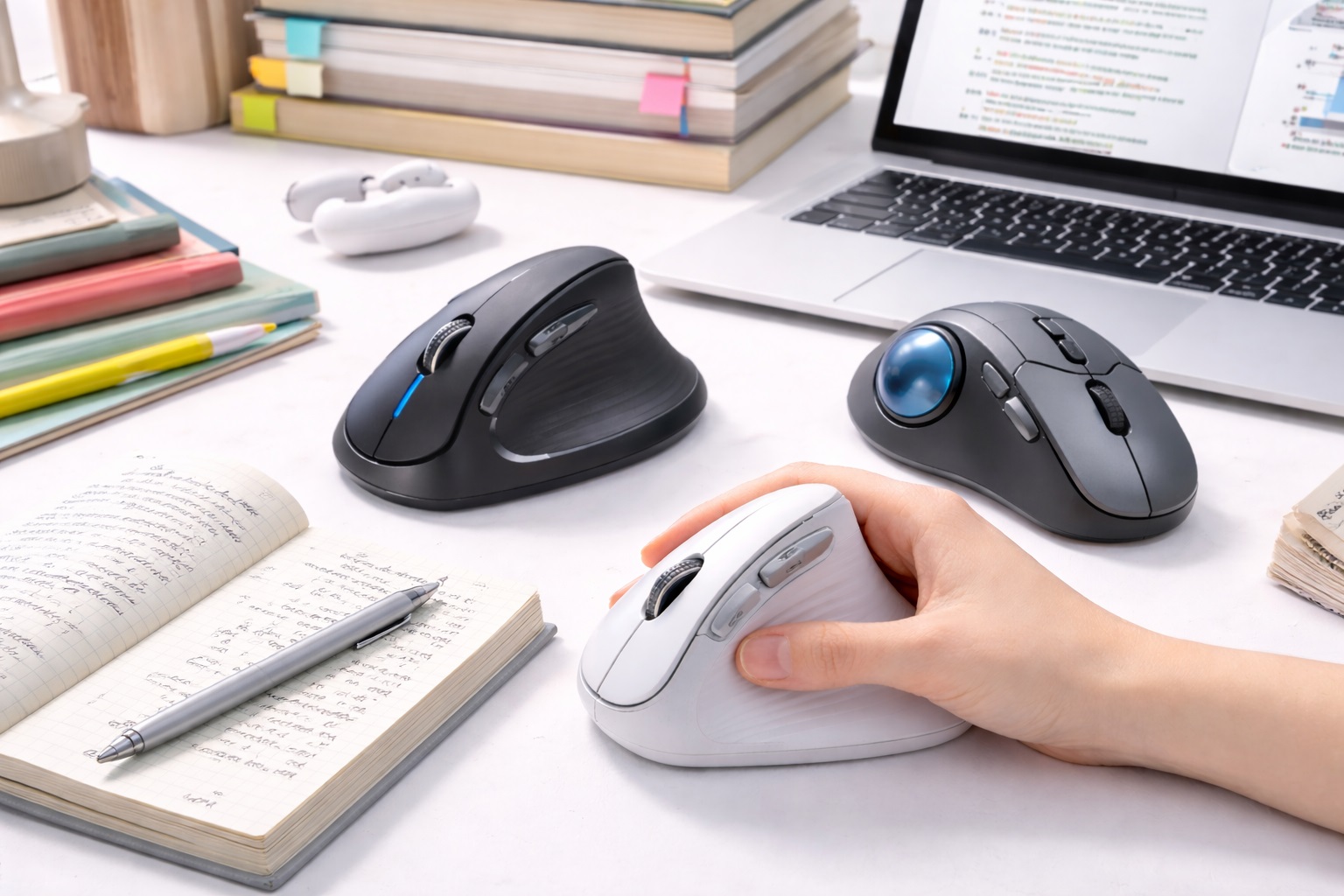
Vertical mice orient the hand in a handshake position — thumb up, palm facing inward — which places the forearm in its neutral position and eliminates the forearm rotation that flat mice require. This single change dramatically reduces the wrist pronation stress that causes repetitive strain injury in heavy computer users, which is exactly the kind of cumulative strain a multi-hour study session without breaks tends to produce. Most vertical mice include adjustable DPI and wireless connectivity, both useful for a student who might study across a dorm room, library, and coffee shop over the course of a week.
- Pros:
- Neutral forearm position reduces pronation stress
- Reduces wrist and forearm strain over time
- Adjustable DPI for different task sensitivities
- Available wired and wireless
- Cons:
- Right-handed only on most models
- Adjustment period of one to two weeks is common
Best For: Students experiencing early wrist or forearm discomfort from long study sessions, and preventative students who want to build good habits before any pain develops during years of continued heavy computer use.
Why We Recommend It: The vertical mouse is the most directly effective ergonomic mouse design for preventing and relieving forearm strain. Establishing this habit during school years, before strain has accumulated over a full career, gives students the easiest possible starting point for the adjustment period. Students who already notice mild tingling or soreness after a long paper-writing session are especially good candidates for the vertical design, since that early discomfort tends to worsen rather than resolve on its own if the underlying hand position doesn't change.
2. Trackball Mouse – Best for Marathon Study Sessions
Trackball mice keep the mouse body stationary — you move the cursor by rolling a ball with your thumb or fingers rather than moving the entire mouse. This virtually eliminates the repetitive arm and wrist movement that standard mice require, making them particularly valuable for users who need complete wrist stillness due to injury or severe RSI, and equally useful for students whose exam or essay deadlines produce unusually long, uninterrupted stretches at the computer. Because the mouse body stays in place, it also travels well in a backpack between a dorm room and a library carrel without needing extra desk space to set up wherever a student ends up studying.
- Pros:
- Near-zero wrist and arm movement required
- Mouse body stays stationary on desk
- Available in thumb-operated and finger-operated designs
- Precise control once the learning curve is mastered
- Cons:
- Steep learning curve for new users
- Trackball requires regular cleaning as dust accumulates
Best For: Students with existing wrist discomfort, severe RSI symptoms, or those who regularly pull all-nighters or long library sessions where hand movement adds up fastest.
Why We Recommend It: The trackball design offers the most wrist-stationary operation of any mouse type. For students whose study patterns include unusually long single sittings, no other mouse design reduces cumulative hand movement as effectively. The initial learning curve is a reasonable tradeoff considering how many total hours of use a full semester of heavy studying actually adds up to, and most students who commit to the adjustment period during a lighter week report the switch was worth it well before finals arrive.
3. Ergonomic Standard Mouse – Best Budget-Friendly Option for Students
Some mice take a less radical approach to ergonomics — using a contoured right-hand shape, elevated thumb rest, and angled grip that improves on a standard flat mouse without the full commitment of a vertical design. These represent a gentler ergonomic improvement that requires no adjustment period while still reducing strain compared to a generic flat mouse, and this category is also where student budgets tend to find the most accessible entry point into ergonomic design. For a student buying their first ergonomic mouse, the combination of low price and zero learning curve makes this the lowest-risk starting purchase.
- Pros:
- More comfortable than flat mice with minimal adjustment required
- Still compatible with standard mouse muscle memory
- Side thumb button support on most models
- Often available at more accessible prices
- Cons:
- Less ergonomic benefit than vertical or trackball alternatives
- Not suitable for left-handed users on most models
Best For: Students on a tighter budget who want meaningful comfort improvement without the cost or adjustment period of a fully vertical or trackball design.
Why We Recommend It: For students testing the idea of ergonomic support for the first time, an ergonomically shaped standard mouse offers real improvement with zero learning curve and no significant added cost over a typical standard mouse. It's a sensible first purchase for a student who wants to build the habit of using an ergonomic accessory without committing scholarship or part-time job earnings to a pricier option before knowing whether the habit sticks.
Buying Guide: How to Choose the Best Ergonomic Mouse for Students
Use these factors to match your purchase to your actual study habits and budget rather than defaulting to whichever mouse looks most impressive on a spec sheet.
1. Ergonomic Type (Vertical vs. Standard Contoured vs. Trackball)
Vertical mice put the forearm in a neutral position, reducing pronation. Standard contoured mice improve on flat mice with less dramatic hand angle change and virtually no learning curve. Trackballs eliminate arm movement entirely. Consider both your study habits and your current budget before choosing, since the most ergonomically effective option isn't always the cheapest one.
2. Budget Realities for Student Purchases
Ergonomic mice span a wide price range, and a student budget doesn't have to mean skipping ergonomic benefit entirely. Standard contoured designs typically sit at the more affordable end, while fully vertical and trackball designs often cost more. Weigh the added cost of the more advanced designs against how urgently your specific strain complaint needs addressing. If money is genuinely tight this semester, starting with the standard contoured option and upgrading later once you've confirmed the habit sticks is a perfectly reasonable approach rather than a compromise.
3. Portability Between Study Locations
Many students study across multiple locations in a single week — a dorm room, a library, a shared study space. A compact, wireless mouse that fits easily in a backpack pocket makes it realistic to bring your ergonomic mouse wherever you actually study, rather than leaving it behind and reverting to a laptop trackpad. A small carrying pouch or a dedicated backpack pocket also helps protect the mouse from the general wear and tear of being carried around campus daily.
4. Hand Orientation (Right vs. Ambidextrous)
Most ergonomic mice are right-hand specific. Left-handed students have fewer options — some vertical mice offer left-handed versions, and trackballs are often ambidextrous. Verify orientation compatibility before purchasing, as most ergonomic mouse designs don't work for left-handed use, and don't assume a listing supports left-handed use just because it isn't mentioned either way.
5. Size and Grip Match
Vertical mice specifically need to match hand size. A mouse that's too small forces the hand into an uncomfortable grip angle. A mouse that's too large strains the hand in the opposite direction. Check whether the manufacturer lists size recommendations and use them, since hand sizes vary significantly among students of different ages, and a mouse sized for an adult office worker may not be the ideal fit for every student's hand.
6. Learning Curve Expectation Around Exam Periods
Vertical mice require a one to two week adjustment period, during which control feels less precise than with a familiar flat mouse. Avoid starting this transition during exam week or right before a major deadline — a quieter stretch of the semester gives you room to adjust without added pressure. Early in a new semester, or right after a break, tends to be the easiest time to make the switch.
7. Wireless vs. Wired Ergonomic Mouse
Both wired and wireless ergonomic mice are available. Wireless removes the cable drag that affects mouse movement with some designs and is generally more convenient for students who move their setup between locations. Battery life on wireless ergonomic mice is typically 2 to 4 weeks per charge, which is more than enough to cover a normal week of classes without needing to think about charging mid-semester.
8. DPI Range for Everyday Precision
Adjustable DPI allows fine-tuning cursor sensitivity. For vertical mice, which may feel imprecise during adjustment, starting at lower DPI and increasing gradually helps calibrate to the new form factor. Most students settle between 1000 and 2000 DPI for general study use, which comfortably covers browsing, note-taking, and document editing. There's rarely a need to chase higher DPI figures marketed toward gaming mice for typical academic work.
9. Thumb Rest Design
Vertical mice support the thumb against a rest rather than using it for scrolling. The angle and height of this rest affects grip comfort significantly. Check whether the thumb rest suits your thumb length, since a poor match becomes more noticeable across the several-hour sessions that studying often demands, particularly during exam periods when single sessions stretch even longer than usual.
10. Scroll Wheel Position
On a vertical mouse, the scroll wheel is angled sideways compared to a flat mouse. Most students adapt to this quickly. Ensure the scroll wheel position falls naturally under your index finger, since scrolling through long readings and lecture slides is one of the most frequent actions during study sessions and any awkwardness here compounds quickly across a busy reading week.
11. Durability for Daily, Heavy Use
A mouse used for hours of daily studying across an entire semester or academic year experiences more cumulative use than a typical casual mouse. Look for models with a stated click-durability rating or a track record of reliability in reviews, since a mouse that wears out mid-semester is an avoidable interruption to your routine, and replacing it mid-term is an added cost most students would rather avoid.
12. Return Policy for Ergonomic Mice
Ergonomic mice have a higher return rate than standard mice because hand fit is difficult to evaluate without physically holding the device. Purchasing from a retailer with a 30-day return window gives you sufficient time to evaluate whether the design genuinely suits your hand and study habits.
13. Building the Habit Beyond Just the Mouse
An ergonomic mouse works best alongside reasonable study breaks and a properly positioned chair and monitor. If you find yourself studying for many hours without moving, consider pairing the ergonomic mouse switch with a habit of standing or stretching briefly every hour, since the mouse alone won't fully offset a complete lack of breaks.
14. Shared Housing and Multiple Users
Students in shared housing sometimes lend or share a mouse between roommates for group projects or shared computers. A right-hand-specific vertical mouse can be awkward for a left-handed roommate, so an ambidextrous trackball or a standard contoured mouse may be the more practical shared-use choice if the accessory needs to work for more than one person's hand.
15. Warranty and Campus Bookstore Return Policies
Campus bookstores and student-focused retailers sometimes have shorter or different return policies than general electronics retailers. Check the specific return window before buying through a campus store, and keep a copy of your receipt in an easily findable place during the semester in case you need it later.
16. Balancing Ergonomics With Note-Taking Software Habits
Some ergonomic mice support programmable buttons that can be mapped to common note-taking or citation-manager shortcuts. If your study workflow relies heavily on specific software shortcuts, check whether the mouse's companion software supports custom button mapping, since this can meaningfully speed up repetitive tasks like adding citations or switching between reference tabs.
17. Recognizing Early Warning Signs Worth Acting On
Tingling in the fingers, a dull ache across the top of the wrist after a long session, or a habit of shaking out your hand periodically while studying are all early signs worth paying attention to. None of these on their own mean something is seriously wrong, but they're a reasonable prompt to reconsider your current mouse setup rather than waiting for the discomfort to become a daily occurrence. Catching these signals early is exactly the situation where switching to a vertical or trackball design tends to make the biggest difference, since the underlying strain hasn't had time to become deeply established yet.
18. Setting Up the Rest of Your Study Station
An ergonomic mouse works best as part of a broader setup rather than in isolation. Chair height that lets your feet rest flat, a monitor or laptop screen positioned at eye level, and a keyboard at a height that keeps your wrists roughly neutral all compound with a good mouse choice to meaningfully reduce overall strain. Students working primarily from a laptop screen propped on a stack of books, paired with an external keyboard and ergonomic mouse, often get closer to a genuinely ergonomic setup than they expect without needing to buy an expensive standing desk or monitor arm.
19. Cleaning and Hygiene for Shared Study Spaces
A mouse carried between a dorm room, library, and shared study room picks up more general grime than one that stays on a single home desk, and trackball designs in particular need periodic cleaning around the ball to keep tracking smooth. Wiping the mouse down with a disinfecting wipe between study locations is a small habit worth building, especially during exam periods when shared study spaces see heavier use from more people.
20. Noise Consideration in Quiet Libraries
Standard mouse clicks are rarely loud enough to bother anyone, but in a genuinely silent library reading room, a mouse with a quieter click mechanism can be a small courtesy worth considering. Some ergonomic mice, particularly in the standard contoured and vertical categories, offer a quieter click option specifically marketed for this kind of noise-sensitive environment.
Frequently Asked Questions
1. How long does it take to adjust to a vertical ergonomic mouse as a student?
Most users need one to two weeks to feel as comfortable with a vertical mouse as with their previous flat mouse. Starting the adjustment during a lighter part of the semester, rather than right before exams, makes the transition smoother and less stressful overall.
2. Is a vertical ergonomic mouse better than a trackball for studying?
Both address different aspects of ergonomics. Vertical mice reduce forearm pronation significantly. Trackballs eliminate arm movement entirely by keeping the mouse body stationary, which particularly suits students with unusually long single study sessions. For general daily studying, either works well depending on your specific complaint and how much desk space you have available in your dorm or apartment.
3. Can left-handed students find a good ergonomic mouse?
Most vertical ergonomic mice are right-hand specific by design. Left-handed students have more limited options. Some manufacturers offer specific left-handed vertical models, and trackball mice are often ambidextrous, giving left-handed students a more flexible starting point than the vertical category alone would provide.
4. Does an ergonomic mouse actually help with carpal tunnel syndrome?
Ergonomic mice can reduce the forearm pronation and repetitive movements that contribute to carpal tunnel syndrome. They're not a medical treatment and should be used alongside medical advice for existing conditions. For prevention, early adoption during school years reduces cumulative strain significantly over time, well before symptoms would otherwise appear later in a career.
5. What's the most budget-friendly ergonomic option for a student?
A contoured standard ergonomic mouse is generally the most affordable entry point, offering meaningful comfort improvement over a flat mouse without the higher price often attached to fully vertical or trackball designs. Watching for seasonal sales around the start of a semester can also lower the cost of a vertical or trackball model if budget allows for some flexibility.
6. Can I use an ergonomic mouse for gaming between study sessions?
Vertical mice are less commonly used for gaming because the hand position doesn't suit the rapid directional changes competitive gaming requires. For casual gaming between study sessions, a vertical mouse works adequately, though dedicated gaming mice remain the better choice for competitive play if gaming performance is a genuine priority alongside studying.
7. Is the most expensive ergonomic mouse always the best for students?
Not necessarily. Higher price often means more features, but many mid-range and budget options offer excellent comfort for everyday studying. Focus on the features that matter most for your specific study habits and complaint.
8. How long should a quality ergonomic mouse last through school?
A well-built product from a reputable brand typically lasts two to five years or longer with reasonable care, which comfortably covers most degree programs. Always check warranty terms as a quality indicator, particularly since a multi-year warranty can outlast the length of your program and provide peace of mind through graduation.
9. Can I return an ergonomic mouse if it doesn't suit me?
Most retailers offer a 15 to 30 day return window. Keep the original packaging during your evaluation period so you have the option to return it if the design doesn't fit your hand or study routine, and test it across at least one genuinely long study session before deciding.
10. What is the best ergonomic mouse for students who study for long hours?
The best choice depends on your specific priorities and budget. Review the buying guide factors above and match each option to your most important requirement — cost, portability, or maximum strain reduction — rather than assuming one single model is universally the right answer for every student.
11. Does brand name matter when choosing a student ergonomic mouse?
Established brands generally offer better quality control, customer support, and warranty reliability. However, newer and budget-focused brands sometimes offer excellent value for students — read verified reviews carefully before purchasing, paying particular attention to reviews from other students or long-session users rather than casual buyers alone.
12. Should I buy an ergonomic mouse before or after symptoms start?
Before, if at all possible. Making the switch preventatively means there's no existing discomfort complicating the adjustment period, and the transition tends to go more smoothly than switching after weeks or months of accumulated strain have already made typing and clicking uncomfortable.
13. Is it worth asking for an ergonomic mouse as a gift?
Yes — an ergonomic mouse is a practical, relatively low-cost request that addresses a genuine long-term health concern rather than a purely aesthetic upgrade. Family members are often receptive to a specific, well-explained request like this around gift-giving occasions tied to the start of a school term.
14. Should I bring my ergonomic mouse to in-class exams or testing centers?
Check your specific institution's testing center policy first, since some computer-based exam environments restrict personal peripherals for security reasons. For regular class laptop use and take-home assignments, bringing your own ergonomic mouse is almost always fine and often more comfortable than whatever trackpad or shared equipment might otherwise be available.
15. Can I use my ergonomic mouse with a tablet for reading-heavy classes?
Many wireless ergonomic mice pair with tablets over Bluetooth just as they do with a laptop, which can make annotating readings or navigating a PDF noticeably easier than using touch input alone for extended reading sessions. Check the specific mouse's compatibility with your tablet's operating system before assuming full functionality, since some advanced buttons may require companion software that isn't available on every platform.
Final Verdict
- Best Overall for Long Study Sessions: Vertical Ergonomic Mouse – The most direct, lasting solution for wrist and forearm strain built up over a semester.
- Best for Marathon Study Sessions: Trackball Mouse – Maximum strain reduction for the longest, most demanding study stretches.
- Best Budget-Friendly Option: Ergonomic Standard Mouse – The lowest-cost, zero-learning-curve entry point into better habits.
The right ergonomic mouse for a student depends on budget, study habits, and how urgently any current discomfort needs addressing. Starting good habits now, while the adjustment is easiest, pays off across years of continued computer use well beyond graduation. Whichever category fits your situation, the habit of paying attention to wrist and hand comfort during long study sessions is worth building early, since it's far easier to maintain a good habit from the start than to correct years of strain later in a career that will likely involve just as much time at a keyboard.