Best Monitor Arms for Students: Healthier Posture Through Every Semester
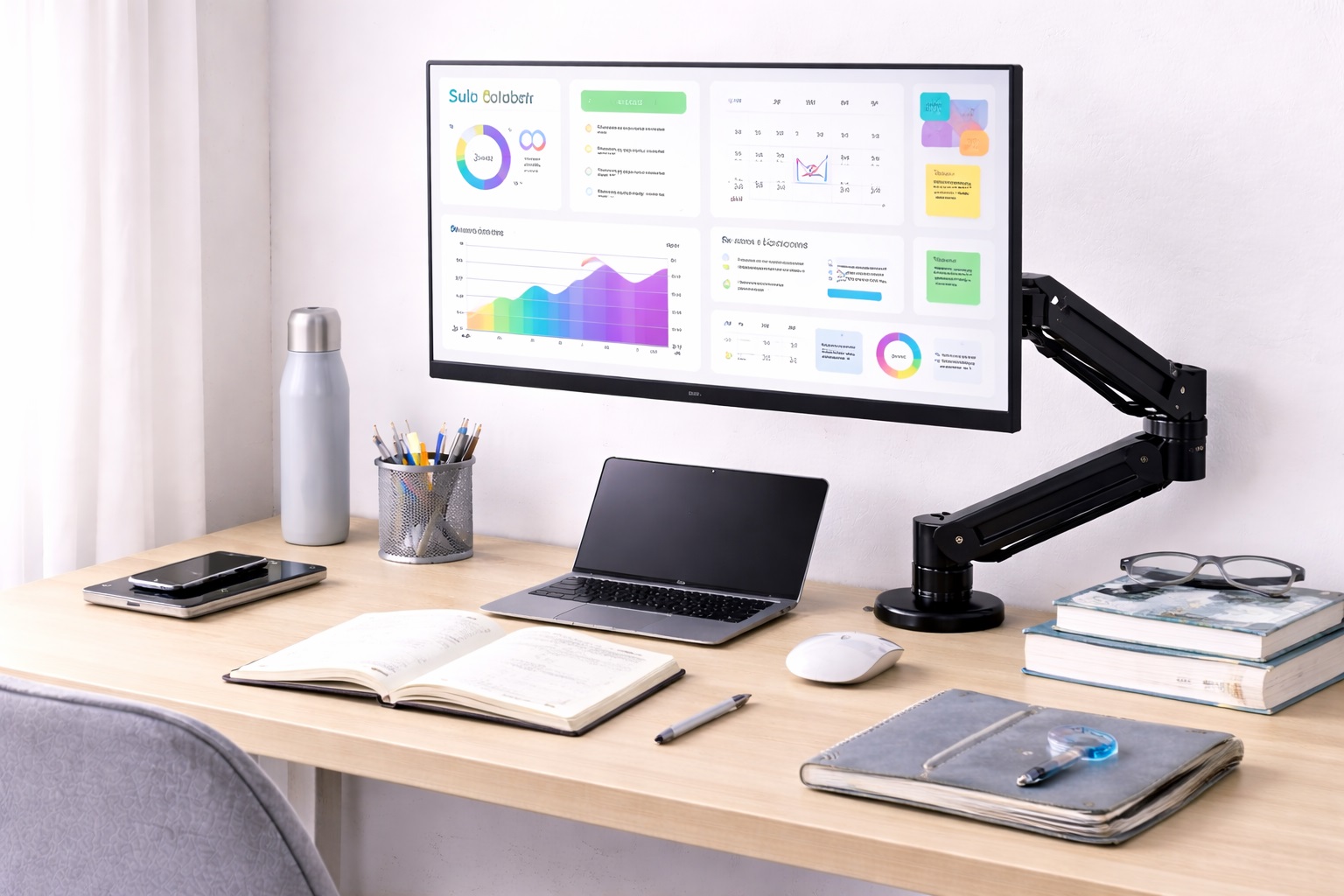
A student desk carries a heavier workload than most people realize until they actually try to fit everything on it — a laptop, an external monitor, textbooks, notebooks, and whatever else a given semester requires. Add a bulky monitor stand taking up several inches of depth right at the point where elbows and forearms need room to work, and the desk starts feeling cramped well before the semester gets busy. A monitor arm solves the space problem directly while also fixing the more overlooked issue: a monitor sitting at whatever height its stand happened to place it, rather than at a height that actually protects the neck and shoulders during long study sessions.
The effect compounds over the course of a semester in a way that's easy to underestimate at the start. A minor postural strain that feels negligible during the first week of classes tends to build into genuine discomfort by midterms, particularly for students spending long stretches of time coding, writing papers, or attending online lectures back to back. A monitor arm addresses the root cause early rather than leaving it to accumulate across weeks of daily desk time.
Students face a specific version of the usual monitor arm buying decision, shaped by two constraints that don't apply equally to every buyer: budget and housing. Many students are working with a tighter budget than a typical home office professional, and many are living in dorms or rented apartments where drilling into a desk isn't an option regardless of preference. Both constraints point toward specific styles and mounting methods rather than ruling out monitor arms altogether.
A third, less obvious constraint is uncertainty about how long a particular setup will actually be used. A dorm assignment might last a single year, a shared apartment lease might run for nine months, and a course of study itself might shift focus from single-monitor work to a dual-screen coding or design workflow partway through. Choosing an arm flexible enough to adapt to at least some of that uncertainty tends to be a better long-term decision than optimizing narrowly for the exact setup in place on move-in day, since replacing an arm after only a year rarely feels like a good use of a tight budget.
This guide walks through the monitor arm and stand options that work well within those constraints, compares what each one offers for the money, and covers the buying factors that matter most for a student desk specifically.
It's worth thinking about the monitor arm as an investment that spans an entire degree program rather than a single semester. A well-chosen arm from a reasonable brand can move between dorm rooms, apartments, and eventually a first post-graduation desk without needing to be replaced, which changes the math on spending slightly more upfront compared to buying the cheapest possible option and potentially replacing it partway through school. That first post-graduation desk is often the same arm's final destination, making the purchase a genuinely multi-year one rather than a disposable dorm accessory.
Housing restrictions are the detail most general monitor arm buying guides skip entirely, since they're written with a homeowner or long-term renter in mind rather than someone moving between a dorm, a summer sublet, and a new apartment every year or two. That difference shapes several of the recommendations in this guide more than it would for a typical home office buyer, and it's worth keeping in mind while comparing any general monitor arm advice found elsewhere.
Top 4 Monitor Arms for Students (Detailed Reviews)
Each of the picks below addresses a different combination of budget and use case, from the most affordable way to improve monitor height to a full dual-arm setup for coding or research-heavy coursework. Matching the pick to actual study habits and housing situation matters more than assuming the priciest option is automatically the right one for a student budget. A first-year student in a shared dorm room has very different requirements from a graduate student with a private apartment and a dedicated study corner, and the right pick reflects that difference.
1. Gas Spring Monitor Arm at Student Pricing – Best Overall for Students
A gas spring monitor arm at an accessible price point still delivers the core benefit that makes this category worthwhile — correct screen height, desk space freed from a bulky stand, and effortless one-finger repositioning. Models from established brands in a moderate, student-friendly price range provide dependable gas spring performance and typically support monitors in the common 22 to 27-inch range that most students use for external displays.
For anyone spending several hours a day at a desk for classes, coding, or writing, the height correction alone tends to be the most immediately noticeable benefit. A monitor raised to proper eye level reduces the forward neck lean that builds up gradually during long study sessions, and unlike many ergonomic recommendations, the improvement is felt within the first few days of use rather than requiring weeks to notice.
Because this style typically supports the full range of tilt, swivel, and height adjustment found on pricier arms, a student doesn't have to sacrifice much functional range for the more accessible price point. The main difference from a premium arm tends to show up gradually, in how the gas spring performs after a few years of daily adjustment, rather than in the day-to-day experience of using it.
Reading a handful of verified reviews from other students or long-term buyers, rather than relying only on the initial product description, is a reasonable way to gauge how a specific model tends to hold up over a semester or two of daily repositioning. This extra step of diligence pays off more at this price tier than it would for a premium arm with a more established reputation.
- Pros:
- Frees desk space previously occupied by a bulky monitor stand
- Correct screen height reduces neck and shoulder strain
- Gas spring adjustment requires no tools once installed
- Supports most common external monitor sizes
- Cons:
- Budget-tier gas springs may lose some smoothness after a few years of heavy use
- C-clamp fit may not suit every desk edge type
Best For: Students setting up a home or dorm study space who want a genuine ergonomic upgrade without a significant financial commitment.
Why We Recommend It: The posture and desk-space benefit pays off quickly for anyone spending long daily hours at a desk, and it remains the single most impactful upgrade available within a typical student budget across an entire academic year.
2. C-Clamp Arm for Dorm and Rental Desks – Best for No-Damage Installation
A C-clamp monitor arm attaches to the desk edge without drilling, which matters enormously for students in dorms or rental apartments where modifying furniture isn't allowed under lease or housing terms. Installation typically takes well under half an hour, and removing the arm at the end of a lease or when moving out leaves the desk exactly as it was found.
Beyond the practical housing benefit, this style is also the easiest to relocate between semesters or apartments, since the entire setup packs down to just the arm itself with no permanent hardware left behind on any desk. For students who move at least once a year, this portability is worth as much as the ergonomic benefit itself.
Most C-clamp arms in this category tighten with a hex key rather than requiring specialized tools, which matters for a demographic that may not have a full toolbox on hand. The included hardware typically covers everything needed for a complete installation without a trip to a hardware store first.
For a roommate situation, this style also avoids any awkward conversation about permanently altering shared furniture, since the entire installation and removal process is reversible in minutes. That reversibility extends naturally to end-of-lease inspections as well, where a desk showing no signs of modification is simply one less thing to worry about at move-out time.
- Pros:
- No drilling — fully compliant with typical dorm and rental restrictions
- Quick to install, remove, and relocate between moves
- Leaves no lasting mark on the desk after removal
- Suitable for most standard desk edge thicknesses
- Cons:
- May not fit unusually thick or thin desk edges common in some furnished housing
- Slightly less rigid than a grommet-mounted arm under a heavier monitor
Best For: Students in dorms, shared housing, or rental apartments who need a mounting method that fully complies with housing restrictions.
Why We Recommend It: The no-drill mounting method removes any risk of violating a lease or dorm policy, making this the safest and most portable option for the housing situations most students actually live in during school.
3. Height-Adjustable Monitor Stand – Best Budget-Friendly Starting Point
For students working with the tightest possible budget, a height-adjustable monitor stand offers a lower-cost path to better screen positioning without the cost of a full articulating arm. These stands raise the monitor and often add some tilt adjustment, meaningfully improving on a basic fixed stand even though they don't reclaim desk space the way an arm does.
This option makes the most sense as a stepping stone rather than a permanent solution — it solves the height problem immediately and affordably, while leaving the door open to upgrade to a full monitor arm later once budget allows, without having wasted money on a stand that becomes obsolete the moment an arm is purchased, since many stands remain useful as extra storage or a laptop riser afterward.
Because there's nothing to mount or attach to the desk itself, this option also works regardless of desk edge thickness, dorm furniture restrictions, or whether drilling is permitted at all. It's the one option on this list that sidesteps every housing-related constraint entirely, simply by not requiring any attachment to the desk in the first place.
Some models in this category also include a small drawer or tray built into the base, adding a bit of organized storage directly under the monitor for pens, a phone, or small accessories. On an already crowded student desk, that incidental storage can be nearly as useful as the height improvement itself, particularly in a room without much other storage space to spare.
- Pros:
- The most affordable way to improve monitor height
- No installation beyond placing the stand on the desk
- Works with virtually any monitor regardless of VESA compatibility
- Some models add useful under-monitor storage space
- Cons:
- Does not adjust as flexibly as a full articulating arm
- Doesn't reclaim the desk footprint the way an arm does
Best For: Students on the tightest possible budget who need an immediate height improvement and can consider a full arm later.
Why We Recommend It: Even a modest height improvement over a flat, fixed-height desk setup meaningfully reduces neck strain during long study sessions, and this option delivers that benefit at the lowest possible cost to a tight student budget.
4. Dual Monitor Arm for Coding and Research – Best for Two-Screen Study Setups
Students who work across two monitors — code on one screen with documentation on the other, or source material on one screen with a paper draft on the other — benefit significantly from a dual monitor arm that positions both screens independently at the correct height and angle. This setup transforms a two-monitor study or coding workflow that would otherwise consume most of the desk into an organized, space-efficient arrangement.
Computer science students in particular tend to accumulate a second monitor early, whether for running code alongside documentation or for testing across multiple windows simultaneously, and a dual arm addresses the resulting desk clutter directly rather than leaving two separate stands competing for the same limited space.
Weight matching between the two monitors matters more here than with a single arm, since an uneven pairing — a larger primary display alongside a smaller secondary one — can make balanced adjustment slightly trickier. Checking that both monitors fall comfortably within the arm's stated capacity on each side avoids one screen drifting more than the other after installation.
For students inheriting a second, older monitor from a previous laptop setup or a family hand-me-down, this weight check is especially worth doing, since older monitors sometimes weigh more than their screen size would suggest compared to newer, lighter panels built with more modern materials.
- Pros:
- Two screens adjusted independently for optimal individual positioning
- Removes both monitor stands, reclaiming significant desk space
- Well suited to coding, writing, and multi-source research workflows
- Creates a more organized, professional-looking study space
- Cons:
- Higher upfront cost than a single monitor arm
- Heavier overall assembly requires a solid desk edge or grommet mounting point
Best For: Computer science students, research-heavy majors, and anyone who regularly works across two monitors at once.
Why We Recommend It: For a genuine two-monitor workflow, the desk space reclaimed by consolidating both stands into one mounting point is worth the higher upfront cost, particularly in a typically compact student desk setup with limited surface area to spare.
Buying Guide: How to Choose the Best Monitor Arm for Students
Student housing situations and budgets vary widely, so a few factors matter more here than they would for a typical home office buyer with more space and a bigger budget to work with. Working through them roughly in order tends to filter out unsuitable options quickly before comparing specific product listings against each other.
1. Student Budget Priorities
A monitor arm from an established brand at a moderate, student-accessible price point generally provides more reliable ergonomic benefit than the very cheapest unbranded options, where gas spring quality control tends to be inconsistent. A slightly higher budget within reason buys meaningfully better long-term reliability, which matters over a multi-year degree program.
2. Rental and Dorm Compatibility
Students living in a rented apartment or dorm should favor a C-clamp arm that attaches without drilling, since grommet mounts require a hole in the desk that may violate lease or housing terms entirely. Checking housing rules before ordering avoids a costly mismatch and a possible security deposit issue later.
3. VESA Compatibility
Check the monitor's back panel for a VESA mounting pattern, most commonly a square of four threaded holes spaced 75mm or 100mm apart. Most external monitors support this, though some ultra-thin or all-in-one displays do not, which would rule out a standard arm entirely.
4. Desk Stability
A monitor arm is only as stable as the desk it mounts to. A wobbly or flimsy dorm-issued desk can undermine even a high-quality arm's stability, so testing the desk's own sturdiness before investing in an arm is a reasonable first step before spending any money.
5. Height Range for the Setup
Verify the arm's minimum and maximum height accommodates seated eye level on the specific desk and chair being used. Taller students in particular should check a budget arm's upper height limit carefully before assuming it will reach comfortably to the correct level.
6. Weight Limit for the Monitor
Budget arms typically support a moderate weight range that covers most common external monitor sizes. Checking the monitor's actual weight, listed in its specifications, against the arm's rated capacity avoids overloading a lighter-duty mechanism meant for smaller screens.
7. Assembly Complexity
Student-oriented arms typically include all necessary tools and assemble within about thirty minutes. Reading reviews that specifically mention assembly instruction clarity helps avoid a frustrating setup experience during an already busy week of classes.
8. Desk Space Recovery
Removing a monitor stand in favor of an arm typically frees up meaningful desk depth — often enough for notebooks, a second device, or simply more elbow room, which matters considerably on the smaller desks common in dorms and student apartments specifically.
9. Cable Management
Even basic cable clips along the arm help contain monitor power and video cables, which matters more in a small dorm room where visible cable clutter affects how organized the whole space feels to a roommate or visitor.
10. Portability Between Moves
Students who move at least once a year should favor arms that are easy to uninstall and pack, since a mounting method that's difficult to remove becomes a hassle at the end of every lease or semester move-out.
11. Longevity and Warranty
At a student price point, a reasonable warranty length is worth checking before buying, since an arm that fails partway through a semester is a false economy regardless of how little it cost upfront to begin with.
12. Shared Room Considerations
Students sharing a room or desk space should consider whether the arm's footprint and reach work within a shared setup, and whether a no-drill mounting method is preferable to avoid affecting a roommate's side of a shared desk or furniture arrangement.
Frequently Asked Questions
1. Is a monitor arm actually worth it for a student?
Yes, particularly for students spending long hours at a desk for classes, coding, or writing. Correct monitor height reduces neck and upper back strain, and the desk space recovered from removing a bulky stand is a meaningful practical benefit in typically small student workspaces where every inch counts.
2. Can I use a monitor arm in a dorm room?
Yes. C-clamp monitor arms attach to the desk edge without any drilling or permanent modification. Checking that the desk edge is thick enough and reasonably flat before ordering avoids a mismatched clamp fit once the arm actually arrives.
3. What's the minimum reasonable budget for a decent monitor arm?
A modest budget from a recognized brand typically buys a functional arm with reliable gas spring performance for monitors up to around 24 inches. Going significantly below that range tends to introduce more inconsistent quality control and less reliable gas spring performance over time.
4. Is the most expensive monitor arm for students always the best choice?
Not necessarily. A higher price often reflects more features or premium materials, but many mid-range options perform just as well for typical student needs. Matching the arm to actual daily use matters more than defaulting to the highest price available on a listing page.
5. How long should a quality monitor arm for students last?
A well-built arm from a reputable manufacturer typically lasts several years of regular use with reasonable care, comfortably outlasting a typical degree program. Warranty length is a useful proxy for the manufacturer's own confidence in durability at that price point.
6. Can I return a monitor arm if it doesn't suit my dorm setup?
Most retailers offer a standard return window, commonly two to four weeks. Keeping the original packaging during the evaluation period preserves that option if the clamp doesn't fit the desk or the arm doesn't suit the space as expected once tested.
7. What should I prioritize when choosing a monitor arm as a student?
Starting with actual housing restrictions, budget, and daily study habits helps match the arm's features to real needs rather than chasing maximum specifications that a typical student setup won't fully use anyway.
8. Does brand name matter when buying a monitor arm on a student budget?
Established brands typically offer more consistent quality control and more reliable warranty support even at accessible price points. Newer or lesser-known brands can still offer good value, so reading verified reviews carefully is worth the extra few minutes before ordering.
9. Should I buy a monitor arm before or after choosing my external monitor?
Choosing the monitor first is generally more effective, since the arm needs to match the monitor's actual weight and VESA pattern rather than the other way around. Buying both together without confirming compatibility risks an avoidable mismatch and a return.
10. Can a monitor arm help with online classes specifically?
Yes. Positioning the monitor at the correct height also tends to improve webcam angle for video-based classes and meetings, in addition to the general posture benefit during lectures, coding sessions, or extended reading assignments.
11. Is a height-adjustable stand a reasonable substitute for a full monitor arm?
For a tighter budget, yes — it solves the core height problem, even though it doesn't reclaim desk space the way a full arm does. It's a reasonable stepping stone for students planning to upgrade to a full arm later in their studies once finances allow.
12. Will a monitor arm fit a standard dorm-issued desk?
Most C-clamp arms fit standard flat desk edges without issue, but dorm-issued desks vary in thickness and edge shape more than typical retail desks. Measuring the actual desk edge before ordering avoids a frustrating mismatch once move-in day arrives and the arm needs to go up quickly.
Final Verdict
The four picks below reflect the most common combinations of budget, housing, and study needs students actually face.
- Best Overall for Students: Gas Spring Monitor Arm at Student Pricing – the strongest ergonomic investment within a typical student budget for daily desk use.
- Best for No-Damage Installation: C-Clamp Arm for Dorm and Rental Desks – the fully lease-compliant, portable choice for shared and rented student housing.
- Best Budget-Friendly Starting Point: Height-Adjustable Monitor Stand – the lowest-cost way to improve screen height immediately without any installation.
- Best for Two-Screen Study Setups: Dual Monitor Arm for Coding and Research – the productivity upgrade for coding and research-heavy coursework and thesis work.
The right monitor arm for a student depends on the combination of budget, housing situation, and how many screens a given course of study actually requires. A gas spring arm at a reasonable price covers most single-monitor needs well, while housing restrictions push clearly toward a no-drill mounting method regardless of which style is chosen. Working through the buying guide factors above against an actual dorm or apartment setup narrows the decision down quickly and avoids spending money on features that a specific living situation won't ever use.
A monitor arm is one of the few desk upgrades that pays off across an entire degree program rather than a single semester, provided it's chosen with actual housing and budget constraints in mind from the start. Spending a bit more time comparing the options above against a specific dorm room or apartment desk, rather than buying whichever arm appears first in a search, is what turns a modest purchase into years of genuinely better posture and a more organized workspace.