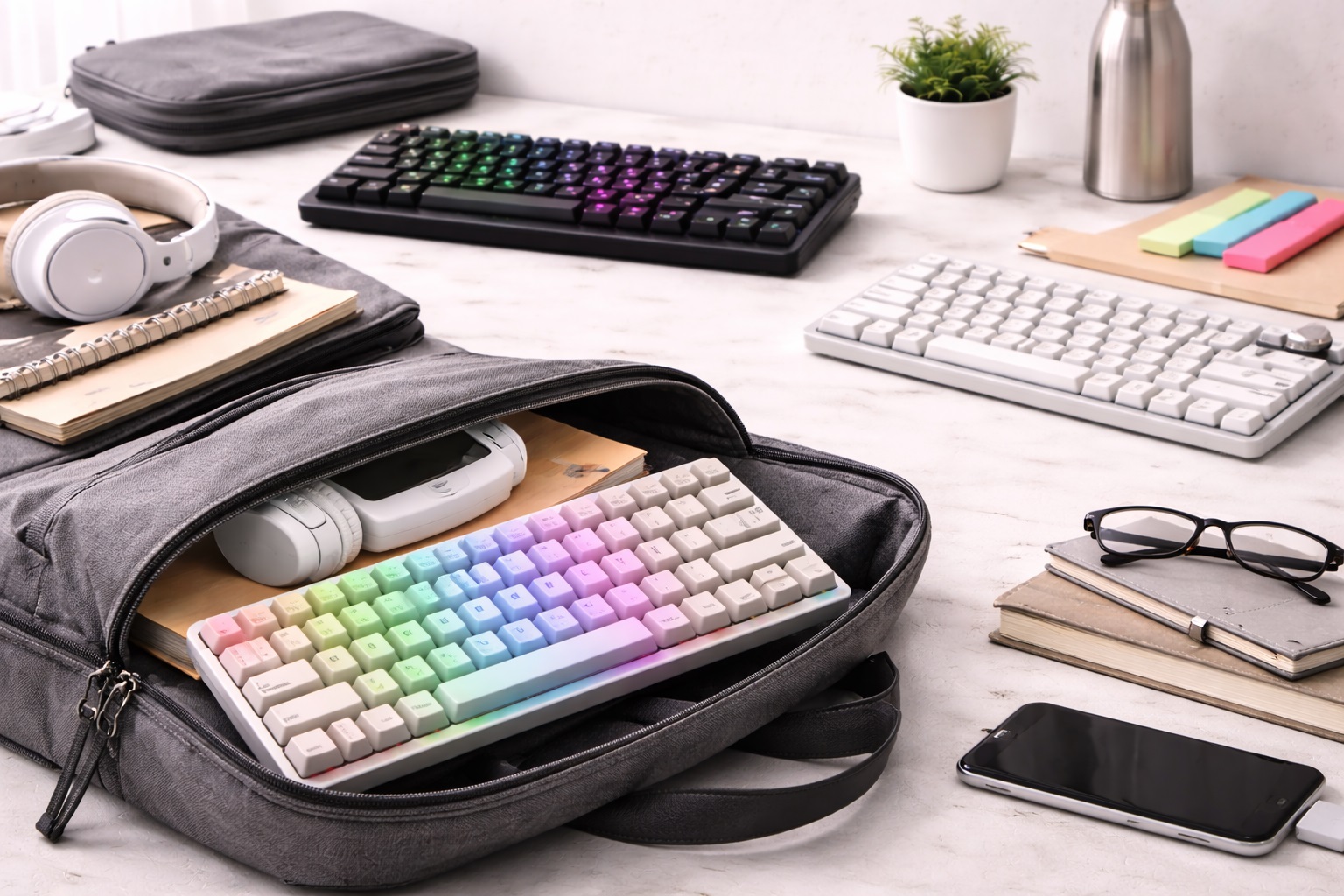
Best Keyboards for Students: Fast, Durable & Backpack-Ready
A keyboard is one of the few pieces of gear a student touches every single day, yet it's usually the last thing anyone thinks to upgrade. Between typing essays at 1 a.m., running problem sets in a code editor, and taking rapid-fire notes during a lecture, the keys under your fingers get more use than almost anything else in a dorm room or shared apartment. A keyboard that feels sluggish, sounds like a typewriter, or falls apart after one semester of being shoved in a backpack isn't just an annoyance — it slows down the work itself, and it does so at the exact moments when speed and comfort matter most, like the night before a paper is due, when every extra second spent fighting the keyboard instead of the assignment feels disproportionately frustrating.
Students have a narrower set of priorities than the average shopper browsing a general electronics aisle. Budget matters more when every purchase competes with textbooks, food, and rent. Desk space is usually smaller in a dorm room or a shared apartment bedroom than in a private home office. Roommates or library neighbors genuinely care about noise in a way that a solo remote worker in their own house doesn't have to think about. And the keyboard itself often needs to survive being carried between a dorm, a lecture hall, a group study room, and a coffee shop, sometimes multiple times in a single day.
A keyboard built primarily for gaming, with flashy per-key lighting and a bulky wrist rest, isn't necessarily the right fit for someone whose primary use case is writing papers and running code. Neither is the cheapest membrane board that came bundled with a desktop computer years ago and has been passed down through a family. The right choice sits somewhere in between, shaped by how much you type, how quiet your environment needs to be, and how much abuse the keyboard needs to tolerate over a semester or a full degree.
This guide breaks down the keyboard types that actually make sense for students who type extensively for assignments, coding, and note-taking, with an honest look at where each option shines and where it falls short. Rather than pushing one universal "best" answer, it matches keyboard types to the situations students actually deal with day to day — shared living spaces, tight budgets, long study sessions that stretch past midnight, and the frequent transport that comes with moving between classes, the library, and home.
Top 3 Keyboards for Students (Detailed Reviews)
Wireless Mechanical Keyboard – Best For Serious Typing and Coding
A wireless mechanical keyboard pairs individual mechanical switches under every key with Bluetooth or 2.4GHz wireless connectivity, removing the cable clutter that makes small dorm desks feel even smaller than they already are. Mechanical switches are rated for roughly 50 to 100 million keystrokes per key, which for a student typing thousands of words a week across a full degree translates into a keyboard that can realistically outlast the years spent using it, rather than needing replacement halfway through. Most current wireless mechanical boards charge over USB-C and can pair with more than one device at once, so switching between a laptop for writing and a tablet for reading research doesn't require unplugging or repairing anything each time.
- Pros:
- Tactile, responsive feedback that makes long writing and coding sessions noticeably less fatiguing on the fingers
- Wireless pairing keeps a shared or cramped desk free of extra cables running to a laptop
- Switch lifespan comfortably covers multiple years of daily academic use without wearing out
- Multi-device pairing simplifies moving between a laptop, tablet, or secondary device
- Cons:
- Higher upfront cost than a basic membrane keyboard, which matters on a tight student budget
- Audible key sound can be a genuine problem in a shared dorm room or a quiet library setting
Best For: Students who type heavily for coursework or code regularly and want a keyboard that will still feel good to use in their final semester, not just their first week of freshman year.
Why We Recommend It: For anyone whose workload involves sustained typing — essays, lab reports, problem sets, or programming assignments — the combination of durability and tactile feedback pays off across a full academic term, even if the initial price is somewhat higher than a basic membrane option would cost upfront.
Silent Membrane Keyboard – Best For Shared Rooms and Libraries
Silent membrane keyboards use a rubber dome layer beneath the keys that muffles sound significantly compared to mechanical switches, which matters a great deal when a roommate is asleep three feet away or a library neighbor is trying to focus on their own reading. Modern membrane designs have improved noticeably over the mushy, unresponsive boards bundled with old desktop computers a decade ago, and many current models now come in slim, wireless formats that fit easily into a backpack side pocket alongside a laptop charger and a water bottle.
- Pros:
- Quiet enough for late-night typing sessions without disturbing roommates or hallmates
- Generally the most affordable option available for a tight student budget
- Widely available in slim, lightweight, wireless designs suited to small spaces
- Noticeably lighter than most mechanical alternatives, which helps with daily transport
- Cons:
- Softer feedback that some students find less satisfying during long, sustained typing sessions
- Shorter typical lifespan than mechanical switches under heavy, daily academic use
Best For: Students living in dorms, shared apartments, or anyone who studies frequently in libraries or quiet common areas where keyboard noise is a real and unavoidable social consideration.
Why We Recommend It: When noise is the deciding factor in a shared living or studying environment, a quality silent membrane keyboard resolves the issue directly without asking a student to sacrifice a wireless connection or spend far outside a realistic budget.
Compact TKL or 60% Keyboard – Best For Small Dorm Desks
Tenkeyless (TKL) keyboards drop the number pad entirely, cutting roughly 20% off the width of a full-size board, while 60% keyboards go further still and remove the function row and navigation cluster too, shrinking the footprint even more aggressively. On a dorm desk shared with textbooks, a monitor, a desk lamp, and a mug of coffee, that reclaimed space is often the difference between a genuinely workable setup and a cramped one where the mouse barely has room to move. Both formats are available in mechanical and membrane versions, so choosing a compact footprint doesn't force a separate trade-off on switch type.
- Pros:
- Frees up meaningful desk space on small dorm or shared apartment desks
- More portable for carrying between a dorm room, a study space, and home
- Available in both mechanical and membrane builds depending on preference
- Encourages a more natural hand and wrist position by bringing the mouse closer
- Cons:
- No number pad, which matters for students doing heavy spreadsheet or numeric data entry work
- Function keys require a secondary key combination on true 60% models, which takes adjustment
Best For: Students in small dorm rooms, those who frequently move their setup between locations, or anyone whose coursework doesn't depend heavily on a dedicated number pad.
Why We Recommend It: Desk space is a genuine, physical constraint in most student housing, and a compact layout solves that problem directly while still leaving the choice between mechanical and membrane switches entirely open.
Buying Guide: How to Choose the Best Keyboard for Students
1. Switch Type on a Student Budget
Mechanical switches cost more upfront but hold up through years of coursework without needing replacement, while membrane keyboards are cheaper at the register and generally adequate for lighter typing loads. If you're majoring in something with heavy writing or programming demands — English, computer science, journalism — the mechanical option is more likely to earn back its higher price over a full degree through comfort and durability alone. If your typing needs are lighter or your budget is genuinely tight this semester, a solid membrane keyboard is a perfectly reasonable starting point that can always be upgraded later once finances loosen up or a birthday gift card arrives. Many students end up owning two keyboards across a degree — a budget membrane board for the first year and a mechanical upgrade once the daily typing volume makes the difference obvious.
2. Actuation Force and Study Fatigue
Lighter switches, such as Cherry MX Red, require less force per keystroke, which can meaningfully reduce finger fatigue during marathon writing sessions the night before a deadline. Medium-weight tactile switches, such as MX Brown, offer a small felt bump partway through the keystroke that helps with typing accuracy over long documents. Heavier clicky switches give the most pronounced physical and audible feedback but are also the loudest option by a wide margin, which matters considerably in shared student housing. If you're unsure which weight suits you, a tactile medium-weight switch is usually the safest default for mixed writing and casual gaming, since it avoids the extremes of either the lightest gaming switches or the loudest clicky ones.
3. Layout Size and Desk Space
Full-size keyboards include a dedicated number pad, which is genuinely useful for students doing statistics, accounting, engineering, or other data-heavy coursework that involves frequent numeric entry. TKL and 60% layouts free up desk space at the cost of that number pad and, on true 60% boards, dedicated function keys as well. Measure your actual available desk space before deciding — a keyboard that leaves no room for a notebook, textbook, or water bottle isn't a practical daily setup no matter how good it feels to type on. A simple tape-measure check of the desk before ordering saves the hassle of returning a full-size board that turns out to dominate the entire surface.
4. Wireless Connectivity for Multiple Devices
Bluetooth keyboards work without occupying a USB port, which matters on laptops with limited port selection, though Bluetooth can introduce slightly more input latency than a dedicated receiver. 2.4GHz USB receiver connections are typically faster and more consistently stable for extended typing sessions. Keyboards that support both connection types let you use one board across a laptop and a tablet without re-pairing every single time you switch between the two devices during a study session. Check the specification sheet closely, since some budget keyboards advertise "wireless" but only support one connection method, not both.
5. Keycap Material and Semester-Long Durability
ABS keycaps are common on cheaper keyboards and develop a visible, slightly greasy shine after months of consistent daily use — often noticeable by the end of a single semester of heavy typing. PBT keycaps resist that shine considerably better and hold their original texture longer, which matters if the keyboard needs to survive multiple years of a degree program rather than just a single academic term before looking worn. If long-term appearance matters to you, checking whether a listing specifies PBT versus ABS is worth the extra minute before purchase, since many product pages bury this detail in fine print.
6. N-Key Rollover for Coding and Fast Typing
N-key rollover ensures every keystroke registers correctly even when multiple keys are pressed at the same time, which matters more than most students realize when typing quickly or using keyboard shortcuts constantly inside a code editor or a spreadsheet application. Anti-ghosting prevents phantom, unintended inputs during fast typing bursts, which is a small but genuinely meaningful quality indicator when comparing otherwise similar keyboards. It's not a headline feature on most product listings, but it tends to correlate with overall build quality across the rest of the keyboard.
7. Backlighting for Late-Night Sessions
A backlit keyboard makes a real, practical difference for late-night study sessions in a dim dorm room, letting you keep typing without turning on an overhead light and waking a sleeping roommate. Single-color backlighting is common on budget boards and is functionally sufficient for finding keys in low light; full RGB lighting is mostly a visual preference rather than a practical necessity for actual coursework and shouldn't be a deciding factor on its own. Adjustable brightness is a more useful feature to look for than color variety, since the ability to dim the backlight low enough not to disturb a sleeping roommate matters more than how many colors it can cycle through.
8. Noise Level in Shared Housing
Clicky mechanical switches are the loudest option available and can genuinely strain a roommate relationship over the course of a full semester of late-night typing. Linear switches are noticeably quieter, tactile switches sit somewhere in between the two extremes, and silent linear switches specifically address this trade-off while still keeping a recognizably mechanical typing feel. If you study in shared spaces or libraries frequently, noise level should weigh heavily in your final decision. Some manufacturers list an approximate decibel rating for their switches, and even a rough comparison between two listed numbers is more useful than guessing from marketing copy alone.
9. Portability for Moving Between Locations
Students rarely use one keyboard in one fixed spot for an entire degree. Between dorm rooms, libraries, group study sessions, and trips home during breaks, a keyboard that's compact and reasonably light travels noticeably better than a bulky full-size board with a dedicated number pad. Check the actual weight and dimensions listed if you plan to carry the keyboard in a backpack on a regular basis rather than leaving it permanently on one desk. A difference of even half a pound becomes noticeable across a backpack already loaded with a laptop, charger, and several textbooks.
10. Durability for Backpack Transport
A keyboard that gets tossed into a backpack alongside heavy textbooks and a laptop needs to tolerate a certain amount of jostling and pressure without keys popping off or the chassis cracking. Solid keycap mounting, a sturdy overall chassis, and even a simple protective sleeve or pouch meaningfully reduce the risk of damage during the kind of daily transport that student life involves. Checking user reviews specifically for mentions of keys popping off or hinges loosening after a few months is one of the more reliable ways to gauge real-world durability before committing to a purchase.
11. Battery Life and Charging Habits
Wireless keyboards vary considerably in battery life, ranging anywhere from about a week to several months per charge depending heavily on how much backlighting is used. For students who realistically forget to charge devices on a regular schedule, a longer battery cycle or a fast USB-C top-up capability avoids the frustration of a dead keyboard appearing right before a paper is due at midnight. Keeping a short USB-C cable in your backpack as a backup is a cheap insurance policy against exactly that scenario.
12. Price Versus Features for a Student Budget
It's easy to overspend on features that don't actually matter for coursework, like elaborate per-key RGB lighting or gaming-specific high polling rates aimed at competitive shooters. Prioritize the features that genuinely affect daily academic use instead — typing comfort, noise level, portability, and long-term durability — before paying extra for features that were really designed with a different type of user in mind. Writing down the two or three factors that matter most to your specific routine before browsing listings tends to prevent impulse purchases driven by marketing rather than actual need.
Frequently Asked Questions
1. What is the best keyboard for typing lecture notes quickly?
A keyboard with responsive tactile or light linear switches generally supports faster, more accurate typing during live note-taking than a soft, mushy membrane board does. If typing speed during fast-paced lectures is your top priority, testing a few different switch types in person, where that's possible, helps identify what genuinely feels fastest and most comfortable for your individual typing style. Many campus bookstores or electronics retailers keep floor models out for exactly this kind of hands-on comparison.
2. Is a mechanical keyboard worth it for a college student?
For students who type heavily — long essays, detailed lab reports, or substantial amounts of code — the durability and improved tactile feedback of mechanical switches tend to justify the higher upfront cost over the span of a multi-year degree. For lighter, more occasional use, a quality membrane keyboard covers the actual need perfectly well at a considerably lower price point. Consider how many hours per week you realistically spend typing before deciding — a student in a writing-intensive program logs vastly more keystrokes than one in a mostly lab-based or discussion-based major.
3. Can I use the same keyboard with both my laptop and my tablet?
Yes, provided the keyboard supports Bluetooth or explicit multi-device pairing. Many wireless keyboards let you switch between two or even three paired devices with a single button press, which is genuinely convenient for students who regularly alternate between a laptop for typing papers and a tablet for reading assigned research or textbooks.
4. Which keyboard type is quietest for a shared dorm room?
Silent membrane keyboards are generally the quietest option overall across the board. Among mechanical keyboards specifically, silent linear switches reduce noise output while still keeping a mechanical typing feel intact, making them a reasonable middle-ground option if you want mechanical durability without the loudest possible click sound disturbing a roommate.
5. How long should a student keyboard last through a full degree?
A well-built mechanical keyboard can realistically last through an entire undergraduate degree and well beyond it, given the multi-million keystroke rating stamped on most modern mechanical switches. A membrane keyboard used heavily every day may need replacement somewhat sooner, though a moderate-use student can still expect several solid years of service from a decent one before it needs swapping out.
6. Do I need backlighting if I don't touch type?
If you regularly look down at the keys while typing rather than relying purely on muscle memory, backlighting is genuinely useful for late-night sessions in dim dorm rooms or shared spaces. If you're already a confident touch typist, backlighting becomes much more of an aesthetic preference than a strict functional necessity for your coursework.
7. What connectivity works best for switching between devices?
Bluetooth with reliable multi-device pairing is generally the most convenient option for students who move frequently between a laptop and a tablet, since it avoids the hassle of swapping a physical USB receiver back and forth. A 2.4GHz receiver offers slightly better responsiveness in exchange, but it's limited to whichever single device the receiver happens to be plugged into at the time.
8. Are compact keyboards a good fit for small dorm desks?
Yes, particularly TKL or 60% layouts, which meaningfully reduce the physical footprint on a desk that's already shared with a laptop, a monitor, and stacks of course books. The trade-off is losing the number pad and, on true 60% boards, losing dedicated function keys as well, which is worth weighing carefully against your specific coursework's actual numeric or function-key needs.
9. How much should a student realistically budget for a keyboard?
Budgets vary widely depending on the student and the program, but a solid membrane keyboard covers basic needs comfortably at the lower end of the price range, while a quality wireless mechanical keyboard represents a reasonable mid-range investment for students who type extensively for their coursework. Match the actual spend to how much genuine daily use the keyboard is likely to get over the coming semesters.
10. Can I safely carry a keyboard in my backpack to class?
Most compact and slim keyboards tolerate regular backpack transport reasonably well, especially when paired with a simple protective sleeve or a padded pocket. It's worth avoiding keyboards with delicate detachable parts or loosely seated keycaps if frequent daily transport is genuinely part of your routine between classes.
11. Does brand name matter when buying a keyboard on a student budget?
Established brands typically offer more consistent quality control and considerably more reliable warranty support, which matters quite a bit if something fails partway through a semester when you can't easily wait weeks for a replacement. That said, some newer or lesser-known brands still offer solid value for the price — reading verified reviews carefully before buying is worth the extra few minutes of research. Pay particular attention to reviews written by other students, when identifiable, since their use case and environment are likely to mirror your own more closely than a general reviewer's would.
12. Can I return a student keyboard if it doesn't work out for me?
Most retailers offer a return window of roughly 15 to 30 days from the date of purchase. It's worth keeping the original packaging until you're genuinely confident in the keyboard, since properly testing it for typing comfort, noise level, and overall fit into your routine typically takes more than just a day or two of casual use. A full week of normal coursework, including at least one late-night session, gives a far more honest read on whether the keyboard actually suits your habits than a quick unboxing test ever could.
Final Verdict
- Best Overall for Serious Typing: Wireless Mechanical Keyboard – the strongest long-term investment for heavy essay writing and coding work.
- Best for Shared Rooms: Silent Membrane Keyboard – the practical, budget-friendly choice whenever noise is the deciding priority.
- Best for Small Desks: Compact TKL or 60% Keyboard – reclaims valuable desk space without forcing a separate switch-type trade-off.
There's no single keyboard that fits every student's schedule, housing situation, or coursework load, but matching the type to your actual daily routine — how much you type, how quiet your living space needs to be, and how much desk room you genuinely have available — makes the decision far more straightforward than scrolling endlessly through star ratings and marketing claims. Use the comparisons above to narrow down what matters most for your semester, and the rest of the choice tends to fall into place on its own. A keyboard purchased with these priorities in mind is far less likely to end up back in its box after a few weeks, which ultimately saves both money and the hassle of shopping all over again mid-semester.