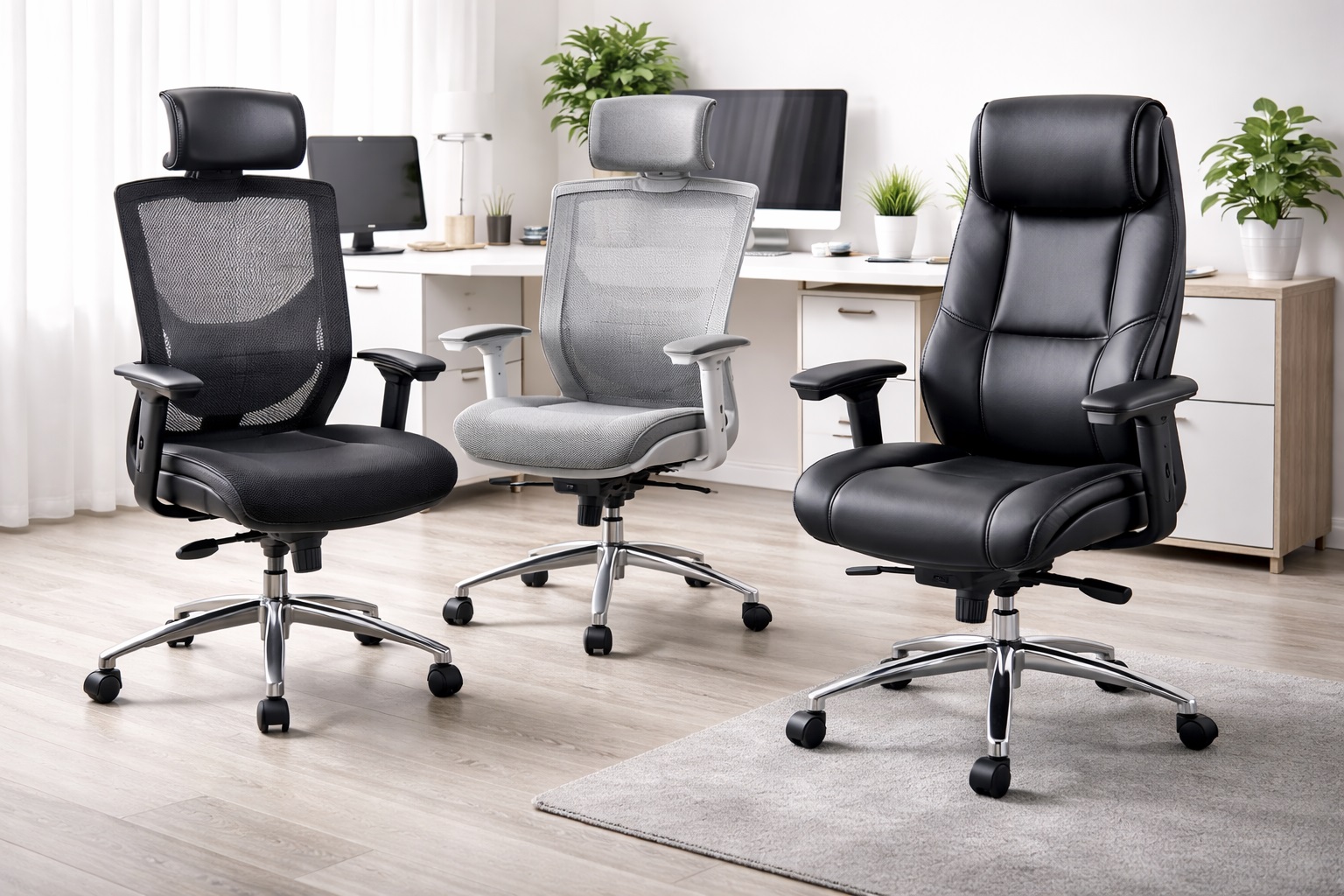
Best Office Chairs for Long Hours: Ergonomic Support That Actually Lasts
Sitting for six, eight, or ten hours a day puts real strain on your back, hips, and shoulders, and most of that strain traces back to a chair that isn't built for sustained use. A chair that feels fine for the first twenty minutes in a showroom can become genuinely uncomfortable by hour four of an actual workday, which is exactly why long-hours comfort needs to be judged differently than casual seating.
This guide compares the main styles of office chairs suited to extended desk work — from high-back mesh chairs to executive leather models, ergonomic task chairs, and alternative designs like saddle and kneeling chairs. Each style makes different trade-offs between support, adjustability, breathability, and price, and understanding those trade-offs matters more than chasing the chair with the longest feature list.
Whether you're setting up a home office, replacing a chair that's started causing genuine back pain, or shopping for a shared workspace where multiple body types need to be accommodated, the right choice depends on how your body actually holds up over a full day of sitting, not how the chair looks in a product photo.
It's also worth being realistic about what a chair alone can and can't fix. No chair replaces getting up to stretch periodically, and even the most supportive ergonomic design works best paired with a properly set desk height and monitor position. The reviews below focus on which chair styles give your body the best structural support as a foundation, since that's the piece a chair actually controls.
It's also worth considering how a chair interacts with the rest of your daily routine, not just the hours spent actively working. Many people underestimate how much a chair's tilt-lock and recline range affect short breaks — a quick two-minute recline between tasks can meaningfully reduce cumulative strain over an eight-hour day, even though it has nothing to do with the chair's support while sitting upright. Thinking about a chair as something that needs to serve both focused work and brief recovery moments throughout the day, rather than only the sitting-upright posture, gives a fuller picture of what long-hours comfort actually requires.
Top Office Chairs for Long Hours (Detailed Reviews)
High-Back Mesh Chair – Best Overall
High-back mesh chairs extend support up through the shoulder blades and upper back, rather than stopping at the mid-back like standard task chairs. The mesh material stays breathable through long sitting sessions, which matters considerably more once you're several hours into a workday than it does in a quick showroom test. Most models in this category combine the taller backrest with adjustable lumbar support and armrests, making them a genuinely versatile pick for people who spend most of their working day seated. The taller profile also tends to support the head and neck slightly when reclined, which is a detail lower-back chairs simply can't offer regardless of how good their lumbar support is.
- Pros:
- Extended back coverage supports the shoulders as well as the lower back
- Mesh material breathes well during long sitting sessions
- Typically includes multiple adjustment points for a more personalized fit
- Cons:
- Taller backrest can feel bulky in smaller office spaces
- Mesh tension sometimes needs periodic adjustment as it breaks in
Best For: Full-time desk workers who want comprehensive back support and breathability for long, uninterrupted sitting sessions.
Why We Recommend It: The combination of extended back coverage and breathable material addresses two of the biggest complaints about long-hours seating — inadequate upper back support and heat buildup — in a single design.
Executive Leather Chair – Best for a Polished Workspace
Executive leather chairs prioritize a padded, upholstered feel and a professional appearance, often found in private offices or client-facing workspaces. The thicker cushioning provides a plush, cradled sitting experience that many people find comfortable for the first several hours of the day, and the leather or leather-look upholstery gives the chair a more formal presence than mesh alternatives. Many models in this category also include a padded headrest, which mesh task chairs sometimes lack, giving additional support during reclined breaks between focused work.
- Pros:
- Plush cushioning offers a comfortable, cradled feel
- Professional appearance suits client-facing or executive offices
- Padded armrests and headrest reduce pressure points during long sits
- Cons:
- Leather and leather-look materials trap heat more than mesh
- Heavier construction makes the chair less easy to reposition frequently
Best For: Professionals who want a polished-looking chair for a private office or client-facing space without sacrificing padded comfort.
Why We Recommend It: It balances a professional aesthetic with genuine cushioned support, making it a sensible choice when appearance and comfort both matter for the space it's used in.
Ergonomic Task Chair – Best for Adjustability
Ergonomic task chairs are built around the idea that a chair should adapt to your body rather than the other way around. These models typically include independently adjustable seat height, seat depth, armrest height and width, lumbar support position, and tilt tension, giving users far more control over their exact seated posture than fixed-design chairs allow. This makes them a common choice for company-provided workstations, where a single chair model needs to accommodate employees of very different heights and builds.
- Pros:
- Extensive adjustability accommodates a wide range of body types
- Seat depth adjustment helps shorter or taller users get proper thigh support
- Independent lumbar positioning targets your specific lower back curve
- Cons:
- More adjustment points mean a steeper learning curve to dial in the fit
- Higher part count can mean more components that could eventually wear
Best For: Users who want to fine-tune every aspect of their seated position, particularly in shared workspaces where multiple people use the same chair.
Why We Recommend It: Genuine adjustability is one of the strongest predictors of long-term comfort, since a chair that fits your specific proportions will outperform a fixed design regardless of how well-padded that design is. It's also the style most likely to remain comfortable if your desk setup, body weight, or working habits change over the years you own it.
Budget Ergonomic Chair – Best Value
Budget ergonomic chairs bring the core adjustable features of pricier task chairs — lumbar support, adjustable armrests, and tilt lock — down to a more accessible price point, typically by simplifying materials and reducing the range of each adjustment. For many home office setups, this trims away some fine-tuning without sacrificing the fundamentals that actually prevent discomfort. They're a particularly sensible upgrade path for anyone moving off a basic kitchen or dining chair, since even limited lumbar adjustability represents a substantial improvement over no back support at all.
- Pros:
- Includes core ergonomic features at a lower price point
- Reasonable starting point for a first proper office chair upgrade
- Generally lighter and easier to assemble than premium models
- Cons:
- Adjustment ranges are narrower than premium ergonomic chairs
- Materials and mechanisms may not hold up as well under years of daily use
Best For: Home office workers who want genuine ergonomic support without paying premium-tier prices.
Why We Recommend It: It delivers the features that matter most for long-hours comfort — lumbar support and basic adjustability — without the added cost of features many users won't fully utilize.
Saddle Chair – Best for Active Sitting
Saddle chairs use a split, forward-tilted seat shape modeled on a riding saddle, which encourages an open hip angle and more upright spine position than a traditional flat seat. This style is less about passive support and more about promoting active posture, engaging core muscles slightly rather than allowing the body to sink into a fixed position. Because the design has no traditional backrest to lean into, it tends to appeal most to users who already sit fairly upright and are looking to reinforce that habit rather than correct a severe slouch.
- Pros:
- Encourages a more open hip angle and upright spine posture
- Reduces pressure on the lower back compared to slouched seating
- Distinctive design can reduce fatigue for users who dislike traditional backrests
- Cons:
- Takes an adjustment period for users unfamiliar with the seating style
- Lack of a full backrest isn't suited to users who need to recline periodically
Best For: Users specifically looking to reduce slouching and encourage more active, upright sitting posture throughout the day.
Why We Recommend It: For the specific subset of users who respond well to active-sitting designs, the open hip angle can meaningfully reduce the lower back discomfort associated with long hours in a traditional chair.
Kneeling Chair – Best for Posture Correction
Kneeling chairs shift part of your body weight forward onto a lower shin rest, tilting the pelvis into a position that naturally straightens the spine. There's no traditional backrest, which forces a more upright posture by design rather than relying on lumbar padding to hold that position for you. Some models include a slight rocking or tilting base, which allows small shifts in weight distribution throughout the day rather than locking the body into one static position.
- Pros:
- Promotes a naturally straighter spine position without a backrest
- Can reduce lower back pressure for users prone to slouching
- Compact footprint compared to full-size ergonomic task chairs
- Cons:
- Can place noticeable pressure on the shins and knees over extended use
- Not well suited to continuous all-day sitting without breaks
Best For: Users looking to supplement — rather than fully replace — a traditional chair, using it for shorter, posture-focused sitting intervals.
Why We Recommend It: As a deliberate posture tool used in rotation with a standard chair, it can help reinforce spine alignment habits that carry over to how you sit the rest of the day.
Buying Guide: How to Choose the Best Office Chair for Long Hours
Office chairs marketed toward long-hours use vary enormously in how well they actually deliver on that promise. These are the factors that separate chairs that genuinely support a full workday from ones that simply look ergonomic in a product photo.
1. Lumbar Support Quality
Lower back support is arguably the single most important factor for long-hours comfort, since the lumbar spine's natural inward curve needs consistent support to avoid slumping. Look for chairs where the lumbar support is height-adjustable and, ideally, adjustable in depth as well, so it can be positioned to match your specific lower back curve rather than a generic average. A support pad that's fixed in one position only works well for users whose torso length happens to match the manufacturer's assumptions, which is a narrower range of people than most product descriptions suggest.
2. Seat Depth and Cushioning
Seat depth determines whether your thighs are fully supported without the front edge pressing into the back of your knees, which restricts circulation during long sits. Cushioning density matters just as much as thickness — foam that's too soft will compress and lose support within a few months, while firmer foam tends to hold its shape over years of daily use. Shorter users in particular should check whether seat depth is adjustable, since a seat that's too deep for your leg length forces you to either sit without back contact or accept knee pressure from the front edge.
3. Adjustable Armrests
Armrests that adjust in height, width, and sometimes depth let you rest your forearms at a natural angle rather than hunching your shoulders to reach a fixed armrest position. This directly affects shoulder and neck tension over a long workday, particularly for users whose desk height doesn't perfectly match a fixed-armrest chair. Armrests that also pivot inward or outward add another layer of adjustment that's particularly useful for tasks like writing or using a trackpad at an angle other than straight ahead.
4. Breathable Back Material
Mesh backs stay noticeably cooler over multi-hour sitting sessions than foam-and-fabric or leather upholstery, which matters more in warmer climates or offices without strong air conditioning. If you tend to run warm while working, prioritizing a breathable back material can meaningfully improve comfort regardless of how supportive the rest of the chair is. Mesh tension also tends to conform slightly to your back shape over time, offering a form of passive support that rigid padded backs don't replicate in the same way.
5. Tilt Tension and Lock
A tilt mechanism that lets you recline slightly and lock at a comfortable angle reduces the strain of sitting perfectly upright for hours at a stretch. Look for a tension adjustment that can be tuned to your body weight, since a tilt mechanism that's too loose or too stiff for your weight defeats the purpose of having adjustable tilt at all. Multiple lock positions, rather than just fully upright or fully reclined, give you more flexibility to shift posture slightly throughout the day without losing support.
6. Price and Value
Within the long-hours category, price generally tracks with the number and precision of adjustment points rather than pure material cost. A slightly higher price for genuinely adjustable lumbar support and armrests is often worth it, while paying extra purely for brand recognition on a chair with limited adjustability may not improve daily comfort. Comparing the specific adjustment features across a shortlist of chairs, rather than comparing prices alone, usually reveals where the extra cost is actually going.
7. Brand Reliability
Established office furniture brands typically have more consistent quality control on the mechanical components — gas lift cylinders, tilt mechanisms, casters — that tend to wear out first on cheaper chairs. This doesn't rule out newer brands, but it does mean checking reviews specifically for mechanical durability rather than just initial comfort impressions. Brands with a longer history specifically in office seating, rather than general furniture, tend to have more refined mechanisms behind their mid-range models.
8. Warranty and Support
A longer warranty, particularly one that explicitly covers the gas lift cylinder and tilt mechanism, is a reasonable signal that the manufacturer expects the chair to hold up under daily use. Since these mechanical parts are the most common failure point in office chairs, warranty terms specific to them are worth reading closely. Some manufacturers offer tiered warranties with longer coverage on the frame and shorter coverage on upholstery, which is worth understanding before you buy.
9. User Reviews and Real-World Feedback
Reviews that specifically mention how a chair performs after six months or a year of regular use are far more valuable than reviews written the week of delivery. Pay attention to complaints about sagging cushioning, squeaking mechanisms, or armrests loosening over time, since these issues typically surface well after the return window closes. Reviews from people with a similar height or weight to your own tend to be more predictive of your experience than the average review score.
10. Compatibility With Your Existing Setup
Consider desk height, available floor space, and flooring type — chairs with hard casters suit carpet, while soft casters are generally better for hardwood or tile. A chair that's technically excellent but too tall for your desk or poorly suited to your flooring creates day-to-day friction that undermines its ergonomic benefits. It's also worth measuring the chair's fully assembled height against your desk's underside clearance, since some ergonomic chairs sit higher than standard task chairs once the seat is raised to a comfortable typing height.
11. Caster Type and Flooring Match
Casters designed for carpet use harder wheel material to roll smoothly over thicker pile, while casters meant for hardwood or tile use softer, quieter wheels that won't mark or scratch the floor. Using the wrong caster type on the wrong flooring can lead to a chair that feels sluggish to move or, over time, causes visible marks on hard flooring. Many manufacturers sell replacement caster sets separately, so this is a fixable mismatch rather than a reason to avoid an otherwise good chair.
12. Weight Capacity Rating
Every chair has a maximum weight rating, and choosing one with headroom above your actual weight — rather than right at the limit — tends to result in a more durable, stable feel over years of daily use, particularly for the gas lift cylinder and frame welds. This matters more for long-hours use than occasional sitting, since components under sustained daily load near their rated limit wear faster than the same components used well within their rated range.
Frequently Asked Questions
What's the single most important feature for a long-hours office chair?
Adjustable lumbar support tends to have the biggest individual impact on comfort during extended sitting, since it directly addresses the lower back strain that causes the most common complaints. Seat depth and cushioning quality are close behind in importance, particularly for users whose height falls outside the average range a chair was designed around.
How long should an office chair last with daily use?
A well-built office chair used daily should reasonably last five to eight years before cushioning, mechanisms, or upholstery show significant wear. Mid-range and budget chairs used heavily may need replacement sooner, particularly in shared workspaces with multiple daily users, since shared use accelerates wear on adjustment mechanisms more than single-user setups.
Is mesh or padded upholstery better for long sitting sessions?
Mesh generally stays cooler over long sessions and tends to hold its shape better over time, while padded upholstery offers a plusher initial feel that some users prefer for the first few hours. The better choice depends mainly on how warm you tend to run while working and how much cushioned feel matters to you, and some hybrid designs use mesh backs paired with padded seats to balance both concerns.
Do kneeling and saddle chairs actually improve posture?
For some users, yes — the forward pelvic tilt these designs encourage can reduce slouching and support a straighter spine. They're generally better used as a supplement to a traditional chair rather than a full-time replacement, since sustained pressure on the shins or an unfamiliar seating angle can become uncomfortable over a full day without breaks to switch positions.
How do I know if a chair's armrests are actually adjustable enough?
Check the specifications for the number of adjustment axes — height alone is the minimum, while height, width, and pivot together offer meaningfully more customization. If your desk has a fixed height that doesn't match a chair's armrest range, even multi-directional armrests may not resolve the mismatch, so it's worth measuring your desk clearance before assuming any given chair will fit.
What should I do if my chair still causes discomfort after adjusting it?
Confirm that your desk height, monitor position, and keyboard placement are also properly set, since a well-adjusted chair paired with a poorly set desk can still cause strain. If discomfort persists after addressing the full setup, the chair's design may simply not suit your body proportions, and a different style might be worth trying rather than assuming more adjustment will eventually solve it.
Are more expensive office chairs always more comfortable?
Not necessarily. Price often reflects the number of adjustment points, materials, and brand reputation rather than a guaranteed comfort improvement for your specific body. A mid-range ergonomic chair that fits your proportions well can outperform a pricier chair that doesn't, particularly if the pricier option's extra features go unused.
How important is the warranty when buying an office chair?
Fairly important, particularly coverage on the gas lift cylinder and tilt mechanism, since these mechanical parts are the most likely components to fail with regular use. A longer warranty on these specific parts is a reasonable indicator of build confidence, and it's worth confirming whether the warranty requires proof of purchase or product registration to activate.
Can one chair work for multiple people with different body types?
Chairs with extensive adjustability — particularly seat depth, lumbar height, and armrest range — accommodate a wider range of body types than fixed-design chairs. For shared workspaces, prioritizing adjustability over any single fixed comfort feature tends to work best across users, since each person can reset the chair to their own preferred configuration.
Is it worth trying a chair in person before buying online?
Where possible, yes, particularly for chairs with unconventional designs like saddle or kneeling styles, since the fit is more personal than with a standard task chair. For familiar designs like mesh task chairs, reading detailed reviews on fit and adjustability can substitute reasonably well for an in-person test, especially when reviewers include their own height and weight for context.
Does chair color or upholstery type affect comfort?
Not directly, though darker upholstery can show less visible wear over time and lighter mesh may show dust more easily. The material itself — mesh versus padded fabric versus leather — matters more for comfort than the color, primarily through its effect on breathability and cushioning feel.
How much does desk height affect how comfortable a chair feels?
Quite a bit — even a highly adjustable chair can't fully compensate for a desk that's too high or too low relative to your seated elbow height, since the mismatch forces your shoulders or wrists into an awkward position regardless of how the chair itself is set. Checking that your desk height and chair height can be adjusted to work together, rather than evaluating the chair in isolation, gives a more realistic sense of eventual comfort.
Is it worth adding a footrest to an office chair?
For shorter users whose feet don't rest flat on the floor once the seat is raised to the correct height for their desk, a footrest can meaningfully improve lower body circulation and overall comfort during long sitting sessions. It's a relatively low-cost addition worth considering if seat height and desk height don't naturally line up for your particular proportions.
Final Verdict
- Best Overall: The High-Back Mesh Chair, for its combination of extended back support, breathability, and multi-point adjustability.
- Best Budget: The Budget Ergonomic Chair, for delivering core lumbar and armrest adjustability at an accessible price.
- Best for Posture Focus: The Saddle Chair, for users specifically looking to reduce slouching through active sitting.
There's no single best office chair for every long-hours situation — the right pick depends on how your body responds to different seating angles, how warm your workspace tends to run, and how much you value fine-grained adjustability versus straightforward comfort. Spend a little time honestly assessing what's actually causing your current discomfort, whether it's lower back strain, shoulder tension, or simply overheating by the afternoon, and let that specific pain point guide which style you try first.
It's also reasonable to treat this as an iterative decision rather than a one-time purchase you have to get perfect immediately. Many people find that their ideal chair setup changes as their workload, workspace, or physical needs shift over time, and a chair with generous adjustability gives you room to adapt without needing to replace it entirely. Prioritizing the fundamentals — genuine lumbar adjustability, adequate seat depth, and a mechanism built to hold up under daily use — will serve you better over years of use than any single standout feature.